# Concepts

Learn about the core concepts in Materialize.


The pages in this section introduces some of the key concepts in Materialize:

Concept                                  | Description
-----------------------------------------|-----
[Clusters](/fundamentals/concepts/clusters/)          | Clusters are isolated pools of compute resources for sources, sinks, indexes, materialized views, and ad-hoc queries.
[Sources](/fundamentals/concepts/sources/)            | Sources describe an external system you want Materialize to read data from.
[Views](/fundamentals/concepts/views/)    | Views represent a named query that you want to save for repeated execution. You can use **indexed views** and **materialized views** to incrementally maintain the results of views.
[Indexes](/fundamentals/concepts/indexes/)            | Indexes represent query results stored in memory.
[Arrangements](/fundamentals/concepts/arrangements/) | Arrangements are the in-memory data structures that maintain indexes and materialized views.
[Sinks](/fundamentals/concepts/sinks/)                | Sinks describe an external system you want Materialize to write data to.
[Snapshotting](/fundamentals/concepts/snapshotting/) | The initial sync of a source's data from an upstream system, before the source can serve queries.
[Hydration](/fundamentals/concepts/hydration/) | Hydration is the reconstruction of an object's in-memory state by reading
from Materialize's storage layer and existing indexes; hydration does not
read from the upstream system.

[Reaction Time](/fundamentals/concepts/reaction-time) | Measures how quickly a system can reflect a change in input data and return an up-to-date query result. Defined as the sum of data freshness and query latency.

Refer to the individual pages for more information.


---

## Namespaces


Namespaces are a way to organize Materialize objects logically. In organizations
with multiple objects, namespaces help avoid naming conflicts and make it easier
to manage objects.

## Namespace hierarchy

Materialize follows SQL standard's namespace hierarchy for most objects (for the
exceptions, see [Other objects](#other-objects)).

|                           |             |
|---------------------------| ------------|
| 1st/Highest level:        |  **Database** |
| 2nd level:                |  **Schema**   |
| 3rd level:                | <table><tbody><tr><td><ul><li>**Table**</li><li>**View**</li><li>**Materialized view**</li><li>**Connection**</li></ul></td><td><ul><li>**Source**</li><li>**Sink**</li><li>**Index**</li></ul></td><td><ul><li>**Type**</li><li>**Function**</li><li>**Secret**</li></ul></td></tr></tbody></table>|
| 4th/Lowest level:             | **Column**     |

Each layer in the hierarchy can contain elements from the level immediately
beneath it. That is,

- Databases can contain: schemas;
- Schemas can contain: tables, views, materialized views, connections, sources,
sinks, indexes, types, functions, and secrets;
- Tables, views, and materialized views can contain: columns.


### Qualifying names

Namespaces enable disambiguation and access to objects across different
databases and schemas. Namespaces use the dot notation format
(`<database>.<schema>....`) and allow you to refer to objects by:

- **Fully qualified names**

  Used to reference objects in a different database (Materialize allows
  cross-database queries); e.g.,

  ```
  <Database>.<Schema>
  <Database>.<Schema>.<Source>
  <Database>.<Schema>.<View>
  <Database>.<Schema>.<Table>.<Column>
  ```

  > **Tip:** You can use fully qualified names to reference objects within the same
>   database (or within the same database and schema). However, for brevity and
>   readability, you may prefer to use qualified names instead.


- **Qualified names**

  - Used to reference objects within the same database but different schema, use
    the schema and object name; e.g.,

    ```
    <Schema>.<Source>
    <Schema>.<View>
    <Schema>.<Table>.<Column>
    ```

  - Used to reference objects within the same database and schema, use the
    object name; e.g.,

    ```
    <Source>
    <View>
    <Table>.<Column>
    <View>.<Column>
    ```

## Namespace constraints

All namespaces must adhere to [identifier rules](/sql/identifiers).


## Other objects

The following Materialize objects  exist outside the standard SQL namespace
hierarchy:

- **Clusters**: Referenced directly by its name.

  For example, to create a materialized view in the cluster `cluster1`:

  ```mzsql
  CREATE MATERIALIZED VIEW mv IN CLUSTER cluster1 AS ...;
  ```

- **Cluster replicas**: Referenced as `<cluster-name>.<replica-name>`.

  For example, to delete replica `r1` in cluster `cluster1`:

  ```mzsql
  DROP CLUSTER REPLICA cluster1.r1
  ```

- **Roles**: Referenced by their name. For example, to alter the `manager` role, your SQL statement would be:

  ```mzsql
  ALTER ROLE manager ...
  ```

### Other object namespace constraints

- Two clusters or two roles cannot have the same name. However, a cluster and a
  role can have the same name.

- Replicas can have the same names as long as they belong to different clusters.
  Materialize automatically assigns names to replicas (e.g., `r1`, `r2`).

## Database details

- By default, Materialize regions have a database named `materialize`.
- By default, each database has a schema called `public`.
- You can specify which database you connect to either when you connect (e.g.
  `psql -d my_db ...`) or within SQL using [`SET DATABASE`](/sql/set/) (e.g.
  `SET DATABASE = my_db`).
- Materialize allows cross-database queries.


---

## Arrangements


The mechanisms that maintain materialized views for Materialize dataflows are
called **arrangements**. Understanding arrangements better can help you make
decisions that will reduce memory usage while maintaining performance.

## Materialized views

Before we talk about the arrangements that maintain materialized views, let's
review what materialized views are, how they work in traditional databases, and
how they work in Materialize.

A view is simply a query saved under a name for convenience; the query is
executed each time the view is referenced, without any savings in performance
or speed. But some databases also support something more powerful: materialized
views, which save the *results* of the query for quicker access.

Traditional databases typically only have limited support for materialized views
in two ways: first, the updates to the views generally occur at set intervals,
so views are not updated in real time, and second, only a limited subset of SQL
syntax is supported. In cases where a traditional database *does* support
refreshes for each data update, it tends to be very slow. These limitations
stem from limited support for incremental updates; most databases are not
designed to maintain long-running incremental queries, but instead are
optimized for queries that are executed once and then wound down. This means
that when the data changes, the materialized view must be recomputed from
scratch in all but a few simple cases.

Our mission at Materialize is to manage materialized views better than this.
Materialize supports incrementally updating a much broader set of views than is
common in traditional databases (e.g. views over multi-way joins with complex
aggregations), and can do incremental updates in the presence of arbitrary
inserts, updates, and deletes in the input streams while maintaining
correctness.

## Dataflows

Materialize can make incremental updates efficiently because it's built on an
incremental data-parallel compute engine, [Differential Dataflow](https://timelydataflow.github.io/differential-dataflow/introduction.html),
which in turn is built on a distributed processing framework called
[Timely Dataflow](https://timelydataflow.github.io/timely-dataflow/).

When you create a materialized view and issue a query, Materialize creates
a **dataflow**. A dataflow consists of instructions on how to respond to data
input and to changes to that data. Once executed, the dataflow computes the
result of the SQL query, polls the source for updates, and then incrementally
updates the query results when new data arrives.

### Collections

Materialize dataflows act on **collections** of data, [multisets](https://en.wikipedia.org/wiki/Multiset)
that store each event in an update
stream as a triple of `(data, time, diff)`.

Term | Definition
-----|-----------
**data**  |  The record update.
**time**  |  The logical timestamp of the update.
**diff**  |  The change in the number of copies of the record (typically `-1` for deletion, `1` for addition).

## Arrangements

A collection provides a data stream of updates as they happen. To provide fast
access to the changes to individual records, the collection can be represented
in an alternate form, indexed on `data` to present the sequence of changes
(`time, diff`) the collection has undergone. This indexed representation is
called an **arrangement**.

Materialize builds and maintains indexes on both the input and output
collections as well as for many intermediate collections created when
processing a query. Because queries can overlap, Materialize might need to
build the exact same indexes for multiple queries. Instead of performing
redundant work, Materialize builds the index once and maintains it in memory,
sharing the required resources across all queries that use the indexed data.
The index is then effectively a sunk cost, and the cost of each query is
determined only by the new work it introduces.

You can find a more detailed analysis of the arrangements built for different
types of queries in our blog post on [Joins in Materialize](https://materialize.com/joins-in-materialize).

### Arrangement size

The size of an arrangement, or amount of memory it requires, is roughly
proportional to its number of distinct `(data, time)` pairs, which can be small
even if the number of records is large. As an illustration, consider a
histogram of taxi rides grouped by the number of riders and the fare amount.
The number of distinct `(rider, fare)` pairs will be much smaller than the
number of total rides that take place.

The amount of memory that the arrangement requires is then further reduced by
background compaction of historical data.

## Analyzing arrangements

Materialize provides various tools that allow you to analyze arrangements,
although they are post-hoc tools best used for debugging, rather than planning
tools to be used before creating indexes or views. See [Diagnosing Using SQL](/ops/troubleshooting/)
and [`EXPLAIN PLAN`](/sql/explain-plan/) for more details.

## Reducing memory usage

### Creating indexes manually

When creating an arrangement for a join where the key is not clear, Materialize
attempts to choose a key that will ensure that data is well distributed. If
there is a primary key, that will be used; if there are source fields not
required by the query, they are not included. Often Materialize can pull
primary key info from a Confluent schema.

If Materialize cannot detect a primary key, the default key is the full set of
columns, in order to ensure good data distribution. Creating an unmaterialized
view and then specifying a custom index makes the key smaller.

For more information on when and how to create indexes, see
[Optimization](/transform-data/optimization/).
For more in-depth details on joins, see [Joins in Materialize](https://materialize.com/joins-in-materialize/).

### Type casting

Currently, Materialize handles implicit casts inserted in join constraints in a very memory-intensive way.
Until this issue
is resolved, you can reduce memory usage by building an index on the view with
the type changed for any queries that include implicit casts, for example,
when you combine 32-bit and 64-bit numbers.

## Related pages

* [Optimization](/transform-data/optimization/)
* [Joins in Materialize](https://materialize.com/joins-in-materialize/)
* [Diagnosing Using SQL](/ops/troubleshooting/)
* [Deployment](/ops/optimization/)
* [Differential Dataflow](https://timelydataflow.github.io/differential-dataflow/)


---

## Clusters


## Overview

Clusters are pools of compute resources (CPU, memory, and scratch disk space)
for running your workloads.

## Resource isolation

Clusters provide **resource isolation.** Each cluster provisions dedicated
compute resources and can fail independently from other clusters. All workloads
on a given cluster compete for access to that cluster's compute resources.

Workloads on different clusters are strictly isolated from one another. That is,
a given workload has access only to the CPU, memory, and scratch disk of the
cluster it runs on.

Resource isolation lets you place workloads on separate clusters to prevent
them from competing for compute resources.

See also [three-tier architecture](#three-tier-architecture-in-production).

## Clusters and workloads

The following operations require a cluster in Materialize:

- Maintaining [sources](/fundamentals/concepts/sources/), [tables (or
  subsources)](/fundamentals/concepts/sources/#tables-and-subsources) created from a
  source, and [sinks](/fundamentals/concepts/sinks/).
- Maintaining [indexes](/fundamentals/concepts/indexes/) and [materialized
  views](/fundamentals/concepts/views/#materialized-views).
- Executing [`SELECT`] and [`SUBSCRIBE`] statements.

Each session has an **active cluster**, which you can change with [`SET
CLUSTER`](/sql/set/#set-active-cluster).

```mzsql
SET CLUSTER = 'my_transform_cluster';
```

[`SELECT`] and [`SUBSCRIBE`] statements run in the session's active cluster.

Objects that require compute (e.g., indexes, materialized views, sources) are
associated with a cluster when they are created. The associated cluster is
either:

- the session's active cluster by default, or

- the cluster specified by the `IN CLUSTER <cluster>` clause in the `CREATE`
  statement.

### Cross-cluster objects

Tables, [views](/fundamentals/concepts/views/#views), and [materialized
views](/fundamentals/concepts/views/#materialized-views) are accessible across clusters.
That is, you can query or reference them from any cluster.


### Cluster-local objects

Indexes are accessible only from their own cluster. Indexed results reside
in the memory of the cluster where the index is created, and a [cluster's
memory](/fundamentals/concepts/clusters/#resource-isolation) cannot be accessed from
another cluster.


For more on indexes and clusters, see [Indexes](/fundamentals/concepts/indexes/).

## Cluster replicas

The [replication factor](/sql/create-cluster/#replication-factor) of a cluster
determines the number of replicas provisioned for the cluster.

Each replica of a cluster provisions a new pool of compute resources to perform exactly the same work on exactly the same data. That is, replicas are redundant copies of the cluster's workload, not shards: each replica processes the full workload.

Materialize automatically assigns names to replicas (e.g., `r1`, `r2`). You can
view information about individual replicas in the Materialize console and the
system catalog.

### Fault tolerance

Provisioning more than one replica for a cluster improves **fault tolerance**.
Clusters with multiple replicas can tolerate failures of the underlying
hardware that cause a replica to become unreachable. As long as one replica of
the cluster remains available, the cluster can continue to maintain dataflows
and serve queries.

> **Note:** - For Cloud, each replica incurs cost, calculated as `cluster size *
>   replication factor` per second. See [Usage &
>   billing (Cloud)](/materialize-cloud/billing/) for more details.
> - Increasing the replication factor does **not** increase the cluster's work
>   capacity. Replicas are exact copies of one another: each replica must do
>   exactly the same work as all the other replicas of the cluster (i.e., maintain
>   the same dataflows and process the same queries). To increase the capacity of
>   a cluster, you must increase its size.


### Availability guarantees

When provisioning replicas,

- For clusters sized **up to and including `3200cc`**, Materialize guarantees
  that all provisioned replicas in a cluster are distributed across the
  underlying cloud provider's availability zones.

- For clusters sized **above `3200cc`**, even distribution of replicas
  across availability zones **cannot** be guaranteed.

See also [Hydration considerations](#hydration-considerations).

## Lifecycle of a cluster

Whenever a cluster starts running a workload (after you create it, resize it,
or one of its replicas restarts), its replicas move through a sequence of states
before results are fully up to date. Knowing which state a cluster is in tells
you whether it is making progress or is stuck.

The queries below monitor a cluster named `lifecycle_demo` that hosts the
materialized view `bids_by_auction` and its index `bids_by_auction_idx`, both
built on a continuously-updating `AUCTION` load-generator source. Substitute
your own cluster and object names.

### Provisioning

Replicas are scheduled and brought online. A cluster with a [replication
factor](#cluster-replicas) of `0` has no compute and never leaves this state. To
monitor progress, check that replicas report `online` in
[`mz_cluster_replica_statuses`](/sql/system-catalog/mz_internal/#mz_cluster_replica_statuses),
and confirm the cluster has replicas via
[`mz_clusters`](/sql/system-catalog/mz_catalog/#mz_clusters).

```mzsql
SELECT c.name AS cluster, r.name AS replica, r.size, st.status, st.reason
FROM mz_internal.mz_cluster_replica_statuses st
JOIN mz_catalog.mz_cluster_replicas r ON r.id = st.replica_id
JOIN mz_catalog.mz_clusters c ON c.id = r.cluster_id
WHERE c.name = 'lifecycle_demo'
ORDER BY r.name;
```

```none
    cluster     | replica | size | status | reason
----------------+---------+------+--------+--------
 lifecycle_demo | r1      | 25cc | online |
(1 row)
```

The `reason` column is empty while the replica is `online`, and reports why a
replica is unavailable otherwise.

### Hydrating

Each replica reconstructs its in-memory state by reading from Materialize's
storage layer (see [hydration](/fundamentals/concepts/hydration/)). While an object is
hydrating, its `hydrated` flag reads `f` and its lag is reported as `NULL`. To
monitor progress, check the `hydrated` flag per object in
[`mz_hydration_statuses`](/sql/system-catalog/mz_internal/#mz_hydration_statuses),
where the `replica_id` stays blank until the object attaches to a replica. For
indexes and materialized views,
[`mz_compute_hydration_statuses`](/sql/system-catalog/mz_internal/#mz_compute_hydration_statuses)
also reports how long hydration took.

```mzsql
SELECT o.name AS object, o.type, r.name AS replica, ch.hydrated, ch.hydration_time
FROM mz_internal.mz_compute_hydration_statuses ch
JOIN mz_objects o ON o.id = ch.object_id
JOIN mz_catalog.mz_cluster_replicas r ON r.id = ch.replica_id
WHERE o.name IN ('bids_by_auction', 'bids_by_auction_idx', 'bids_load')
ORDER BY o.name;
```

```none
       object        |       type        | replica | hydrated | hydration_time
---------------------+-------------------+---------+----------+-----------------
 bids_by_auction     | materialized-view | r1      | t        | 00:00:00.000074
 bids_by_auction_idx | index             | r1      | t        | 00:00:00.000019
 bids_load           | materialized-view | r1      | t        | 00:00:05.6032
(3 rows)
```

The light view and index hydrate in microseconds, while the larger `bids_load`
view takes about 5.6 seconds. A larger object with more state to reconstruct
shows a longer, more visible hydration window.

### Catching up

Once hydrated, the cluster processes the backlog of input updates that
accumulated while it was unavailable, so its total lag starts high and comes
down. To monitor progress, watch `lag` decrease in
[`mz_wallclock_global_lag_recent_history`](/sql/system-catalog/mz_internal/#mz_wallclock_global_lag_recent_history),
or break the lag down by input with
[`mz_materialization_lag`](/sql/system-catalog/mz_internal/#mz_materialization_lag).

```mzsql
SELECT o.name AS object, l.local_lag, l.global_lag,
       si.name AS slowest_local_input, sg.name AS slowest_global_input
FROM mz_internal.mz_materialization_lag l
JOIN mz_objects o ON o.id = l.object_id
LEFT JOIN mz_objects si ON si.id = l.slowest_local_input_id
LEFT JOIN mz_objects sg ON sg.id = l.slowest_global_input_id
WHERE o.name IN ('bids_by_auction', 'bids_load')
ORDER BY o.name;
```

```none
     object      |    local_lag     |    global_lag    | slowest_local_input | slowest_global_input
-----------------+------------------+------------------+---------------------+----------------------
 bids_by_auction | 00:00:34.001     | 00:00:34.001     | bids                | bids
 bids_load        | 00:00:41.001     | 00:00:41.001     | bids                | bids
```

Both objects trail their slowest input, the `bids` source, by tens of seconds.
As the cluster works through the backlog, these lags fall.

### Steady state

The cluster has caught up and its lag holds low and roughly constant, typically
a few seconds. Re-running the lag query confirms the objects have caught up to
their input.

```mzsql
SELECT o.name AS object, l.local_lag, l.global_lag,
       si.name AS slowest_local_input, sg.name AS slowest_global_input
FROM mz_internal.mz_materialization_lag l
JOIN mz_objects o ON o.id = l.object_id
LEFT JOIN mz_objects si ON si.id = l.slowest_local_input_id
LEFT JOIN mz_objects sg ON sg.id = l.slowest_global_input_id
WHERE o.name = 'bids_by_auction';
```

```none
     object      | local_lag | global_lag | slowest_local_input | slowest_global_input
-----------------+-----------+------------+---------------------+----------------------
 bids_by_auction | 00:00:00  | 00:00:00   | bids                | bids
(1 row)
```

Wallclock lag in
[`mz_wallclock_global_lag_recent_history`](/sql/system-catalog/mz_internal/#mz_wallclock_global_lag_recent_history)
holds near-constant at a few seconds. A lag that instead climbs steadily, at
about one minute per minute, means the cluster has stopped making progress.

> **Note:** Sources go through an additional
> [snapshotting](/fundamentals/concepts/snapshotting/) step the first time they run, reading the
> initial state of the upstream system before the states above apply. See
> [Troubleshooting](/transform-data/freshness-troubleshooting/) for how to
> diagnose a cluster that is not progressing through these states.


<a name="sizing-your-clusters"></a>

## Cluster sizing

When creating a cluster, you must choose its
[size](/sql/create-cluster/#available-sizes) (e.g., `25cc`, `50cc`, `100cc`),
which determines its resource allocation (CPU, memory, and scratch disk space)
and [cost (for Cloud)](/materialize-cloud/billing/#compute). The appropriate size
for a cluster depends on the resource requirements of your workload. Larger
clusters have more compute resources available and can therefore process data
faster and handle larger data volumes.

To gauge the performance and utilization of your clusters, use the
[**Environment Overview** page in the Materialize
Console](/developer-tools/console/monitoring/).

As your workload changes, you can [resize a cluster](/sql/alter-cluster/). A
resize triggers [hydration](#hydration-considerations). During hydration, the
cluster keeps serving since Materialize provisions new replicas at the
target size and hydrates them before retiring the old ones.

## Hydration considerations

Hydration is the reconstruction of an object's in-memory state by reading
from Materialize's storage layer and existing indexes; hydration does not
read from the upstream system.


Depending on the object, hydration (or rehydration) occurs after:
- **An object is created**, triggering its hydration.
  * This includes dropping and recreating objects to force re-planning. For
    example, after dropping an index, you can drop and recreate its
    dependent objects to force them to re-plan. The recreated objects then
    hydrate like any newly created object.
- **A cluster replica restarts**, such as during Materialize Cloud's
  routine maintenance or after an out-of-memory event. Hydration can be
  memory-intensive and can itself trigger the out-of-memory event. The
  replica then restarts and rehydrates again, potentially creating a
  restart-and-rehydrate loop if the replica is undersized.
- **A cluster resize**. A cluster resize provisions new replicas at the
  target size and hydrates them before retiring the old ones. The cluster
  keeps serving throughout.
- **Adding a replica to a cluster**, which hydrates the new replica only.
  Existing replicas are unaffected and keep serving.


Hydration is per cluster replica: when a hydration trigger occurs, the
objects on the affected replicas hydrate. When a replica restarts, every
object on it re-hydrates. A resize or an added replica hydrates only the
new replicas.


> **Tip:** Hydration primarily impacts memory usage, and its speed scales with cluster
> size. To handle the temporary compute increases during hydration, you can
> configure an [autoscaling
> strategy](/sql/alter-cluster/#speed-up-hydration-by-autoscaling-to-a-larger-size)
> that provisions an extra burst replica at a larger size while the cluster has
> un-hydrated objects.


For more information, including hydration strategies and the memory usage of
hydrating objects, see [Hydration](/fundamentals/concepts/hydration/).

## Best practices

The following provides some general guidelines for clusters. See also
[Operational guidelines](/clusters/operational-guidelines/).

### Three-tier architecture in production

<p>In production, use a three-tier architecture, if feasible.</p>
<p><img src="/docs/images/3-tier-architecture.svg" alt="Image of the 3-tier architecture: Source cluster(s), Compute/Transform
cluster(s), Serving cluster(s)"  title="3-tier
architecture"></p>
<p>A three-tier architecture consists of:</p>

| Tier | Description |
| --- | --- |
| <strong>Source cluster(s)</strong> | <p><strong>A dedicated cluster(s)</strong> for <a href="/docs/fundamentals/concepts/sources/" >sources</a>.</p> <p>In addition, for upsert sources:</p> <ul> <li> <p>Consider separating upsert sources from your other sources. Upsert sources have higher resource requirements (since, for upsert sources, Materialize maintains each key and associated last value for the key as well as to perform deduplication). As such, if possible, use a separate source cluster for upsert sources.</p> </li> <li> <p>Consider using a larger cluster size during snapshotting for upsert sources. Once the snapshotting operation is complete, you can downsize the cluster to align with the steady-state ingestion.</p> </li> </ul>  |
| <strong>Compute/Transform cluster(s)</strong> | <p><strong>A dedicated cluster(s)</strong> for compute/transformation:</p> <ul> <li> <p><a href="/docs/fundamentals/concepts/views/#materialized-views" >Materialized views</a> to persist, in durable storage, the results that will be served. Results of materialized views are available across all clusters.</p> > **Tip:** If you are using <strong>stacked views</strong> (i.e., views whose definition depends >   on other views) to reduce SQL complexity, generally, only the topmost >   view (i.e., the view whose results will be served) should be a >   materialized view. The underlying views that do not serve results do not >   need to be materialized.  </li> <li> <p>Indexes, <strong>only as needed</strong>, to make transformation fast (such as possibly <a href="/docs/transform-data/optimization/#optimize-multi-way-joins-with-delta-joins" >indexes on join keys</a>).</p> > **Tip:** From the compute/transformation clusters, do not create indexes on the >   materialized views for the purposes of serving the view results. >   Instead, use the [serving cluster(s)](#tier-serving-clusters) when >   creating indexes to serve the results.  </li> </ul>  |
| <strong>Serving cluster(s)</strong> | <a name="tier-serving-clusters"></a> <strong>A dedicated cluster(s)</strong> for serving queries, including <a href="/docs/fundamentals/concepts/indexes/" >indexes</a> on the materialized views. Indexes are local to the cluster in which they are created. |

<p>Benefits of a three-tier architecture include:</p>
<ul>
<li>
<p>Support for <a href="/docs/developer-tools/dbt/blue-green-deployments/" >blue/green
deployments</a></p>
</li>
<li>
<p>Independent scaling of each tier.</p>
</li>
</ul>


See also [Operational guidelines](/clusters/operational-guidelines/).

#### Alternatives

Alternatively, if a three-tier architecture is not feasible or unnecessary due
to low volume or a non-production setup, a two cluster or a single cluster
architecture may suffice.

See [Appendix: Alternative cluster
architectures](/clusters/operational-guidelines/appendix-alternative-cluster-architectures/) for details.

### Use production clusters for production workloads only

Use production cluster(s) for production workloads only. That is, avoid using
production cluster(s) to run development workloads or non-production tasks.

## Related pages

- [`CREATE CLUSTER`](/sql/create-cluster)
- [`ALTER CLUSTER`](/sql/alter-cluster)
- [Hydration](/fundamentals/concepts/hydration/)
- [System clusters](/sql/system-clusters)
- [Usage & billing](/materialize-cloud/billing/)
- [Operational guidelines](/clusters/operational-guidelines/)

[`SELECT`]: /sql/select/
[`SUBSCRIBE`]: /sql/subscribe/


---

## Hydration


Hydration is the reconstruction of an object's in-memory state by reading
from Materialize's storage layer and existing indexes; hydration does not
read from the upstream system.


## When hydration occurs

Depending on the object, hydration (or rehydration) occurs after:
- **An object is created**, triggering its hydration.
  * This includes dropping and recreating objects to force re-planning. For
    example, after dropping an index, you can drop and recreate its
    dependent objects to force them to re-plan. The recreated objects then
    hydrate like any newly created object.
- **A cluster replica restarts**, such as during Materialize Cloud's
  routine maintenance or after an out-of-memory event. Hydration can be
  memory-intensive and can itself trigger the out-of-memory event. The
  replica then restarts and rehydrates again, potentially creating a
  restart-and-rehydrate loop if the replica is undersized.
- **A cluster resize**. A cluster resize provisions new replicas at the
  target size and hydrates them before retiring the old ones. The cluster
  keeps serving throughout.
- **Adding a replica to a cluster**, which hydrates the new replica only.
  Existing replicas are unaffected and keep serving.


For when hydration occurs for each object type, see [Objects and
hydration](#objects-and-hydration).

## Objects and hydration

Hydration is per cluster replica: when a hydration trigger occurs, the
objects on the affected replicas hydrate. When a replica restarts, every
object on it re-hydrates. A resize or an added replica hydrates only the
new replicas.


The objects on the affected replicas hydrate as described in the following
table.


| Object | Hydration behavior |
| --- | --- |
| Materialized views | - **When**: Hydrates on creation and on every replica (re)start or cluster resize. - **What**: Rebuilds the dataflow's operator state: the arrangements that joins, aggregations, and similar operators keep to update results incrementally. Note: A materialized view's result lives in durable storage, so it rebuilds only this maintenance state, not the result. - **Memory Use**: Scales with the view's definition, which it holds at steady state, plus a transient output buffer up to twice the output size: the current output plus a read-back of the previously persisted output. On first creation, since there is no previous output, the buffer is a single output size.  |
| Indexes | - **When**: Hydrates on creation and on every replica (re)start or cluster resize. - **What**: Rebuilds the arranged (indexed) data it keeps in memory to serve reads, plus any operator arrangements its dataflow maintains (for joins, aggregations, and similar). - **Memory Use**: Its memory is proportional to the indexed data plus those arrangements, and is held for as long as the index exists.  |
| Kafka <strong>upsert</strong> sources and associated read-only tables/subsources | - **When**: On replica (re)start or cluster resize. These sources do not hydrate on creation; instead, on creation, their indexes are built as part of [snapshotting](/fundamentals/concepts/snapshotting/). - **What**: Rebuilds the table's or subsource's internal upsert index from storage. - **Memory Use**: The index holds the latest value per key, so its memory scales with the source's key space. On standard cluster sizes it can spill to disk when the key space exceeds memory.  |
| Append-only Kafka sources and CDC database sources (PostgreSQL, MySQL, SQL Server), and their read-only tables/subsources | - **When**: On replica (re)start or cluster resize, marked hydrated as soon as the dataflow starts. - **What**: Effectively nothing. These sources keep no internal index to rebuild and resume from their persisted position, so hydration is a no-op. - **Memory Use**: Negligible, since there is no index to hold.  |
| Webhook sources | Not applicable. A webhook source is not maintained by a dataflow. It receives data pushed over HTTP and writes the data directly to storage, so it does not hydrate.  |
| Sinks | - **When**: If created `WITH (SNAPSHOT = true)` (the default), hydrates:   - On creation, when the sink first emits its input snapshot.   - On a replica (re)start, but only if the sink restarted before recording     any progress: it then re-reads the whole input snapshot, and any data     already written to the external system is discarded, but the memory     cost still occurs. An established sink resumes from its recorded     progress without re-reading the snapshot.  - **What**: Loads a full copy of its input snapshot into the arrangement that feeds the sink before it can emit. - **Memory Use**: Peaks at roughly a full copy of the input snapshot, then decreases as the snapshot is written out. Negligible on a restart of an established sink. At steady state, a sink retains little in memory.  |
| Subscriptions | - **When**: On creation and, while it remains active, on every replica (re)start: the dataflow is re-installed on the (re)started replica and the subscription resumes. A subscription that targets a specific replica instead ends with an error when that replica restarts. A subscription ends with its session and is not reported in `mz_hydration_statuses`. - **What**: Rebuilds the dataflow when it starts. - **Memory Use**: Scales with the dataflow, held while the subscription runs.  |


## Hydration strategies

Hydration primarily impacts memory usage, and its speed scales with cluster
size. Some hydration-related strategies you may want to consider:

- Use a dedicated cluster for [sources](/fundamentals/concepts/sources/).

- In addition, use a dedicated cluster for upsert sources; i.e., do not
  co-locate with append-only Kafka sources or CDC database sources.

  - Keeping append-only Kafka sources and CDC database sources (PostgreSQL,
    MySQL, and SQL Server sources) on a separate cluster isolates ingestion from
    possible OOM loops caused by memory-heavy objects such as Kafka upsert
    sources.

  - Note: PostgreSQL, MySQL, and SQL Server sources run on a single
    replica, the oldest, and remain there until that replica is removed. As
    such, the use of a burst replica (through `AUTO SCALING STRATEGY (ON
    HYDRATION)`) has no impact on these single-replica sources.

- Add an [`AUTO SCALING STRATEGY (ON HYDRATION)`](/sql/alter-cluster/) to your
  cluster with memory-heavy objects. With this strategy, Materialize
  automatically provisions an extra, larger replica (a burst replica) while the
  cluster has unhydrated objects, then removes it once a steady-size replica
  catches up. You pay for the burst replica while it is provisioned, but not at
  steady state.

  - If a steady-size replica runs out of memory during hydration, resize the
    cluster. During the resize, the cluster continues to serve from the burst
    replica.

- Distribute materialized views and indexes across multiple clusters. Each
  cluster's replicas hydrate their objects independently, which distributes the
  memory required for hydration, lets objects on different clusters hydrate in
  parallel, and limits how much must re-hydrate when any one replica restarts.

- When changing a materialized view or index, or forcing dependents to re-plan
  (for example, after dropping an index and recreating the dependents), build
  the new version to the side to avoid downtime:

  - A [blue/green deployment](/developer-tools/dbt/blue-green-deployments/) hydrates the
    new version alongside the old and cuts over when hydrated, with no serving
    gap. Note that blue/green requires sources and sinks to live on dedicated
    clusters that are excluded from the swap. For more information, see
    [blue/green deployment](/developer-tools/dbt/blue-green-deployments/).

  - For a single materialized view, creating and hydrating a [replacement
    materialized view (public preview) and replacing the existing view in
    place](/transform-data/updating-materialized-views/replace-materialized-view/)
    may be simpler, but briefly reduces freshness. The replacement materialized
    view can be either on the same or different cluster.

> **Note:** The burst-replica and blue/green strategies run extra replicas alongside the
> existing ones, as do a resize or a zero-downtime upgrade. During the overlap,
> the cluster temporarily uses additional resources. Account for the additional
> cost and, on self-managed deployments, the additional capacity required.


In addition, consider the following strategies. These strategies trade off peak
hydration memory against added operational complexity, extra objects, and
potentially longer total hydration time. You can use them when peak hydration
memory is the bottleneck rather than as a default modeling pattern.

- <a name="index-order"></a>If multiple objects in the **same** cluster consume
  the same view, add an [index](/fundamentals/concepts/indexes/) to that view **before**
  creating the consumers. Consumers in that cluster can reuse the indexed
  arrangement instead of each building equivalent in-memory state, which can
  reduce both memory usage during hydration and steady-state memory. Note:
  - Index reuse is limited to the cluster the index is on, and the index must
    exist **before** its consumers are created for the optimizer to reuse it.
  - For a view with only one consumer, an index generally adds memory instead of
    saving it.

- For a very large materialized view, consider splitting it into several smaller
  materialized views, for example by a partition key such as customer, region,
  or date range. Smaller materialized views can hydrate as separate dataflows,
  which can bound peak memory compared with hydrating one very large
  materialized view.
  - This helps most when a cluster runs only a few large materialized views,
    where a single view's hydration spike can dictate the cluster size. A
    cluster with many materialized views already hydrates them as separate
    dataflows and gets this benefit naturally.
  - A re-plan or replacement of one split view affects only that portion of
    the data. A replica restart still re-hydrates all views on the replica,
    though in smaller units.
  - If the split views share expensive computation, put that computation in a
    [common indexed view first](#index-order), creating the index **before**
    creating the split views. Otherwise, each split view may rebuild its own
    copy of the shared work, increasing total memory.
  - Queries must target or combine the split views.

## Related pages

- [Snapshotting](/fundamentals/concepts/snapshotting/)
- [Clusters](/fundamentals/concepts/clusters/)
- [Sources](/fundamentals/concepts/sources/)
- [Troubleshooting](/serve-results/troubleshooting/#hydrating-objects)
- [Updating materialized views](/transform-data/updating-materialized-views/)


---

## Indexes


## Overview

Materialize indexes maintain the full result set of the indexed object in
the memory of the [cluster](/fundamentals/concepts/clusters/) where the index is created.
The cluster's workers keep the indexed results up-to-date as new data
arrives. Like clustered[^db-term] hash indexes, Materialize indexes store
the indexed results themselves and are efficient for equality lookups on the
full index key. Materialize indexes are not themselves hash indexes; hashing
is used only to distribute the index across the cluster's workers.

![Materialize index maintains the full result set in memory](/images/indexes/index_in_memory.svg)

Materialize indexes are **not** secondary indexes that store the index keys
and pointers to data rows.

![Materialize indexes do not use a key-pointer structure.](/images/indexes/index_not_key_pointer.svg)

[^db-term]: The term *clustered
index* is a database term unrelated to Materialize clusters, which are
compute resources.


## Creating indexes on objects

In Materialize, you can create indexes on [views](/fundamentals/concepts/views/#views) and
[materialized views](/fundamentals/concepts/views/#materialized-views) as well as on
[sources, tables, and subsources](/fundamentals/concepts/sources/).

To create indexes on an object, use the [`CREATE INDEX`](/sql/create-index/)
command. To create the index in a cluster other than the active cluster, include
the `IN CLUSTER` clause in the `CREATE INDEX` statement.

<no value>```mzsql
CREATE INDEX [<index_name>]
[IN CLUSTER <cluster_name>]
ON <obj_name> [USING <method>] (<col_expr>, ...)
[WITH (<with_options>)];

```

See [`CREATE INDEX`](/sql/create-index/) for the syntax details.

### Indexes on sources, tables, and subsources

> **Note:** In practice, you may find that you rarely need to index a source and its tables
> or subsources without performing some transformation using a view, etc.


In Materialize, you can create indexes on [sources, tables, or
subsources](/fundamentals/concepts/sources/) to maintain up-to-date data in the memory of
the cluster where you create the index. This can help improve [query
performance](#indexes-and-query-optimizations), for example when [using
joins](/transform-data/optimization/#join) in your transformation. However, in
practice, you may find that you rarely need to index these objects directly.

```mzsql
CREATE INDEX idx_on_my_source_table ON my_source_table(...);
```

### Indexes on views

In Materialize, you can [create indexes](/sql/create-index/) on a
[view](/fundamentals/concepts/views/#views "query saved under a name") to maintain
**up-to-date view results in memory** within the [cluster](/fundamentals/concepts/clusters/)
where you create the index.

- To create the index in the current active cluster (you can use the `SET
  CLUSTER` command to change the active cluster):

  ```mzsql
  CREATE INDEX idx_on_my_view ON my_view_name(...);
  ```

- To create the index in a specified cluster:

  ```mzsql
  CREATE INDEX idx_on_my_view IN CLUSTER serving_cluster ON my_view_name(...);
  ```

During the index creation, the view is executed and the view results are stored
in memory within the cluster. **As new data arrives**, the index **incrementally
updates** the view results in memory.

Querying a view from a cluster where the view is indexed is **fast** because
the results are already computed and are served from memory. Querying a view
from a cluster where the view isn't indexed requires executing the view each
time you query it.

### Indexes on materialized views

In Materialize, materialized view results are stored in durable storage and
**incrementally updated** as new data arrives. [Indexing](/sql/create-index/) a
materialized view makes the already up-to-date view results available **in
memory** within the [cluster](/fundamentals/concepts/clusters/) where you create the index.
That is, indexes on materialized views require no additional computation to keep
results up-to-date.

> **Note:** A materialized view can be queried from any cluster whereas its indexed results
> are available only within the cluster where you create the index. Querying a
> materialized view from any cluster, whether the materialized view is indexed or
> not, is fast because the results are already computed. However, querying an
> indexed materialized view from a cluster where the materialized view is indexed
> is faster since the results are served from memory rather than from storage.


- To create the index in the current active cluster (you can use the `SET
  CLUSTER` command to change the active cluster):

  ```mzsql
  CREATE INDEX idx_on_my_mat_view ON my_mat_view_name(...);
  ```

- To create the index in a specified cluster:

  ```mzsql
  CREATE INDEX idx_on_my_mat_view IN CLUSTER serving_cluster ON my_mat_view_name(...);
  ```

## Properties

### Cluster-local

Indexes are accessible only from their own cluster. Indexed results reside
in the memory of the cluster where the index is created, and a [cluster's
memory](/fundamentals/concepts/clusters/#resource-isolation) cannot be accessed from
another cluster.
 As
such, references to the indexed object from a different cluster cannot use the
index.

### Data distribution and ordering

The index data is distributed across the cluster's
workers by a hash of the key, which spreads the maintenance and lookup work
across the cluster.


Within each worker, index keys are ordered by their internal representation
(the encoded key's length, then its bytes), not by the data types' natural
ordering.


### Serving ad-hoc queries

Within a cluster, all ad-hoc queries that reference an indexed object read from
the index, regardless of whether the index is optimized for the query. This
includes queries that do not specify a `WHERE` condition on the index key.
Because the indexed results are already up-to-date and in memory, reading from
an index avoids recomputing the results.

- **Point lookups**: For queries that specify an equality condition on the full
  index key, Materialize can perform a point lookup, reading only the matching
  records from the index. Point lookups are the most efficient use of an index.
  See [Point lookups](#point-lookups) for the exact requirements.

- **Index scans**: Otherwise, Materialize scans the index. Although the indexed
  results are already up-to-date and in memory, a full index scan must examine
  the indexed results and is less efficient than a point lookup. The performance
  of full index scans degrades with data volume.

### Index use by objects

<p>Within a cluster, an index can be used not only by ad-hoc queries but also
by other indexes and materialized views. For an index or materialized view
to use another index, however, that index must exist when the dependent
object is created. That is:</p>
<ul>
<li>
<p>When you create an index or a materialized view, Materialize plans how
to compute its results at creation time. As part of planning, Materialize
checks whether it can reuse an <strong>existing</strong> index in the <strong>same</strong>
cluster.</p>
</li>
<li>
<p>Because the plan is bound at creation time, creation order matters. An
index or materialized view that is already running will <strong>not</strong> adopt an
index created afterward. To have an existing index or materialized view
use a newer index, drop and recreate the existing object. However,
recreating an index or a materialized view triggers
<a href="/docs/fundamentals/concepts/hydration/#when-hydration-occurs" >hydration</a>.</p>
</li>
</ul>
<p>Ad-hoc queries, by contrast, are planned at query time. They can use any
index that exists in the cluster when the query runs.</p>
> **Note:** Reusing an index saves computation since the dependent objects read the
> index's maintained results instead of recomputing them from the base data.
> However, each new index has costs related to cluster memory and ongoing
> maintenance, especially indexes on regular views.


To inspect index reuse and dependencies:

- To check whether a new index would reuse an existing index before creating
  it, use [`EXPLAIN CREATE INDEX`](/sql/explain-plan/).

- To find which indexes and materialized views use an index, query
  [`mz_internal.mz_materialization_dependencies`](/sql/system-catalog/mz_internal/#mz_materialization_dependencies).

### Limitations

<p>Materialize indexes are not optimized for:</p>
<ul>
<li>
<p>Ordered access, including:</p>
<ul>
<li>
<p>Range queries, that is, queries using <code>&gt;</code>, <code>&gt;=</code>, <code>&lt;</code>, <code>&lt;=</code>, or <code>BETWEEN</code>
(e.g., <code>WHERE quantity &gt; 10</code>, <code>WHERE price &gt;= 10 AND price &lt;= 50</code>, and
<code>WHERE quantity BETWEEN 10 AND 20</code>).</p>
</li>
<li>
<p>Queries that use <code>ORDER BY</code> on the index key.</p>
</li>
</ul>
</li>
<li>
<p>Lookups on a prefix of a multi-column index key. For example, an index
with the key <code>(a, b)</code> is not optimized for a query that specifies an
equality condition on <code>a</code> but not on <code>b</code>.</p>
</li>
<li>
<p>Lookups that do not match the exact index key expression. For example,
for an index with the key <code>lower(a)</code>, an equality condition on <code>a</code> does
not match the index key; the query must specify an equality condition on
<code>lower(a)</code> for a point lookup.</p>
</li>
<li>
<p><code>GROUP BY</code> aggregations. An index on the grouping key does not reduce the work of computing the aggregation: Materialize reads the full index and maintains the aggregation separately.</p>
</li>
</ul>


## Point lookups vs index scans

### Point lookups

Point lookups read just the matching records from the index and are the most
efficient use of an index. Materialize performs a point lookup if the query's
`WHERE` clause:

- Specifies equality (`=` or `IN`) condition and **only** equality conditions on
  **all** the indexed fields. The equality conditions must specify the **exact**
  index key expression (including type) for point lookups. For example:

  - If the index is on `round(quantity)`, the query must specify equality
    condition on `round(quantity)` (and not just `quantity`) for Materialize to
    perform a point lookup.

  - If the index is on `quantity * price`, the query must specify equality
    condition on `quantity * price` (and not `price * quantity`) for Materialize
    to perform a point lookup.

  - If the index is on the `quantity` field which is an integer, the query must
    specify an equality condition on `quantity` with a value that is an integer.

- Only uses `AND` (conjunction) to combine conditions for **different** fields.

For queries whose `WHERE` clause meets the point lookup criteria and includes
conditions on additional fields (also using `AND` conjunction), Materialize
performs a point lookup on the index keys and then filters the results using the
additional conditions on the non-indexed fields.

### Index scans

For queries that do not meet the [point lookup criteria](#point-lookups),
Materialize performs a full index scan (including for range queries). That is,
Materialize performs a full index scan if the `WHERE` clause:

- Does not specify **all** the indexed fields.
- Does not specify only equality conditions on the index fields or specifies an
  equality condition that specifies a different value type than the index key
  type.
- Uses `OR` (disjunction) to combine conditions for **different** fields.

Full index scans are less efficient than point lookups. The performance of full
index scans will degrade with data volume; i.e., as you get more data, full
scans will get slower.

### Examples

Within a cluster, indexes can serve queries that reference an indexed object,
regardless of whether the index is optimized for the query.

Consider the following index on the `orders_view`:

```mzsql
CREATE INDEX idx_orders_view_qty ON orders_view (quantity);
```

Materialize can use the index to serve various queries on the `orders_view`
(and not just queries that specify conditions on `orders_view.quantity`). For
example:

```mzsql
SELECT * FROM orders_view;  -- scans the index
SELECT * FROM orders_view WHERE status = 'shipped';  -- scans the index
SELECT * FROM orders_view WHERE quantity = 10;  -- point lookup on the index
```

For the queries that do not satisfy the [point-lookup
conditions](#point-lookups), Materialize scans the index.

The following table shows various queries and whether Materialize performs a
point lookup or an index scan.


| Query | Index Usage |
| --- | --- |
| <div class="highlight"><pre tabindex="0" class="chroma"><code class="language-mzsql" data-lang="mzsql"><span class="line"><span class="cl"><span class="k">SELECT</span> <span class="o">*</span> <span class="k">FROM</span> <span class="n">orders_view</span><span class="p">;</span> </span></span></code></pre></div> | Index scan. |
| <div class="highlight"><pre tabindex="0" class="chroma"><code class="language-mzsql" data-lang="mzsql"><span class="line"><span class="cl"><span class="k">SELECT</span> <span class="o">*</span> <span class="k">FROM</span> <span class="n">orders_view</span> <span class="k">WHERE</span> <span class="n">quantity</span> <span class="o">=</span> <span class="mf">10</span><span class="p">;</span> </span></span></code></pre></div> | Point lookup. |
| <div class="highlight"><pre tabindex="0" class="chroma"><code class="language-mzsql" data-lang="mzsql"><span class="line"><span class="cl"><span class="k">SELECT</span> <span class="o">*</span> <span class="k">FROM</span> <span class="n">orders_view</span> <span class="k">WHERE</span> <span class="n">quantity</span> <span class="k">IN</span> <span class="p">(</span><span class="mf">10</span><span class="p">,</span> <span class="mf">20</span><span class="p">);</span> </span></span></code></pre></div> | Point lookup. |
| <div class="highlight"><pre tabindex="0" class="chroma"><code class="language-mzsql" data-lang="mzsql"><span class="line"><span class="cl"><span class="k">SELECT</span> <span class="o">*</span> <span class="k">FROM</span> <span class="n">orders_view</span> <span class="k">WHERE</span> <span class="n">quantity</span> <span class="o">=</span> <span class="mf">10</span> <span class="k">OR</span> <span class="n">quantity</span> <span class="o">=</span> <span class="mf">20</span><span class="p">;</span> </span></span></code></pre></div> | Point lookup. Query uses <code>OR</code> to combine conditions on the <strong>same</strong> field. |
| <div class="highlight"><pre tabindex="0" class="chroma"><code class="language-mzsql" data-lang="mzsql"><span class="line"><span class="cl"><span class="k">SELECT</span> <span class="o">*</span> <span class="k">FROM</span> <span class="n">orders_view</span> <span class="k">WHERE</span> <span class="n">quantity</span> <span class="o">=</span> <span class="mf">10</span> <span class="k">AND</span> <span class="n">price</span> <span class="o">=</span> <span class="mf">5.00</span><span class="p">;</span> </span></span></code></pre></div> | Point lookup on <code>quantity</code>, then filter on <code>price</code>. |
| <div class="highlight"><pre tabindex="0" class="chroma"><code class="language-mzsql" data-lang="mzsql"><span class="line"><span class="cl"><span class="k">SELECT</span> <span class="o">*</span> <span class="k">FROM</span> <span class="n">orders_view</span> <span class="k">WHERE</span> <span class="p">(</span><span class="n">quantity</span><span class="p">,</span> <span class="n">price</span><span class="p">)</span> <span class="o">=</span> <span class="p">(</span><span class="mf">10</span><span class="p">,</span> <span class="mf">5.00</span><span class="p">);</span> </span></span></code></pre></div> | Point lookup on <code>quantity</code>, then filter on <code>price</code>. |
| <div class="highlight"><pre tabindex="0" class="chroma"><code class="language-mzsql" data-lang="mzsql"><span class="line"><span class="cl"><span class="k">SELECT</span> <span class="o">*</span> <span class="k">FROM</span> <span class="n">orders_view</span> <span class="k">WHERE</span> <span class="n">quantity</span> <span class="o">=</span> <span class="mf">10</span> <span class="k">OR</span> <span class="n">price</span> <span class="o">=</span> <span class="mf">5.00</span><span class="p">;</span> </span></span></code></pre></div> | Index scan. Query uses <code>OR</code> to combine conditions on <strong>different</strong> fields. |
| <div class="highlight"><pre tabindex="0" class="chroma"><code class="language-mzsql" data-lang="mzsql"><span class="line"><span class="cl"><span class="k">SELECT</span> <span class="o">*</span> <span class="k">FROM</span> <span class="n">orders_view</span> <span class="k">WHERE</span> <span class="n">quantity</span> <span class="o">&lt;=</span> <span class="mf">10</span><span class="p">;</span> </span></span></code></pre></div> | Index scan. |
| <div class="highlight"><pre tabindex="0" class="chroma"><code class="language-mzsql" data-lang="mzsql"><span class="line"><span class="cl"><span class="k">SELECT</span> <span class="o">*</span> <span class="k">FROM</span> <span class="n">orders_view</span> <span class="k">WHERE</span> <span class="n">round</span><span class="p">(</span><span class="n">quantity</span><span class="p">)</span> <span class="o">=</span> <span class="mf">20</span><span class="p">;</span> </span></span></code></pre></div> | Index scan. |
| <div class="highlight"><pre tabindex="0" class="chroma"><code class="language-mzsql" data-lang="mzsql"><span class="line"><span class="cl"><span class="c1">-- Assume quantity is an integer </span></span></span><span class="line"><span class="cl"><span class="c1"></span><span class="k">SELECT</span> <span class="o">*</span> <span class="k">FROM</span> <span class="n">orders_view</span> <span class="k">WHERE</span> <span class="n">quantity</span> <span class="o">=</span> <span class="s1">&#39;hello&#39;</span><span class="p">;</span> </span></span><span class="line"><span class="cl"><span class="k">SELECT</span> <span class="o">*</span> <span class="k">FROM</span> <span class="n">orders_view</span> <span class="k">WHERE</span> <span class="n">quantity</span><span class="o">::</span><span class="nb">TEXT</span> <span class="o">=</span> <span class="s1">&#39;hello&#39;</span><span class="p">;</span> </span></span></code></pre></div> | Index scan, assuming <code>quantity</code> field in <code>orders_view</code> is an integer. In the first query, the quantity is implicitly cast to text. In the second query, the quantity is explicitly cast to text. |


Consider that the view has an index on the `quantity` and `price` fields
instead of an index on the `quantity` field:

```mzsql
DROP INDEX idx_orders_view_qty;
CREATE INDEX idx_orders_view_qty_price on orders_view (quantity, price);
```


| Query | Index Usage |
| --- | --- |
| <div class="highlight"><pre tabindex="0" class="chroma"><code class="language-mzsql" data-lang="mzsql"><span class="line"><span class="cl"><span class="k">SELECT</span> <span class="o">*</span> <span class="k">FROM</span> <span class="n">orders_view</span><span class="p">;</span> </span></span></code></pre></div> | Index scan. |
| <div class="highlight"><pre tabindex="0" class="chroma"><code class="language-mzsql" data-lang="mzsql"><span class="line"><span class="cl"><span class="k">SELECT</span> <span class="o">*</span> <span class="k">FROM</span> <span class="n">orders_view</span> <span class="k">WHERE</span> <span class="n">quantity</span> <span class="o">=</span> <span class="mf">10</span><span class="p">;</span> </span></span></code></pre></div> | Index scan. Query does not include equality conditions on <strong>all</strong> indexed fields. |
| <div class="highlight"><pre tabindex="0" class="chroma"><code class="language-mzsql" data-lang="mzsql"><span class="line"><span class="cl"><span class="k">SELECT</span> <span class="o">*</span> <span class="k">FROM</span> <span class="n">orders_view</span> <span class="k">WHERE</span> <span class="n">quantity</span> <span class="o">=</span> <span class="mf">10</span> <span class="k">AND</span> <span class="n">price</span> <span class="o">=</span> <span class="mf">2.50</span><span class="p">;</span> </span></span></code></pre></div> | Point lookup. |
| <div class="highlight"><pre tabindex="0" class="chroma"><code class="language-mzsql" data-lang="mzsql"><span class="line"><span class="cl"><span class="k">SELECT</span> <span class="o">*</span> <span class="k">FROM</span> <span class="n">orders_view</span> <span class="k">WHERE</span> <span class="n">quantity</span> <span class="o">=</span> <span class="mf">10</span> <span class="k">OR</span> <span class="n">price</span> <span class="o">=</span> <span class="mf">2.50</span><span class="p">;</span> </span></span></code></pre></div> | Index scan. Query uses <code>OR</code> to combine conditions on <strong>different</strong> fields. |
| <div class="highlight"><pre tabindex="0" class="chroma"><code class="language-mzsql" data-lang="mzsql"><span class="line"><span class="cl"><span class="k">SELECT</span> <span class="o">*</span> <span class="k">FROM</span> <span class="n">orders_view</span> </span></span><span class="line"><span class="cl"><span class="k">WHERE</span> <span class="n">quantity</span> <span class="o">=</span> <span class="mf">10</span> <span class="k">AND</span> <span class="p">(</span><span class="n">price</span> <span class="o">=</span> <span class="mf">2.50</span> <span class="k">OR</span> <span class="n">price</span> <span class="o">=</span> <span class="mf">3.00</span><span class="p">);</span> </span></span></code></pre></div> | Point lookup. Query uses <code>OR</code> to combine conditions on <strong>same</strong> field and <code>AND</code> to combine conditions on <strong>different</strong> fields. |
| <div class="highlight"><pre tabindex="0" class="chroma"><code class="language-mzsql" data-lang="mzsql"><span class="line"><span class="cl"><span class="k">SELECT</span> <span class="o">*</span> <span class="k">FROM</span> <span class="n">orders_view</span> </span></span><span class="line"><span class="cl"><span class="k">WHERE</span> <span class="n">quantity</span> <span class="o">=</span> <span class="mf">10</span> <span class="k">AND</span> <span class="n">price</span> <span class="o">=</span> <span class="mf">2.50</span> <span class="k">AND</span> <span class="n">item</span> <span class="o">=</span> <span class="s1">&#39;cupcake&#39;</span><span class="p">;</span> </span></span></code></pre></div> | Point lookup on the index keys <code>quantity</code> and <code>price</code>, then filter on <code>item</code>. |
| <div class="highlight"><pre tabindex="0" class="chroma"><code class="language-mzsql" data-lang="mzsql"><span class="line"><span class="cl"><span class="k">SELECT</span> <span class="o">*</span> <span class="k">FROM</span> <span class="n">orders_view</span> </span></span><span class="line"><span class="cl"><span class="k">WHERE</span> <span class="n">quantity</span> <span class="o">=</span> <span class="mf">10</span> <span class="k">AND</span> <span class="n">price</span> <span class="o">=</span> <span class="mf">2.50</span> <span class="k">OR</span> <span class="n">item</span> <span class="o">=</span> <span class="s1">&#39;cupcake&#39;</span><span class="p">;</span> </span></span></code></pre></div> | Index scan. Query uses <code>OR</code> to combine conditions on <strong>different</strong> fields. |


## Usage

### Indexes on views vs. materialized views

In Materialize, both [indexes](/fundamentals/concepts/indexes) on views and [materialized
views](/fundamentals/concepts/views/#materialized-views) incrementally update the view
results when Materialize ingests new data. Whereas materialized views persist
the view results in durable storage and can be accessed across clusters, indexes
on views compute and store view results in memory within a **single** cluster.

Some general guidelines for usage patterns include:

| Usage Pattern | General Guideline |
|--------------------------------------------------------------------------------|--------------------|
| View results are accessed from a single cluster only;<br>such as in a 1-cluster or a 2-cluster architecture. | View with an [index](/sql/create-index) |
| View used as a building block for stacked views; i.e., views not used to serve results. | View |
| View results are accessed across [clusters](/fundamentals/concepts/clusters);<br>such as in a 3-cluster architecture. | Materialized view (in the transform cluster)<br>Index on the materialized view (in the serving cluster) |
| Use with a [sink](/export-data/) or a [`SUBSCRIBE`](/sql/subscribe) operation | Materialized view  |
| Use with [temporal filters](/transform-data/patterns/temporal-filters/) | Materialized view  |

<p>For example:</p>

**3-tier architecture:**

![Image of the 3-tier-architecture
architecture](/images/3-tier-architecture.svg)

In a [3-tier
architecture](/clusters/operational-guidelines/#three-tier-architecture)
where queries are served from a cluster different from the compute/transform
cluster that maintains the view results:

- Use materialized view(s) in the compute/transform cluster for the query
  results that will be served.

  If you are using <strong>stacked views</strong> (i.e., views whose definition depends
  on other views) to reduce SQL complexity, generally, only the topmost
  view (i.e., the view whose results will be served) should be a
  materialized view. The underlying views that do not serve results do not
  need to be materialized.

- Index the materialized view in the serving cluster(s) to serve the results
from memory.


**2-tier architecture:**

![Image of the 2-tier-architecture](/images/2-tier-architecture.svg)

In a [2-tier
architecture](/clusters/operational-guidelines/appendix-alternative-cluster-architectures/#two-tier-architecture)
where queries are served from the same cluster that performs the
compute/transform operations:

- Use view(s) in the shared cluster.

- Index the view(s) to incrementally update the view results and serve the
results from memory.

> **Tip:** Except for when used with a [sink](/export-data/),
> [subscribe](/sql/subscribe/), or [temporal
> filters](/transform-data/patterns/temporal-filters/), avoid creating
> materialized views on a shared cluster used for both compute/transform
> operations and serving queries. Use indexed views instead.


**1-tier architecture:**

![Image of the 1-tier-architecture](/images/1-tier-architecture.svg)

In a [1-tier
architecture](/clusters/operational-guidelines/appendix-alternative-cluster-architectures/#one-tier-architecture)
where queries are served from the same cluster that performs the
compute/transform operations:

- Use view(s) in the shared cluster.

- Index the view(s) to incrementally update the view results and serve the
results from memory.

> **Tip:** Except for when used with a [sink](/export-data/),
> [subscribe](/sql/subscribe/), or [temporal
> filters](/transform-data/patterns/temporal-filters/), avoid creating
> materialized views on a shared cluster used for both compute/transform
> operations and serving queries. Use indexed views instead.

### Indexes and query optimizations

By making up-to-date results available in memory, indexes can help [optimize
query performance](/transform-data/optimization/), such as:

- Provide faster sequential access than unindexed data.

- Provide fast random access for lookup queries (i.e., selecting individual
  keys).

Specific instances where indexes can be useful to improve performance include:

- When used in ad-hoc queries.

- When used by multiple queries within the same cluster.

- When used to enable [delta
  joins](/transform-data/optimization/#optimize-multi-way-joins-with-delta-joins).

For more information, see [Optimization](/transform-data/optimization).


### Best practices

Before creating an index, consider the following:

- If you create stacked views (i.e., views that depend on other views) to
  reduce SQL complexity, we recommend that you create an index **only** on the
  view that will serve results, taking into account the expected data access
  patterns.

- Materialize can reuse indexes across queries that concurrently access the same
  data in memory, which reduces redundancy and resource utilization per query.
  In particular, this means that joins do **not** need to store data in memory
  multiple times.

- For queries that have no supporting indexes, Materialize uses the same
  mechanics used by indexes to optimize computations. However, since this
  underlying work is discarded after each query run, take into account the
  expected data access patterns to determine if you need to index or not.


## Related pages

- [Optimization](/transform-data/optimization)
- [Views](/fundamentals/concepts/views)
- [`CREATE INDEX`](/sql/create-index)

<style>
red { color: Red; font-weight: 500; }
</style>


---

## Reaction Time, Freshness, and Query Latency


In operational data systems, the performance and responsiveness of queries depend not only on how fast a query runs, but also on how current the underlying data is. This page introduces three foundational concepts for evaluating and understanding system responsiveness in Materialize:

* **Freshness**: the time it takes for a change in an upstream system to become visible in the results of a query.
* **Query latency**: the time it takes to compute and return the result of a SQL query once the data is available in the system.
* **Reaction time**: the total delay from data change to observable result.

Together, these concepts form the basis for understanding how Materialize enables timely, accurate insights across operational and analytical workloads.

---

## Freshness

**Freshness** measures the time it takes for a change in an upstream system to become visible in the results of a query. In other words, it captures the end-to-end latency between when data is produced and when it becomes part of the transformed, queryable state.

| System         | Performance  | Explanation                |
| -------------- | ------------ | -------------------------- |
| OLTP Database  | Excellent    | Freshness is effectively zero. Queries run directly against the source of truth, and changes are visible immediately. |
| Data Warehouse | Poor (stale) | Freshness is often poor due to scheduled batch ingestion. Changes may take minutes to hours to propagate.                  |
| Materialize    | Excellent    | Freshness is low, typically within milliseconds to a few seconds, due to continuous ingestion and incremental view maintenance.                  |

### Monitoring Freshness

You can monitor data freshness in Materialize by querying wallclock lag measurements from the [`mz_internal.mz_wallclock_global_lag`](/sql/system-catalog/mz_internal/#mz_wallclock_global_lag) system catalog view.
Wallclock lag indicates how far behind real-world wall-clock time your data objects are, helping you understand freshness across your materialized views, indexes, and sources.

```sql
SELECT object_id, lag
FROM mz_internal.mz_wallclock_global_lag;
```

---

## Query Latency

**Query latency** refers to the time it takes to compute and return the result of a SQL query once the data is available in the system. It is affected by the system's execution model, indexing strategies, and the complexity of the query itself.

| System         | Performance  | Explanation                |
| -------------- | ------------ | -------------------------- |
| OLTP Database  | Poor (slow)  | Optimized for transactional workloads and point lookups. Complex analytical queries involving joins, filters, and aggregations tend to exhibit poor query latency. |
| Data Warehouse | Excellent | Designed for analytical processing, and generally provide excellent query latency even for complex queries over large datasets. |
| Materialize    | Excellent    | Maintains low query latency by incrementally updating and indexing the results of complex views. Queries that read from indexed views typically return results in milliseconds. |

---

## Reaction Time

**Reaction time** is defined as the sum of freshness and query latency. It captures the total time from when a data change occurs upstream to when a downstream consumer can query and act on that change.

```
reaction time = freshness + query latency
```

This is the most comprehensive measure of system responsiveness and is particularly relevant for applications that depend on timely and accurate decision-making.

| System         | Reaction Time |
| -------------- | ------------- |
| OLTP Database  | High          |
| Data Warehouse | High          |
| Materialize    | Low           |


## Example

Consider an e-commerce application that needs to monitor order fulfillment rates in real time. This requires both timely access to new orders and the ability to compute aggregates across multiple related tables.

Let’s compare how this plays out across three systems:

| **System**        | **Data Freshness**                                                                                                              | **Query Latency**                                                                                                                                      |
|-------------------|-------------------------------------------------------------------------------------------------------------------------------|--------------------------------------------------------------------------------------------------------------------------------------------------------|
| **OLTP System**   | The order and fulfillment data is always current, as queries run directly against the transactional system.                   | Computing fulfillment rates involves joins and aggregations over multiple tables, which transactional databases are not optimized for. Queries may be slow or resource-intensive. |
| **Data Warehouse**| The data is typically ingested in batches, so it may lag behind by minutes or hours. Freshness depends on the ETL schedule.   | Analytical queries, including aggregations and joins, are well-optimized and typically return quickly.                                                |
| **Materialize**   | Updates stream in continuously from the operational database. Materialize incrementally maintains the fulfillment rate.       | Because the computation is performed ahead of time and maintained in an indexed view, queries return promptly—even for complex logic.                 |

## Design Implications

Optimizing reaction time is essential for building systems that depend on timely decision-making, accurate reporting, and responsive user experiences. Materialize enables this by ensuring:

* **Low freshness lag**: Data changes are ingested and transformed in near real time.
* **Low query latency**: Results are precomputed and maintained through indexed views.
* **Minimal operational complexity**: Users define transformations using standard SQL. Materialize handles the complexity of incremental view maintenance internally.

This architecture removes the traditional trade-off between fast queries and fresh data. Unlike OLTP systems and data warehouses, which optimize for one at the expense of the other, Materialize provides both simultaneously.

---

## Summary

| Concept       | Definition                                    | How Materialize Optimizes It                     |
| ------------- | --------------------------------------------- | ------------------------------------------------ |
| Freshness     | Time from upstream change to queryability     | Streaming ingestion + incremental transformation |
| Query Latency | Time to execute and return results of a query | Indexes + real-time maintained views             |
| Reaction Time | Total time from data change to insight        | Combines low freshness and low query latency     |

Materialize is built to minimize all three. The result is a system that delivers fast, consistent answers over fresh data, enabling use cases that were previously too costly or complex to implement.


---

## Sinks


## Overview

Sinks are the inverse of sources and represent a connection to an external
stream where Materialize outputs data. You can sink data from a **materialized**
view, a source, or a table.

## Sink methods

To create a sink, you can:


| Method | External system | Guide(s) or Example(s) |
| --- | --- | --- |
| Use <code>COPY TO</code> command | Amazon S3 or S3-compatible storage | <ul> <li><a href="/docs/export-data/s3/" >Sink to Amazon S3</a></li> </ul>  |
| Use Census as an intermediate step | Census supported destinations | <ul> <li><a href="/docs/export-data/census/" >Sink to Census</a></li> </ul>  |
| Use <code>COPY TO</code> S3 or S3-compatible storage as an intermediate step | Snowflake and other systems that can read from S3 | <ul> <li><a href="/docs/export-data/snowflake/" >Sink to Snowflake</a></li> </ul>  |
| Use a native connector | Kafka/Redpanda | <ul> <li><a href="/docs/export-data/kafka/" >Sink to Kafka/Redpanda</a></li> </ul>  |
| Use the Kafka sink + Kafka Connect | Elasticsearch | <ul> <li><a href="/docs/export-data/elasticsearch/" >Sink to Elasticsearch</a></li> </ul>  |
| Use the Kafka sink + Kafka Connect | OpenSearch | <ul> <li><a href="/docs/export-data/opensearch/" >Sink to OpenSearch</a></li> </ul>  |
| Use the Kafka sink + <code>mz-tpuf-sink</code> | turbopuffer | <ul> <li><a href="/docs/export-data/turbopuffer/" >Sink to turbopuffer</a></li> </ul>  |
| Use a native connector | Apache Iceberg hosted on AWS S3 Tables | <ul> <li><a href="/docs/export-data/iceberg/" >Sink to Iceberg</a></li> </ul>  |
| Use <code>SUBSCRIBE</code> | Various | <ul> <li><a href="https://github.com/MaterializeInc/mz-catalog-sync" >Sink to Postgres</a></li> <li><a href="https://github.com/MaterializeIncLabs/mz-redis-sync" >Sink to Redis</a></li> </ul>  |


## Clusters and sinks

Avoid putting sinks on the same cluster that hosts sources.

See also [Operational guidelines](/clusters/operational-guidelines/).

## Hydration considerations

During creation, Kafka sinks need to load an entire snapshot of the data in
memory.

## Related pages

- [`CREATE SINK`](/sql/create-sink)


---

## Snapshotting


Snapshotting is the initial sync of a table's data. It reads from the upstream
system and writes the data into Materialize's storage. The initial snapshot is
committed to storage atomically, with all records assigned the same ingestion
timestamp.

## When snapshotting occurs

When snapshotting occurs depends on the syntax.

- With the legacy [`CREATE SOURCE ... FOR <ALL
  TABLES|TABLES|SCHEMAS>`](/sql/create-source/#legacy-syntax), you run a single
  statement to create both the source and the tables that ingest data.
  Snapshotting begins when you run the statement. For an existing source, the
  legacy [`ALTER SOURCE ... ADD SUBSOURCE`](/sql/alter-source/) starts the
  snapshotting for the added table.

- With the source-versioning syntax, you create the source and its tables
  separately using [`CREATE SOURCE ...`](/sql/create-source/#new-syntax) and
  [`CREATE TABLE ... FROM SOURCE`](/sql/create-table/). Snapshotting begins when
  you run `CREATE TABLE ... FROM SOURCE`.

## Snapshot duration

Snapshot duration depends on:

- Volume of upstream data
- Size of the source's cluster
- Upstream capacity to serve the read, on top of its normal workload
- Network path between the upstream system and Materialize

In cloud environments, an instance's network and disk throughput are typically
capped by its instance type, so a busy or throughput-limited upstream, or a
constrained network path, can be the bottleneck regardless of the source
cluster's size.

For **upsert** sources, snapshotting can be especially resource-intensive
(compared to append-only), and large upsert sources can take hours to snapshot.

### Parallelism

Materialize can parallelize snapshotting across the workers of the cluster
hosting the source.

- **PostgreSQL sources** are parallelized by table, i.e., different tables
  are read concurrently by different workers. On PostgreSQL 14 and later,
  Materialize additionally attempts to partition each table's read across
  workers. Tables that cannot be partitioned fall back to a single worker.

- **MySQL sources** are parallelized by table, i.e., different tables are
  read concurrently by different workers. For tables that meet certain
  requirements, Materialize can additionally partition the table's read
  across workers. See [MySQL snapshot
  parallelism](/ingest-data/mysql/snapshot-parallelism/).

- **Kafka sources** are parallelized by topic partition, with partitions
  distributed across workers, so parallelism is bounded by the topic's
  partition count.

- **SQL Server sources** are not parallelized: a single worker reads all
  tables.

The degree of snapshot parallelism depends on the number of workers. A
cluster's [size](/sql/create-cluster/#available-sizes) determines its number
of workers, so a larger cluster can shorten the snapshot, to the extent the
work parallelizes and the upstream database keeps up. The volume read from
the upstream database is unchanged, it is compressed into a shorter window
of more concurrent queries and connections. To determine whether
snapshotting is overloading the upstream database, and for ways to mitigate
the load, see [Is the upstream database
overloaded?](/ingest-data/troubleshooting/#is-the-upstream-database-overloaded)

## Queries during snapshotting

<!--
Syntax-specific (legacy and source-versioning) query behavior during
snapshotting. For the generic (syntax-agnostic) version, see
headless/ingestion/snapshotting-ingestion.md.
-->

Queries on a table that is snapshotting are blocked until its snapshot
completes.

- With the legacy `CREATE` syntax:

  - None of the subsources created as part of `CREATE SOURCE ... FOR ...` are
    queryable until they have all finished snapshotting.

  - When altering a source to add a new subsource (`ALTER SOURCE ... ADD
    SUBSOURCE`), only the new subsource snapshots. The source's other subsources
    remain queryable. **However**, ingestion for these subsources is temporarily
    blocked, so they stop advancing until the snapshot completes.

- With the source-versioning `CREATE TABLE FROM SOURCE` syntax:

  - None of the tables created within a [transaction
    block](/sql/begin/#ddl-only-transactions) are queryable until all their
    snapshots complete.

  - When you create new tables from a source that already has tables, only the
    new tables snapshot. The source's existing tables remain queryable.
    **However**, ingestion for the existing tables is temporarily blocked, so
    they stop advancing until the snapshots for the new tables complete.

## Impact on upstream system

Snapshotting has the following upstream impacts:

- **Read load.** Snapshotting puts read, CPU, and network load on the upstream
  system. The total load is proportional to the volume of data being
  snapshotted, while the source cluster's [parallelism](#parallelism) affects
  the peak load: more workers compress the reads into a shorter window.

- **Change-log retention for CDC database sources.** When ingesting data from
  CDC database sources (PostgreSQL, MySQL, SQL Server), the upstream system must
  retain its change-log data until Materialize consumes it. During the initial
  snapshot, changes accumulate from the source's starting position until the
  snapshot completes and Materialize has consumed the accumulated changes. A
  stalled or long-running snapshot can therefore increase disk usage on the
  upstream database.

## Related pages

- [Ingest data](/ingest-data/)
- [Sources](/fundamentals/concepts/sources/)
- [Troubleshooting data ingestion](/ingest-data/troubleshooting/)


---

## Sources


## Overview

A source in Materialize represents an external data source. More concretely, it
specifies the connection and the ingestion configuration to use for a particular
external data source (e.g., PostgreSQL, Kafka). For those familiar with
PostgreSQL's foreign servers and foreign tables, a source is like a foreign
server, and the tables (or subsources) created from the source are like foreign
tables.

## Supported external systems

Materialize supports ingesting data from the following external systems:

| Type | External system |
|------|-----------------|
| **Databases (CDC): native connectors** | [PostgreSQL](/ingest-data/postgres/) <br> [MySQL](/ingest-data/mysql/) <br> [SQL Server](/ingest-data/sql-server/) |
| **Databases (CDC): via the Kafka connector** | [CockroachDB](/ingest-data/cdc-cockroachdb/) (using changefeeds) <br> [MongoDB](/ingest-data/mongodb/) (using Debezium) |
| **Message brokers** | [Kafka](/ingest-data/kafka/) <br> [Redpanda](/sql/create-source/kafka) |
| **Webhooks** | [Amazon EventBridge](/ingest-data/webhooks/amazon-eventbridge/) <br> [Segment](/ingest-data/webhooks/segment/) <br> [HubSpot](/ingest-data/webhooks/hubspot/) <br> [RudderStack](/ingest-data/webhooks/rudderstack/) <br> [SnowcatCloud](/ingest-data/webhooks/snowcatcloud/) <br> [Stripe](/ingest-data/webhooks/stripe/)|

## Creating a source

### Prerequisites

Before creating a source in Materialize, you must ensure that the external data
source is properly configured and accessible so that Materialize can establish a
connection and ingest its data. The exact configuration depends on the type of
data source.

### CREATE SOURCE syntax

To create a source, you use the [`CREATE SOURCE`](/sql/create-source/) syntax.
There are two versions of the syntax:

- *Recommended.* The new [`CREATE SOURCE`](/sql/create-source/#new-syntax)
  syntax, used with [`CREATE TABLE ... FROM SOURCE`](/sql/create-table/). The
  new syntax allows Materialize to handle certain upstream schema changes,
  specifically adding or dropping columns, **without** downtime.

- The legacy [`CREATE SOURCE ... FOR <ALL
  TABLES|TABLES|SCHEMAS>`](/sql/create-source/#legacy-syntax) syntax, which
  creates a source and its subsources. *Subsource* is the legacy term for the
  read-only tables created from a source. With the legacy `CREATE SOURCE ...
  FOR ...` syntax, the subsources are automatically created when the `CREATE
  SOURCE ...` command is issued.

### Tables and subsources

A source makes external data available in Materialize through:

- The [tables](/sql/create-table/) created from it, when using the new
  `CREATE SOURCE` syntax.

- The subsources, when using the legacy `CREATE SOURCE` syntax.

Both the tables and subsources created from a source are **read-only**.
Materialize populates them by ingesting changes from the upstream system, and
you cannot insert, update, or delete their data directly.

## Snapshotting

When you create a table from a source (or, with the legacy syntax, when the
subsources are created), Materialize [snapshots](/fundamentals/concepts/snapshotting/) the
data currently available in the upstream system for that table.

<!--
Syntax-specific (legacy and source-versioning) query behavior during
snapshotting. For the generic (syntax-agnostic) version, see
headless/ingestion/snapshotting-ingestion.md.
-->

Queries on a table that is snapshotting are blocked until its snapshot
completes.

- With the legacy `CREATE` syntax:

  - None of the subsources created as part of `CREATE SOURCE ... FOR ...` are
    queryable until they have all finished snapshotting.

  - When altering a source to add a new subsource (`ALTER SOURCE ... ADD
    SUBSOURCE`), only the new subsource snapshots. The source's other subsources
    remain queryable. **However**, ingestion for these subsources is temporarily
    blocked, so they stop advancing until the snapshot completes.

- With the source-versioning `CREATE TABLE FROM SOURCE` syntax:

  - None of the tables created within a [transaction
    block](/sql/begin/#ddl-only-transactions) are queryable until all their
    snapshots complete.

  - When you create new tables from a source that already has tables, only the
    new tables snapshot. The source's existing tables remain queryable.
    **However**, ingestion for the existing tables is temporarily blocked, so
    they stop advancing until the snapshots for the new tables complete.

See [Snapshotting](/fundamentals/concepts/snapshotting/) for more information.

## Hydration

Hydration is the reconstruction of an object's in-memory state by reading
from Materialize's storage layer and existing indexes; hydration does not
read from the upstream system.


- For Kafka upsert sources, their associated read-only tables (or
  subsources if using the legacy syntax) rebuild their internal upsert
  index from storage on replica (re)start or cluster resize.

- For other sources, the hydration process is negligible or not applicable.


See [Hydration](/fundamentals/concepts/hydration/) for more information.

## Sources and clusters

Sources require compute resources in Materialize. That is, sources must be
associated with a [cluster](/fundamentals/concepts/clusters/). If possible, dedicate a
cluster just for sources.

See also [Operational guidelines](/clusters/operational-guidelines/).

## Related pages

- [`CREATE SOURCE`](/sql/create-source)
- [`CREATE TABLE`](/sql/create-table)
- [Snapshotting](/fundamentals/concepts/snapshotting/)
- [Hydration](/fundamentals/concepts/hydration/)


---

## Views


## Overview

Views represent queries that are saved under a name for reference. Views provide
a shorthand for the underlying query.

Type                   |
-----------------------|-------------------
[ **Views** ]( #views ) | Results are recomputed from scratch each time the view is accessed. You can create an **[index](/fundamentals/concepts/indexes/)** on a view to keep its results **incrementally updated** and available **in memory** within a cluster. |
[**Materialized views**](#materialized-views) | Results are persisted in **durable storage** and **incrementally updated**. You can create an [**index**](/fundamentals/concepts/indexes/) on a materialized view to make the results available in memory within a cluster.

## Views

A view saves a query under a name to provide a shorthand for referencing the
query. Views are not associated with a [cluster](/fundamentals/concepts/clusters/) and can
be referenced across clusters.

During view creation, the underlying query is not executed. Each time the view
is accessed, view results are recomputed from scratch.

```mzsql
CREATE VIEW my_view_name AS
  SELECT ... FROM ...  ;
```

**However**, in Materialize, you can create an [index](/fundamentals/concepts/indexes/) on a
view to keep view results **incrementally updated** in memory within a cluster.
That is, with **indexed views**, you do not recompute the view results each time
you access the view in the cluster; queries can access the already up-to-date
view results in memory.

```mzsql
CREATE INDEX idx_on_my_view ON my_view_name(...) ;
```

See [Indexes and views](#indexes-on-views) for more information.

See also:

- [`CREATE VIEW`](/sql/create-view)  for complete syntax information
- [`CREATE INDEX`](/sql/create-index/)  for complete syntax information

### Indexes on views

In Materialize, views can be [indexed](/fundamentals/concepts/indexes/). Indexes represent
query results stored in memory. Creating an index on a view executes the
underlying view query and stores the view results in memory within that
[cluster](/fundamentals/concepts/clusters/).

For example, to create an index in the current cluster:

```mzsql
CREATE INDEX idx_on_my_view ON my_view_name(...) ;
```

You can also explicitly specify the cluster:

```mzsql
CREATE INDEX idx_on_my_view IN CLUSTER active_cluster ON my_view (...);
```

**As new data arrives**, the index **incrementally updates** view results in
memory within that [cluster](/fundamentals/concepts/clusters/). Within the cluster, the
**in-memory up-to-date** results are immediately available to query.

See also:

- [Indexes](/fundamentals/concepts/indexes)
- [Optimization](/transform-data/optimization)
- [`CREATE INDEX`](/sql/create-index/) for complete syntax information

## Materialized views

In Materialize, a materialized view is a view whose underlying query is executed
during the view creation. The view results are persisted in durable storage,
**and, as new data arrives, incrementally updated**. Materialized views can be
referenced across [clusters](/fundamentals/concepts/clusters/).

To create materialized views, use the [`CREATE MATERIALIZED
VIEW`](/sql/create-materialized-view) command:

```mzsql
CREATE MATERIALIZED VIEW my_mat_view_name AS
  SELECT ... FROM ...  ;
```

See also:

- [`CREATE MATERIALIZED VIEW`](/sql/create-materialized-view) for complete
  syntax information

### Hydration and materialized views

Materialized view undergoes hydration when it is created or when its cluster is
restarted. Hydration refers to the reconstruction of in-memory state by reading
data from Materialize’s storage layer; hydration does not require reading data
from the upstream system.

During hydration, materialized views require memory proportional to both
the input and output.

### Indexes on materialized views

In Materialize, materialized views can be queried from any cluster. In addition,
in Materialize, materialized views can be indexed to make the results available
in memory within the cluster associated with the index. For example, in a 3-tier
architecture where you have a separate source cluster(s), a separate
compute/transform cluster(s) with materialized views, and a separate serving
cluster(s), you can create **in the serving cluster** an index on the
materialized views.

```mzsql
CREATE INDEX idx_on_my_view ON my_mat_view_name(...) ;
```

Because materialized views already maintain the up-to-date results in durable
storage, indexes on materialized views can serve up-to-date results without
having to perform additional computation.

> **Note:** Querying a materialized view, whether indexed or not, from any cluster is fast
> since the results are already computed. However, querying an indexed
> materialized view within the cluster associated with the index is faster since
> the results are served from memory rather than from storage.


See also:

- [Indexes](/fundamentals/concepts/indexes)
- [Optimization](/transform-data/optimization)
- [`CREATE INDEX`](/sql/create-index/)  for complete syntax information

### Updating the materialized view definition

> **Public Preview:** This feature is in public preview.


You can use [`CREATE REPLACEMENT MATERIALIZED
VIEW`](/sql/create-materialized-view/) with [`ALTER MATERIALIZED VIEW ... APPLY
REPLACEMENT`](/sql/alter-materialized-view) to replace materialized views
in-place without recreating dependent objects or incurring downtime.

For a step-by-step tutorial, see [Replace Materialized
Views](/transform-data/updating-materialized-views/replace-materialized-view/).

See also:

- [Choosing an update
  strategy](/transform-data/updating-materialized-views/#choosing-an-update-strategy)

## Indexed views vs. materialized views

In Materialize, both [indexes](/fundamentals/concepts/indexes) on views and [materialized
views](/fundamentals/concepts/views/#materialized-views) incrementally update the view
results when Materialize ingests new data. Whereas materialized views persist
the view results in durable storage and can be accessed across clusters, indexes
on views compute and store view results in memory within a **single** cluster.


Some general guidelines for usage patterns include:

| Usage Pattern | General Guideline |
|--------------------------------------------------------------------------------|--------------------|
| View results are accessed from a single cluster only;<br>such as in a 1-cluster or a 2-cluster architecture. | View with an [index](/sql/create-index) |
| View used as a building block for stacked views; i.e., views not used to serve results. | View |
| View results are accessed across [clusters](/fundamentals/concepts/clusters);<br>such as in a 3-cluster architecture. | Materialized view (in the transform cluster)<br>Index on the materialized view (in the serving cluster) |
| Use with a [sink](/export-data/) or a [`SUBSCRIBE`](/sql/subscribe) operation | Materialized view  |
| Use with [temporal filters](/transform-data/patterns/temporal-filters/) | Materialized view  |


<p>For example:</p>

**3-tier architecture:**

![Image of the 3-tier-architecture
architecture](/images/3-tier-architecture.svg)

In a [3-tier
architecture](/clusters/operational-guidelines/#three-tier-architecture)
where queries are served from a cluster different from the compute/transform
cluster that maintains the view results:

- Use materialized view(s) in the compute/transform cluster for the query
  results that will be served.

  If you are using <strong>stacked views</strong> (i.e., views whose definition depends
  on other views) to reduce SQL complexity, generally, only the topmost
  view (i.e., the view whose results will be served) should be a
  materialized view. The underlying views that do not serve results do not
  need to be materialized.

- Index the materialized view in the serving cluster(s) to serve the results
from memory.


**2-tier architecture:**

![Image of the 2-tier-architecture](/images/2-tier-architecture.svg)

In a [2-tier
architecture](/clusters/operational-guidelines/appendix-alternative-cluster-architectures/#two-tier-architecture)
where queries are served from the same cluster that performs the
compute/transform operations:

- Use view(s) in the shared cluster.

- Index the view(s) to incrementally update the view results and serve the
results from memory.

> **Tip:** Except for when used with a [sink](/export-data/),
> [subscribe](/sql/subscribe/), or [temporal
> filters](/transform-data/patterns/temporal-filters/), avoid creating
> materialized views on a shared cluster used for both compute/transform
> operations and serving queries. Use indexed views instead.


**1-tier architecture:**

![Image of the 1-tier-architecture](/images/1-tier-architecture.svg)

In a [1-tier
architecture](/clusters/operational-guidelines/appendix-alternative-cluster-architectures/#one-tier-architecture)
where queries are served from the same cluster that performs the
compute/transform operations:

- Use view(s) in the shared cluster.

- Index the view(s) to incrementally update the view results and serve the
results from memory.

> **Tip:** Except for when used with a [sink](/export-data/),
> [subscribe](/sql/subscribe/), or [temporal
> filters](/transform-data/patterns/temporal-filters/), avoid creating
> materialized views on a shared cluster used for both compute/transform
> operations and serving queries. Use indexed views instead.

## General information

- Views can be referenced across [clusters](/fundamentals/concepts/clusters/).

- Materialized views can be referenced across [clusters](/fundamentals/concepts/clusters/).

- [Indexes](/fundamentals/concepts/indexes) are local to a cluster.

- Views can be monotonic; that is, views can be recognized as append-only.

- Materialized views are not monotonic; that is, materialized views cannot be
  recognized as append-only.
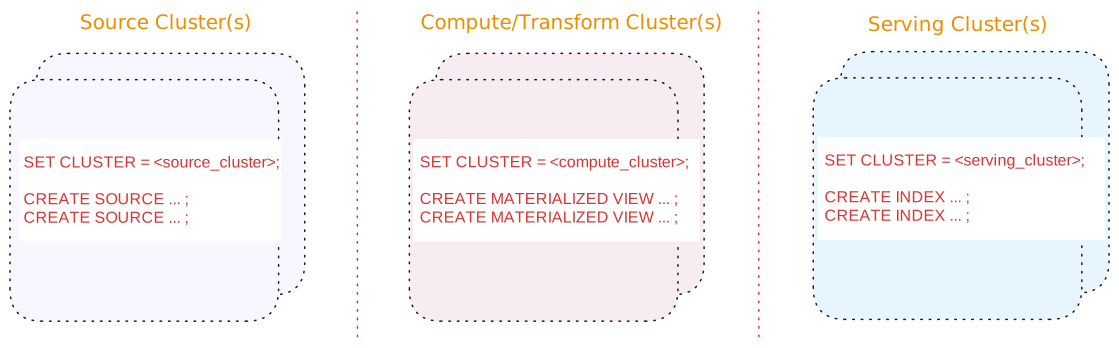
<style>
red { color: Red; font-weight: 500; }
</style>

