Parallelizing MySQL Snapshots
October 20, 2026


A key customer recently came to us because loading data from MySQL into Materialize would run for over 40 hours and then fail. Materialize ingests data by first “snapshotting” existing data, then switching to a stream of diffs from MySQL’s binlog. The initial snapshot took so long that by the time it finished, MySQL couldn’t provide diffs going back to when the snapshot had started.
Even with enough disk to retain days’ worth of diffs, the initial ingestion time is also the disaster recovery time, so an over 40-hour recovery time would be unacceptable.
The customer’s data skewed towards a single table with over two billion rows and two terabytes of data. Our Postgres integration can handle this scale and shape of data because it supports parallelizing snapshots within a single table, but the MySQL integration wasn’t as mature. We knew the solution was to parallelize the initial snapshot for MySQL, but we didn’t know how to partition the table efficiently so parallel readers could share the load.
We started with a Claude-generated PR, optimistic we could unblock the customer in a week. In reality, getting to a performant solution took over a month of iteration as we learned about the customer’s workload, ran scale tests, investigated bottlenecks, and fixed correctness issues caused by the complexities of MySQL string sort ordering. This post shares the missteps we made and the lessons learned along the way.
But let’s start with the good results!
The Outcome
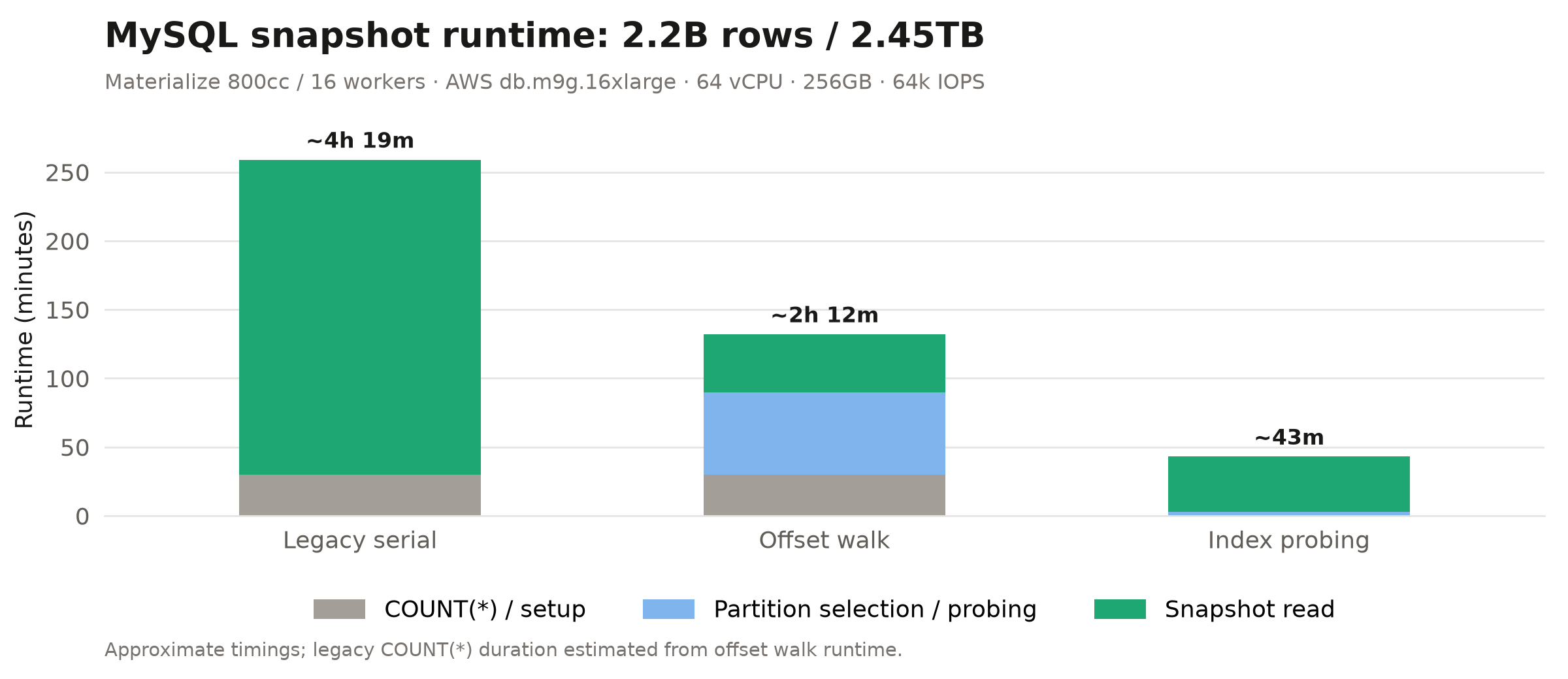
In our largest internal scale tests we saw anywhere from a 2.2 to 6.9x improvement, depending on data shape and MySQL instance size:
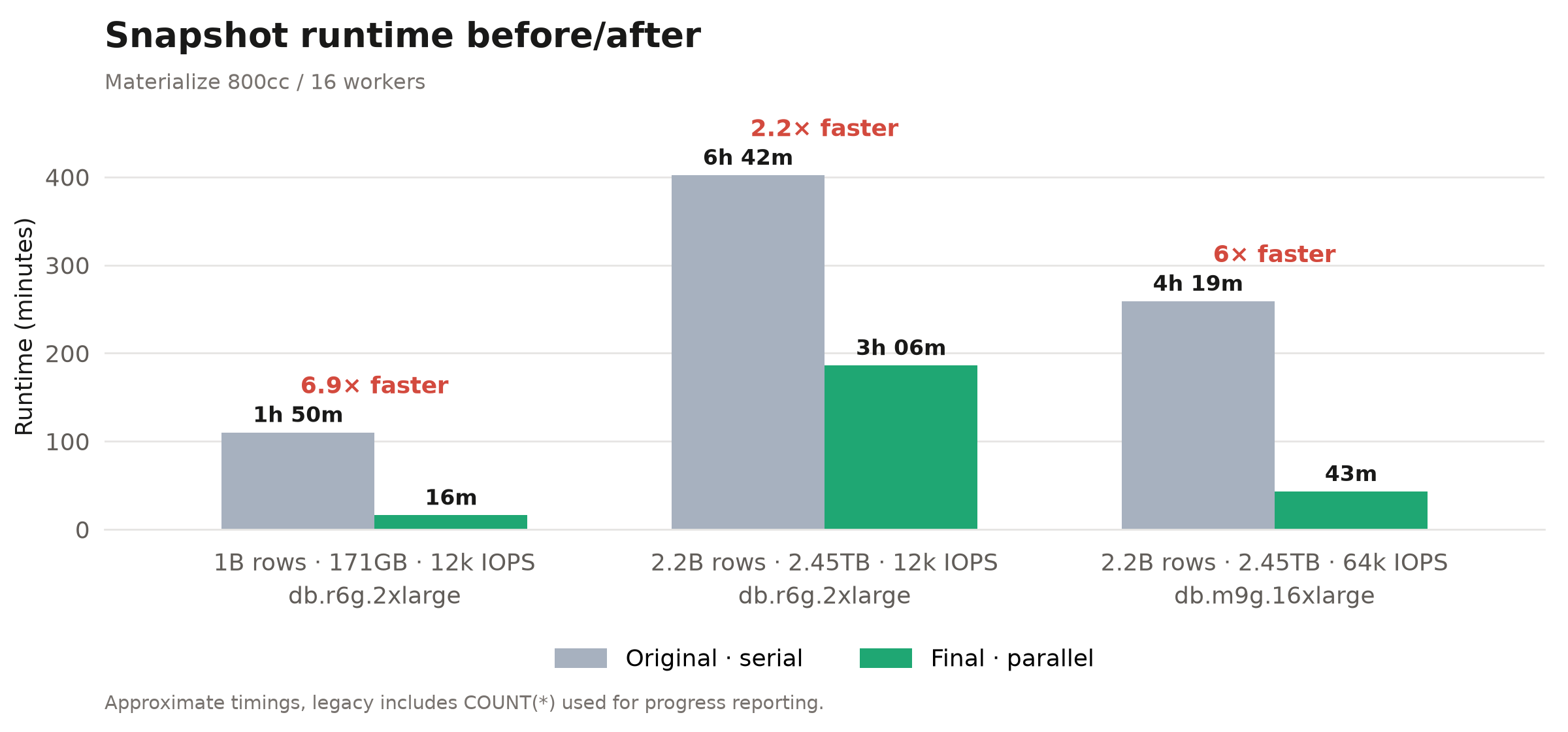
In all of these tests Materialize saturated MySQL’s input/output operations per second (IOPS) at full parallelism, so we likely could have seen more improvement with more provisioned IOPS. Our target was a 4x improvement, so we were happy with the top line numbers.
The Customer Reported a 10x Speedup
For our customer, we brought the snapshot for their largest table down to just three hours! They reported a roughly 10x speedup based on their estimate that the largest table had previously taken around 30 hours to snapshot.
The Odyssey: Primary Key Partitioning
Finding the right values to evenly partition the customer’s primary key space turned out to be a core challenge.
Months before we started pushing on this in earnest we actually had a large Claude-generated PR for parallelized snapshotting. It just needed a review. The PR was tantalizing because all we needed to do was read the code, approve, and then we’re good to go, right? We’re good to go, right??
The initial approach was straightforward and only supported INT and BIGINT primary keys. You select the MIN and MAX and then interpolate. Unfortunately, we quickly learned the customer we wanted to support was using CHAR(n) primary keys, so we focused on getting that to work out of the box first. One major idea from the Claude-generated solution that did work was partitioning along the primary key.
Why Partition Using the Primary Key?
In InnoDB, MySQL’s default storage engine, primary keys are clustered B+ tree indexes. "Clustered" in this context means that all columns for each row are stored inline. This is different from non-clustered indices that only store the columns specified for the index and the primary key as a pointer back to the full row. The primary key’s B+ tree index stores the rows sorted by the primary key in the leaf pages of the index. Having the primary key index means
- We can quickly find our position in the overall sorted order of the table by primary key
- When reading a range of rows ordered by the primary key, we just need to read those values sequentially from the disk, which is faster
For example, imagine the primary keys were common key shapes like ULIDs or UUIDs. The underlying B+ tree would look something like this:
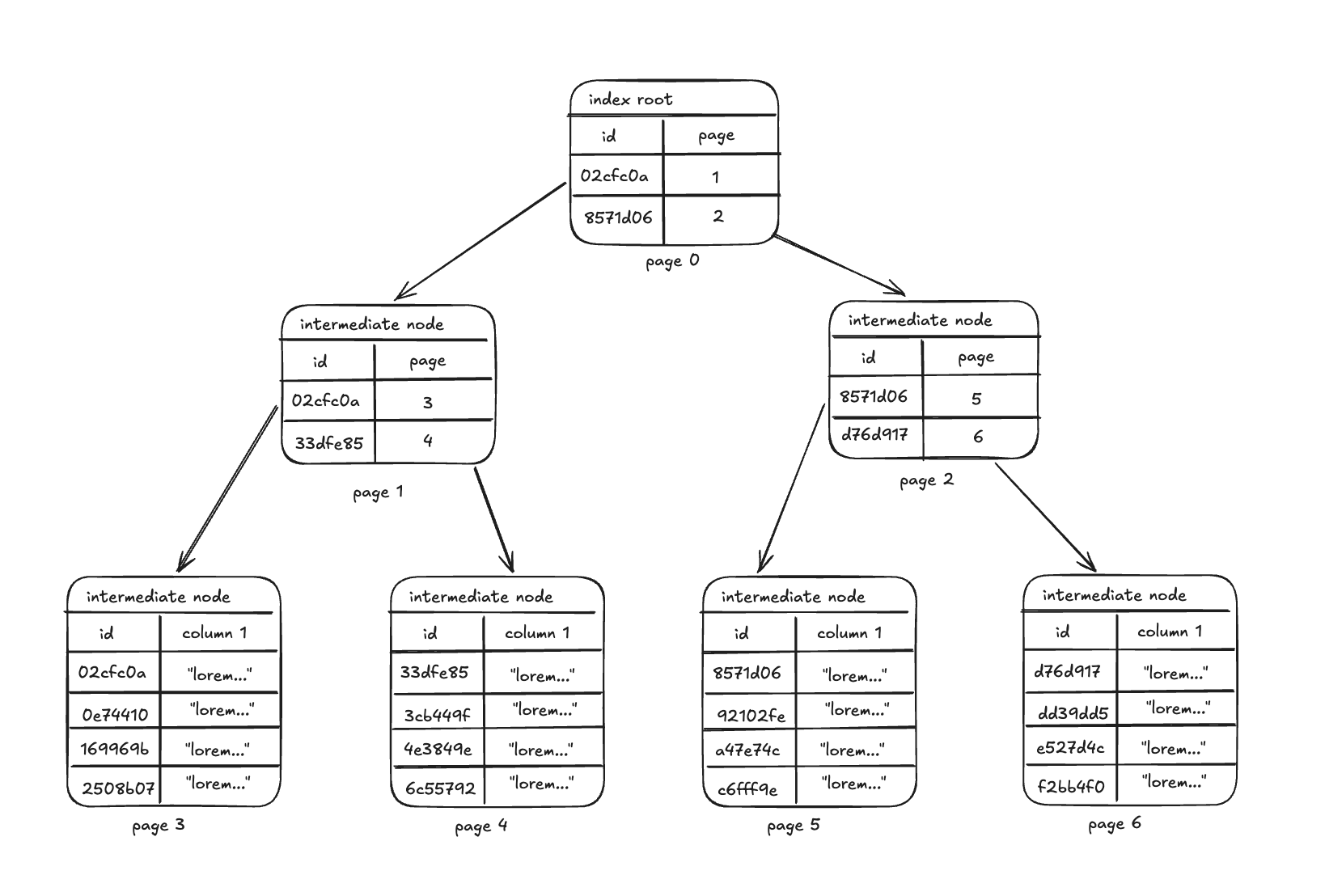
MySQL loads full pages at a time from storage if they aren’t in the cache. Because of this, reading just one row or a subset of rows in a page isn’t cheaper than reading all rows from the page in terms of pages read from storage. Similarly, when reading from a clustered index where all columns are inlined, selecting a subset of the columns doesn’t reduce the pages to be read.
So assuming perfect partitioning for four workers, with this example we’d issue 4 queries:
SELECT * FROM table WHERE id < '33dfe85' ORDER BY idSELECT * FROM table WHERE id >= '33dfe85' AND id < '8571d06' ORDER BY idSELECT * FROM table WHERE id >= '8571d06' AND id < 'd76d917' ORDER BY idSELECT * FROM table WHERE id >= 'd76d917' ORDER BY id
In this case we’d only read each leaf page once, resulting in excellent efficiency. Ok great, the B+ tree has the rows nicely sorted and we can just portion out equal-sized regions of the keyspace to our workers. It sounds simple, but how do we select the right boundary keys?
Early Discarded Approaches
Primary Key Hashing
One approach we considered and thankfully excluded early was hashing the primary key to distribute work across Materialize workers (i.e. SELECT * FROM table WHERE CRC32(id) % <worker_count> = <worker_index>). The rows each worker would read would be spread throughout the pages, likely resulting in all workers reading all pages from the database. If we had 16 workers we might end up pushing up to roughly 16x load into the upstream MySQL, which as we’ll see is a big problem.
String Interpolation
We had a general sense that strings in MySQL are complex, so we wanted to avoid directly handling, generating, or sorting strings in Materialize as much as possible.
Honorable Mention
- Partitioned MySQL tables
- Idea: Given a partitioned table, distribute partitions across workers to process independently
- Blocker: This would require customers to partition their table, which pushes the problem to the customer and is not the product experience we want
- Histogram Statistics
- Idea: Use
ANALYZE TABLEon the primary key column to compute equi-height histograms for partitioning - Blocker: We initially excluded this idea because we didn’t want to run an
ANALYZEwith a specified bucket count on the customer’s cluster. When we came back to try this later out of desperation it turns out you can’t even run on a unique column.
- Idea: Use
False Start: Offset walking
Our first approach to partitioning that merged was selecting primary keys from the table spaced according to the number of rows each worker should own. We had a sense up front that string sorting (a.k.a. collation) in MySQL was complex, so we wanted to avoid directly sorting or generating strings in Materialize as the original PR had done with integer interpolation.
For example, for four workers on the table above:
SELECT COUNT(*) FROM table→ 16 (each worker will own 4 rows then)SELECT id FROM table ORDER BY id LIMIT 1 OFFSET 4→ “33dfe85”SELECT id FROM table WHERE id >= '33dfe85' ORDER BY id LIMIT 1 OFFSET 4→ “8571d06”SELECT id FROM table WHERE id >= '8571d06' ORDER BY id LIMIT 1 OFFSET 4→ “d76d917”
This had the major advantage of not relying on understanding string sort order in Materialize. We were already running SELECT COUNT(*) to report table size statistics, so it was “just” an extra pass over the primary key index to compute the boundary keys.
Performance testing against 200M-row table on an AWS RDS MySQL instance looked great. On a 400cc (8-worker) instance we observed a 3x speedup (~11m → ~3.5m) with minimal load on the RDS instance. This “confirmed” our initial hypothesis that Materialize was the bottleneck, and we were excited to ship.
Unfortunately, it wouldn’t be this clean and easy. Once we started testing against larger tables where we needed parallelism the most, it became apparent that MySQL was the bottleneck and not Materialize.
MySQL Performance Cliff
Hints we had a problem surfaced as we set up a narrow 1B row table to test against. Somewhere between 200M and 500M rows performance fell off a cliff, going from around nine seconds to around nine minutes for running a SELECT COUNT(*):
1 | |
2 | |
3 | |
4 | |
5 | |
6 | |
7 | |
8 | |
9 | |
10 | |
11 | |
12 | |
13 | |
14 | |
15 | |
16 | |
Both SELECT COUNT(*) and SELECT id .... OFFSET ... work by traversing all rows in an index. The slowdown was accompanied by metrics showing an increase in IOPS which shows how many reads and writes MySQL was running against the disk.
We concluded that MySQL had been caching the dataset in memory and that the performance degraded once the dataset exceeded the available cache. The “cache” in InnoDB is called the “buffer pool.” The AWS RDS MySQL instance we had set up at the time was a db.r6g.2xlarge with 64GB of memory. RDS automatically configures the buffer pool to 75% of memory (48GB) so it makes sense that at 500M rows and ~85GB it was no longer cached like it was at 200M rows and ~34GB.
Before we even ran the tests my heart sank. I knew from playing with MySQL at this point that COUNT(*) performance scaled similarly to the OFFSET queries we were running, so we might be SOL.
The legacy snapshot of 1B rows took 1h50m, while the parallelized version took 2h. Back to the drawing board.
The Failed Scale Test Details
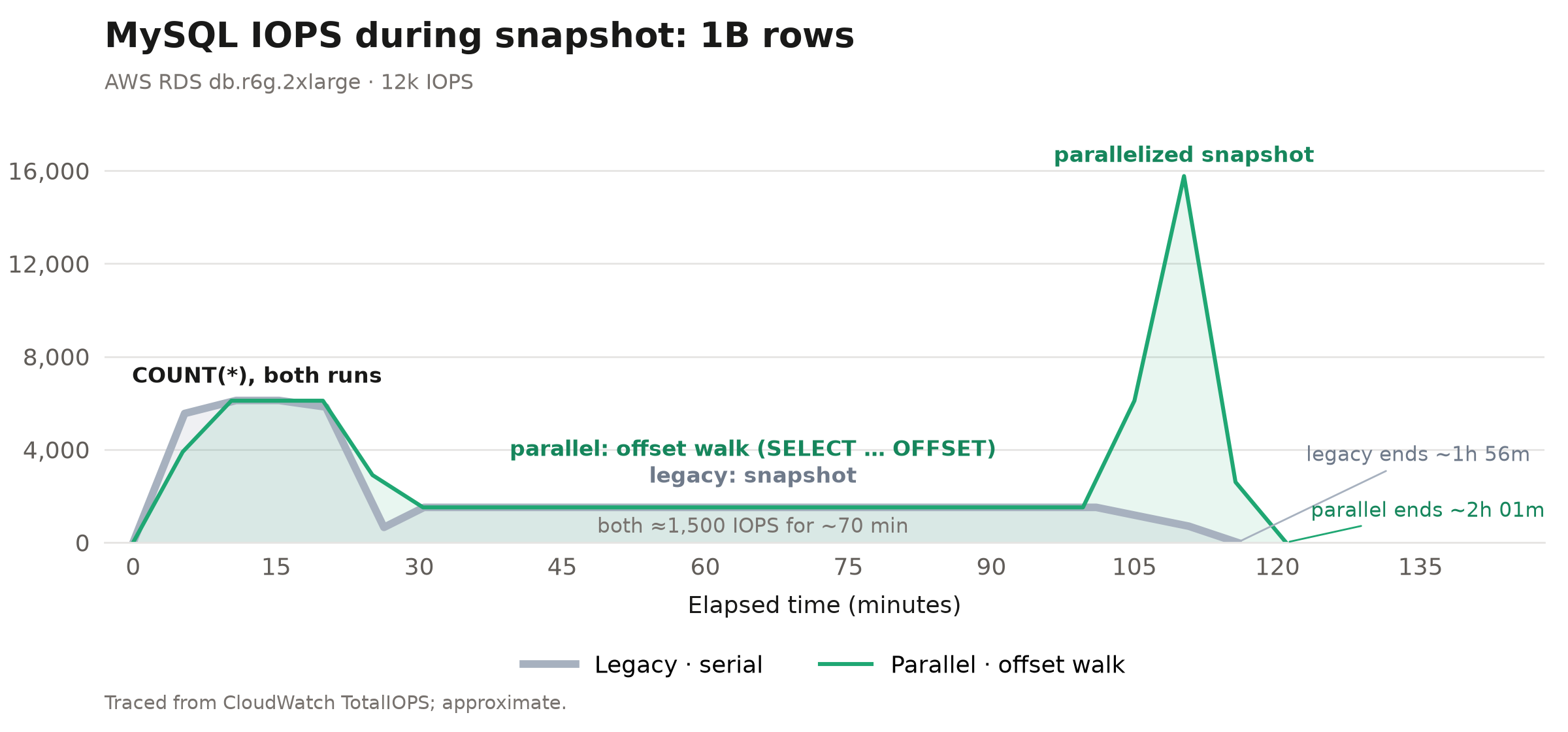
We could clearly see the different phases of the snapshot in the graphs of IOPS. It turns out that COUNT(*) will run with parallelism in MySQL and we had the default minimum parallelism of 4.
We could also see that partition computation phase where we run SELECT ... OFFSET ... took just as long to run as the legacy serial worker’s snapshot! This indicated that the bottleneck was MySQL. You can see in each case we’re stuck at ~1500 IOPS for ~1h30m at steady state.
The one silver lining was that we could see the parallelized snapshot itself was quite effective for this test case.
Giving Up On Offset Walking
We didn’t give up immediately because the results weren’t all strictly worse. It made significant improvements when the full dataset was cached. It also worked well against the test cases with wider tables (2.2B rows with 2.45TB data instead of 1B rows with 171GB). The OFFSET query on a large instance peaked at nearly 40k IOPS, while the legacy single-threaded snapshot topped out around 10k IOPS, so there was some room for optimization. On the largest cluster, we got a ~2x performance improvement. Things were better, and we tried to tell ourselves that this would be good enough for the customer, but deep down we knew that there was more work to do.
Looking at MyDumper
At this point we decided to scrap this approach and look for something that could get us a true 4x+ improvement without increasing upstream load. We couldn’t come up with anything.
Our manager Nick brought up the idea of benchmarking against MyDumper because it’s a best-in-class implementation of MySQL export. He thought it would crush our performance and give us some inspiration. On the off chance MyDumper didn’t have a better approach, that might be a signal to set the project aside.
We quickly found a couple of novel ideas in MyDumper. They did have some form of string primary key partitioning implemented!
Specifically, a couple of query fragments that jumped out were:
- Get the prefix of a key using
LEFT - Get next prefix using
LEFT(id, 1) WHERE id > '<prev_prefix>' AND id NOT LIKE '<prev_prefix>%'(source inspiration) - Get row count estimate for prefix with
EXPLAIN SELECT id FROM table WHERE id LIKE '<prefix>%'
The high level idea this sparked was trying to break down a table with a string primary key into ranges based on the key prefixes. We jumped right at trying to replicate this approach.
Prefix-based Partitioning
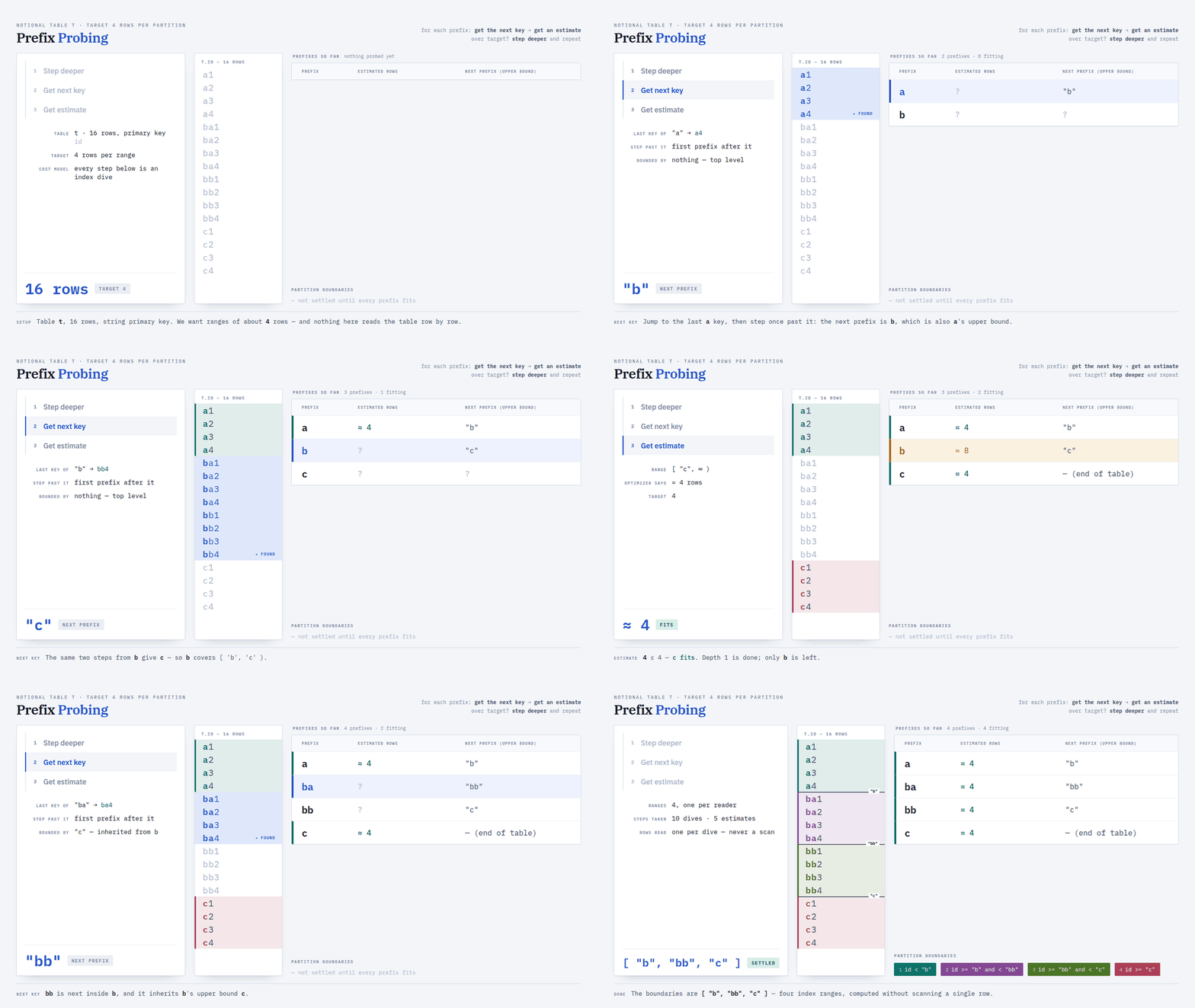
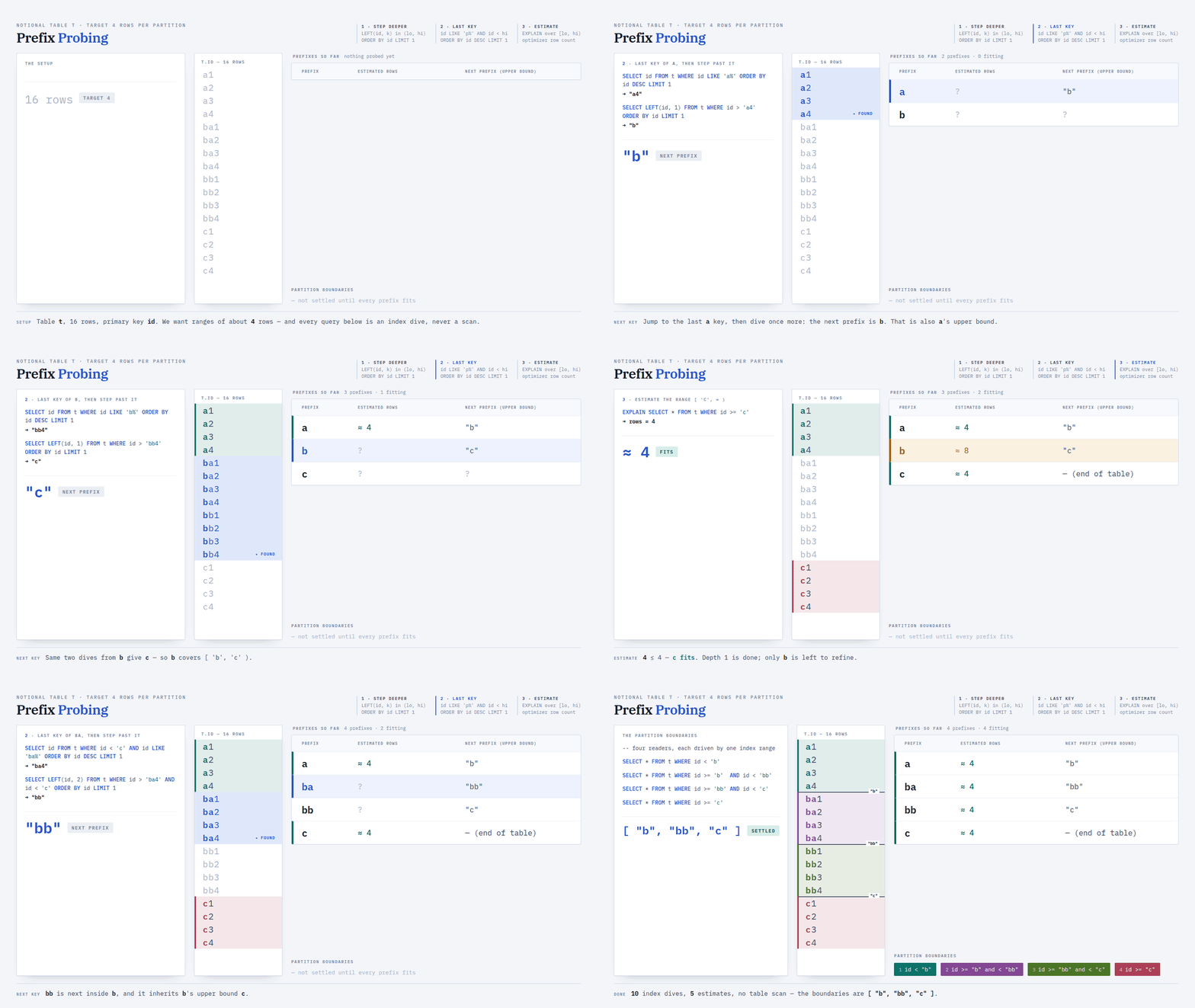
At a high level, the algorithm we came up with inspired by MyDumper’s approach is broken down into a couple of steps:
- Starting with an empty string
""enumerate child prefixes and estimate the keys they cover - For any prefix covering too many rows, repeat the process
Here’s an example of the approach:
The (First) Problem With the MyDumper-inspired Approach
We had learned from the late-in-the-game failure of the offset walking approach and went straight to trying out the queries borrowed from MyDumper. Unfortunately this query hung on our test dataset:
1 | |
For context, our test table was populated with 2.2B rows worth of ULIDs, which were all prefixed with “01K” before any divergence in the characters. This query for finding the next prefix after “0” was triggering a full table scan. We had been running on fumes, propelled by the hope we could rip off MyDumper, but instead we found ourselves tumbling back down into the pits of despair.
While the humans were feeling emotions, Claude was still churning in the background firing off queries at a local MySQL instance running in docker. Claude would bail us out.
One Weird Trick™️ Claude Found
We were able to keep lookups fast for our test cases using two queries instead of the single query (id > '<prefix>' AND id NOT LIKE '<prefix>%') MyDumper used:
SELECT id FROM t WHERE id < hi AND id LIKE '<p>%' ORDER BY id DESC LIMIT 1SELECT LEFT(id, k) FROM t WHERE id > lo AND id < hi ORDER BY id LIMIT 1
The relevant term here is “sargability” (Search ARGument ABLE), which just means the database can do a quick index dive (traversing down the B+ tree in logarithmic time) rather than a slow linear scan evaluating each row individually. The relevant MySQL docs are under “range optimization”. They don’t directly describe why NOT LIKE isn’t sargable while LIKE is, but it certainly wasn’t.
The final algorithm was composed from these sargable queries:
- Get the prefix of length k in the provided exclusive range (lo, hi)
SELECT LEFT(id, k) FROM t WHERE id > lo AND id < hi ORDER BY id LIMIT 1
- Find the last key for a given prefix p below a provided exclusive upper bound hi
SELECT id FROM t WHERE id < hi AND id LIKE '<p>%' ORDER BY id DESC LIMIT 1
- Get row count estimates from MySQL’s optimizer for a provided range [lo, hi)
EXPLAIN SELECT * FROM t WHERE id >= lo AND id < hi
So here’s a fresh example of the prefix probing approach now with the queries plugged in:
Wrangling Estimates and EXPLAIN
We knew going into this that EXPLAIN was approximate, but it was both much better and much worse than expected. It was much better than expected because it actually based estimates on index dives down to samples of live data. It was much worse than expected because we saw major underestimates for queries touching a lot of data and significant over-estimates in some cases.
For example, we knew our table had 2.2B rows, and the information_schema.tables size estimate gave us this:
1 | |
2 | |
3 | |
4 | |
5 | |
6 | |
2.05B seems reasonable. It’s an underestimate in this case, but that’s an accepted tradeoff for speed. Now let’s take our start prefix we know is before everything and see what it covers:
1 | |
2 | |
3 | |
4 | |
5 | |
6 | |
What? Strangely the estimate is 1026791374 which is exactly half of 2053582748. Through empirical testing we’ve observed 3 forms of skew in estimates:
- Top level table size estimates can be quite stale — 24h by default, could be worse depending on config
- Table size estimates that approach the full table size sometimes get capped at 50% of the table size estimate
- Table size estimates are often chronic overestimates — i.e. we broke the 2.2B row table into chunks smaller than ~140M rows (2.2B / 16 rows) and found that the sum of the estimates was approaching 4B
Our current approach is to break down the table into smaller ranges than necessary and then build partitions back up. For example, with 2 workers we’ll still break the table down into chunks smaller than 1/8th to try to limit skew caused by these observed inaccuracies.
Prefix Probing Performance (is Amazing)
Here’s the performance breakdown for the largest dataset we tested with. You can see that this approach makes the partition computation negligible compared to the overall snapshotting work!
Unfortunately we weren’t fully out of the woods yet. QA testing and code review would soon dig up some specific cases where this approach was broken.
Collation Strikes Back
Although we knew strings and collation were complex and the prefix solution ignored string comparisons on our side, we still missed edge cases in the initial version.
1. Expansions, Contractions and Skipped Characters
During review we started by catching issues with “contractions” due to an improbable catch (shoutout Marty) that some Czech collations order “ch” (two characters) after “h”, so the word chlastat ('to get hammered') sorts after the word hospoda ('pub').. This idea of sorting two characters as though they are one is a “contraction.” Digging into this shape of issue, we quickly found more issues. In the default collation utf8mb4_0900_ai_ci, the German character “ß” compares as equal to two “s” characters, which is an “expansion.” Finally, we caught that NUL characters \0 would be skipped in sorting.
Our solution here was to whitelist the collations we support. Given the fact we’re working with primary keys, we’re hoping German or Czech phone book style sorting won’t be crucial for ordering ULID or UUID primary keys. For now, we’re starting with just utf8mb4_bin because it doesn’t have expansions, contractions or skips (and it’s what our customer uses).
2. PAD SPACE
Even so we had still missed a nuance with utf8mb4_bin , which is that it was a PAD SPACE collation. A PAD SPACE collation compares strings as though shorter strings were padded with trailing spaces. So, in a char(4) column "" would be equivalent to “ " (that’s 4 spaces). An additional nuance here is that these spaces are ordered after some other control characters like the tab character "\t", so in places where we previously were relying on the empty prefix “” to be before all strings, or worse the prefix “b” to be before all keys that started with "b" we were simply going to get wrong results. As an example, consider this sort order:
1 | |
2 | |
3 | |
4 | |
5 | |
6 | |
7 | |
8 | |
9 | |
10 | |
If we were relying on the upper bound id < "b" to prevent us revisiting "b" prefixed keys, it wouldn’t work. For now we simply handle this by appending NUL characters "\0" to the prefix to fill out the max key length when we’re using it as an upper bound to avoid revisiting a prefix. We otherwise kept the algorithm as described. We drop control characters below space from our boundary computation, but that doesn’t break the ordering of the final result and so the partitioning may be skewed by the presence of control characters but will not be incorrect.
3. High Cardinality Leading Characters
If a customer makes full use of the utf8mb4 character set for the first character of their keys (or has some other high cardinality key distributions), this partitioning algorithm can start to take a lot of time. In the worst case, 60k rows with a distinct first character would cost a few queries per row. To de-risk we implemented a budget for how many prefixes we explore.
Mission Accomplished (At Last)
After confirming the feature looked good on our side, we waited with bated breath for our customer to run it. We were guessing at this point that they had uniformly random UUID primary keys, but they had only shared the min/max IDs from their table and the IDs weren’t formatted in a way we recognized. We had confidence random UUIDs would perform reasonably well for distributing work because each prefix would cover the same number of rows.
We hadn’t seen any evidence of IOPS, throughput or CPU bottlenecks from the charts they had shared, but we had limited visibility so weren’t sure how quickly we might saturate their database or on what dimension.
When they ran the snapshot, their performance improvement was better than our tests predicted. They reported a 10x improvement! They snapshotted the largest table by itself and it completed in 3 hours. More importantly, we unblocked our customer bringing a new use-case into production.
Our scale tests showed less than a 7x improvement, so why did they see a bigger improvement than we did? Their snapshot was slower than ours so they had more headroom for parallelism to help. The root cause was using random UUIDs as the primary key as opposed to the timestamp prefixed keys we tested with. This resulted in fragmented data on disk and prevented linear readahead, which leaves reads latency bound. The uniformly random UUIDs also resulted in less skewed partitioning than in our testing.
Final Lessons
The utility of reproducing a customer’s workload was clear here. Building a test case close to their scale helped us avoid shipping a regression.
On Claude….it’s unclear how much it helped or hurt overall. The main blocking issues — pushing extra load upstream causing an overall slowdown or the contraction/expansion edge cases — were only caught through careful human review and testing. Arguably, that’s expected, but without the halo of confidence that surrounds it I think it’s likely we would have found a more grounded initial approach. With a confidently wrong starting point, I found myself getting mired in a sort of local optimum, trying to make the offset approach work instead of zooming out.
Going forward we’ll consider INT and BIGINT support next (that seems much easier than CHAR and VARCHAR at first glance). We may explore allowing multi-column primary keys or expanding support to more collations, but that’s likely further down the road. We hope we can expand to *_general_ci and *_bin collation relatively easily. More complex collations with expansions, contractions, and skips may be hard to impossible to adapt to this approach.
Finally, if you’re looking to partition a MySQL table with a CHAR or VARCHAR primary key, don’t. If you decide to do it anyway, please feel free to take inspiration from our approach and let us know about it! Just please remember to limit or carefully test the collations supported and to review our latest partitioning code; some details were omitted from this post.
Materialize is the live data layer for apps and AI agents. To keep results up-to-date as new data arrives, Materialize incrementally updates results as it ingests data rather than recalculating results from scratch.
If you’re interested in exploring Materialize, check out our quickstart guide.
Header photo: Spinner dolphins underwater by Oregon State University, cropped, licensed under CC BY-SA 2.0.