Building the Live Context Graph for Agents, 28 Weekly Releases Later
June 16, 2026


Agents need a tight feedback loop: observe data as context, act, and observe again to figure out if the actions were successful.
Imagine a logistics agent which has to:
- reroute a late shipment
- then read inventory and ETAs to confirm the reroute landed
- finally, alert customers about the change
Traditional solutions weren't designed for agentic feedback loops like this. OLTP databases can't keep up with the volume of complex queries, and warehouses can't maintain the data freshness required.
This era needs a new category of infrastructure; infrastructure that can keep data fresh, and consistent, so that agents have the feedback loop they need.
I'm biased, of course, but I believe Materialize is the right tool for the job.
If you've followed us from the early days, you know the core idea: maintain views incrementally, so the result is already computed, and is served in milliseconds. Incremental view maintenance lets you easily build a live context graph for your agents: an interconnected set of data products, which represent key business objects such as Customers, Orders, or Shipments.
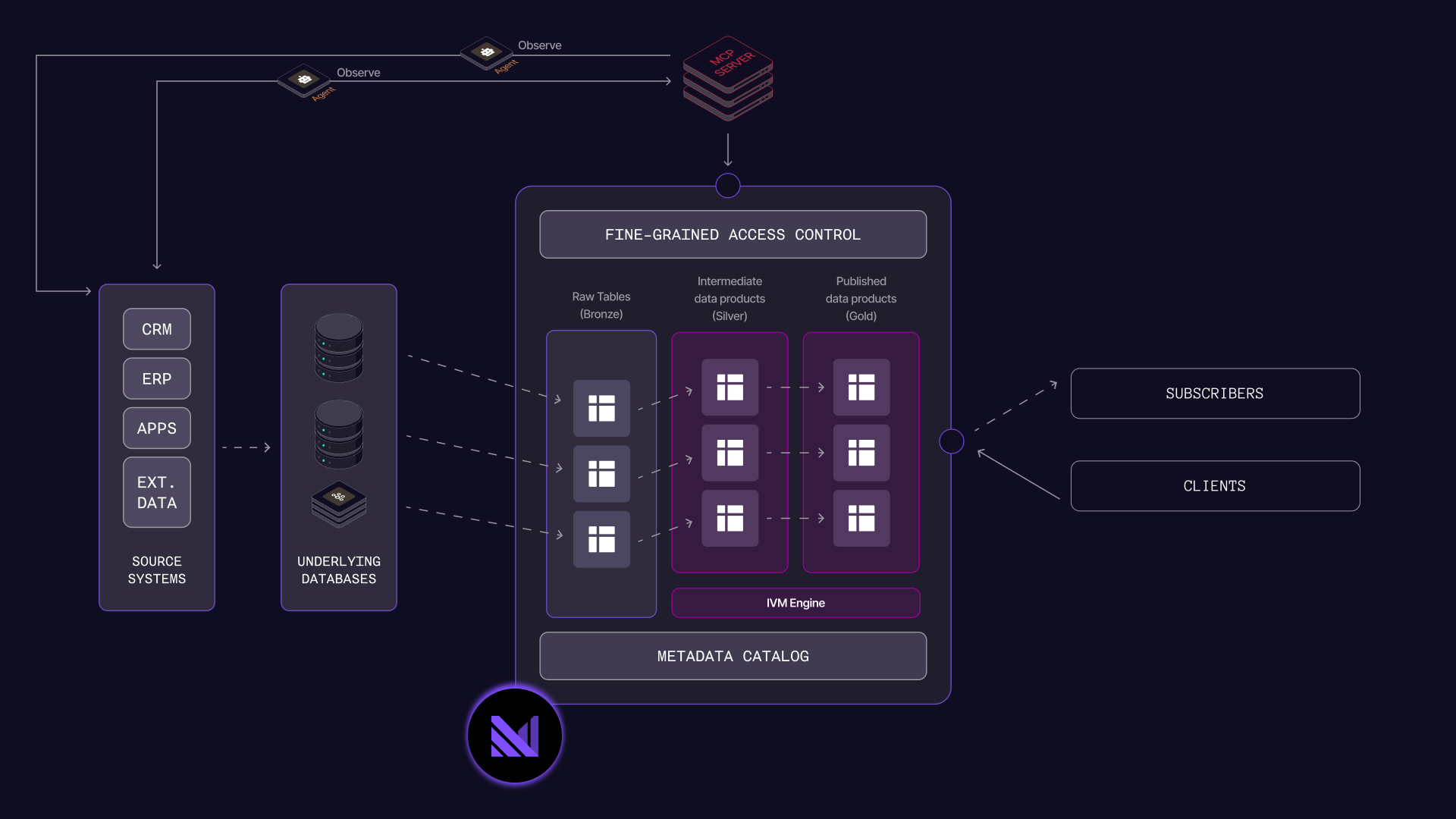
We've worked closely with customers like Bilt Rewards and Crane Worldwide Logistics to enable this pattern. 28 weekly Materialize releases later, we've made it easier to connect agents to your context graph, operate without a human in the loop, connect to all your data sources, and run with enterprise grade security.
If you want to start building right away, check out our guide to get started now. But if you want to learn about what's new, read on!
Build and iterate on your context graph
As mentioned in the introduction, we think of the context graph as an interconnected set of data products. In Materialize, data products are simply materialized views, or indexed views, which are kept up to date as data changes. Maintaining these data products is just step one though; you need to expose them to your agents and iterate on them.
Allow agents to discover & query data products, using our MCP Server for Agents
The Materialize MCP Server for agents allows your agents to discover and query data products. You can create an ontology of these data products, and expose the ontology to an agent so that it understands the relationships between your data. Once your agent understands the data, it can query & join.
A benefit of Materialize's model is that you can create a bespoke data product for each agent if you want to. Using bespoke data products is optional, but it makes data governance simple using our RBAC model; just grant your agent SELECT privileges on exactly the data it should see. To accomplish this with a data warehouse, you'd need to create "just another pipeline" and introduce more lag. On Materialize it's just a few lines of SQL. And you can trust that your agent's bespoke data product will remain correct and fresh.
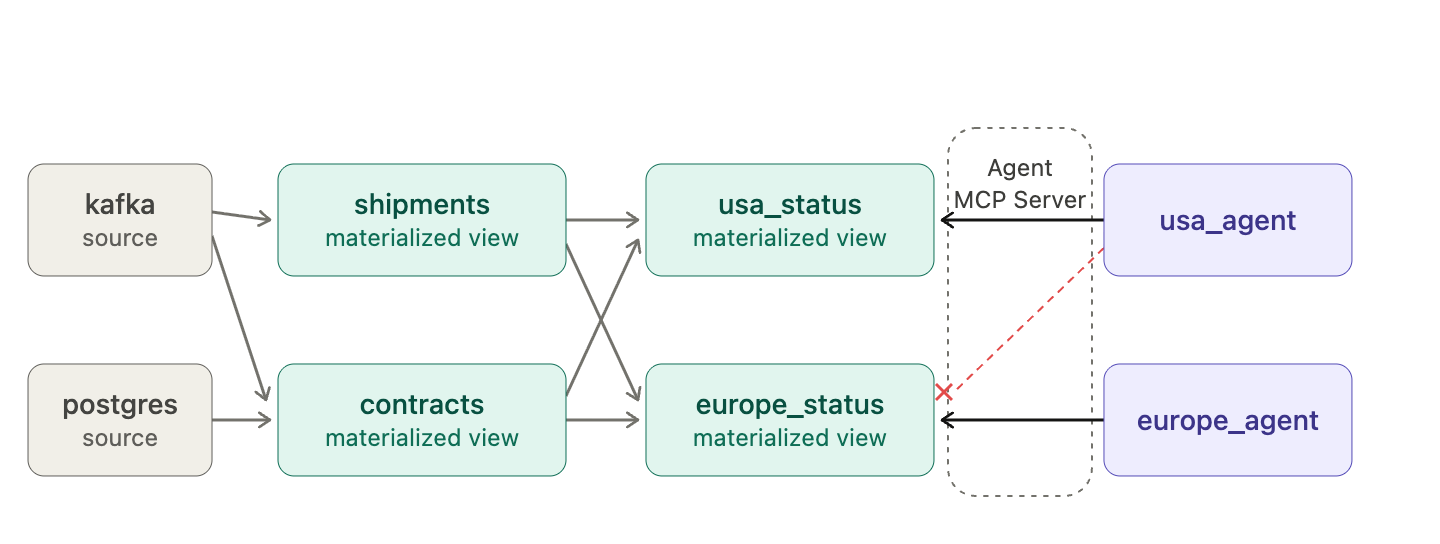
The MCP server for Agents is available today, and endpoints are included with every Materialize environment.
Performance for agent-scale workloads
Agents query far more aggressively than humans or dashboards do. So we've significantly increased maximum queries per second, connections per second. We've improved tail latency; in our tests we saw 50% reductions in p99 latency.
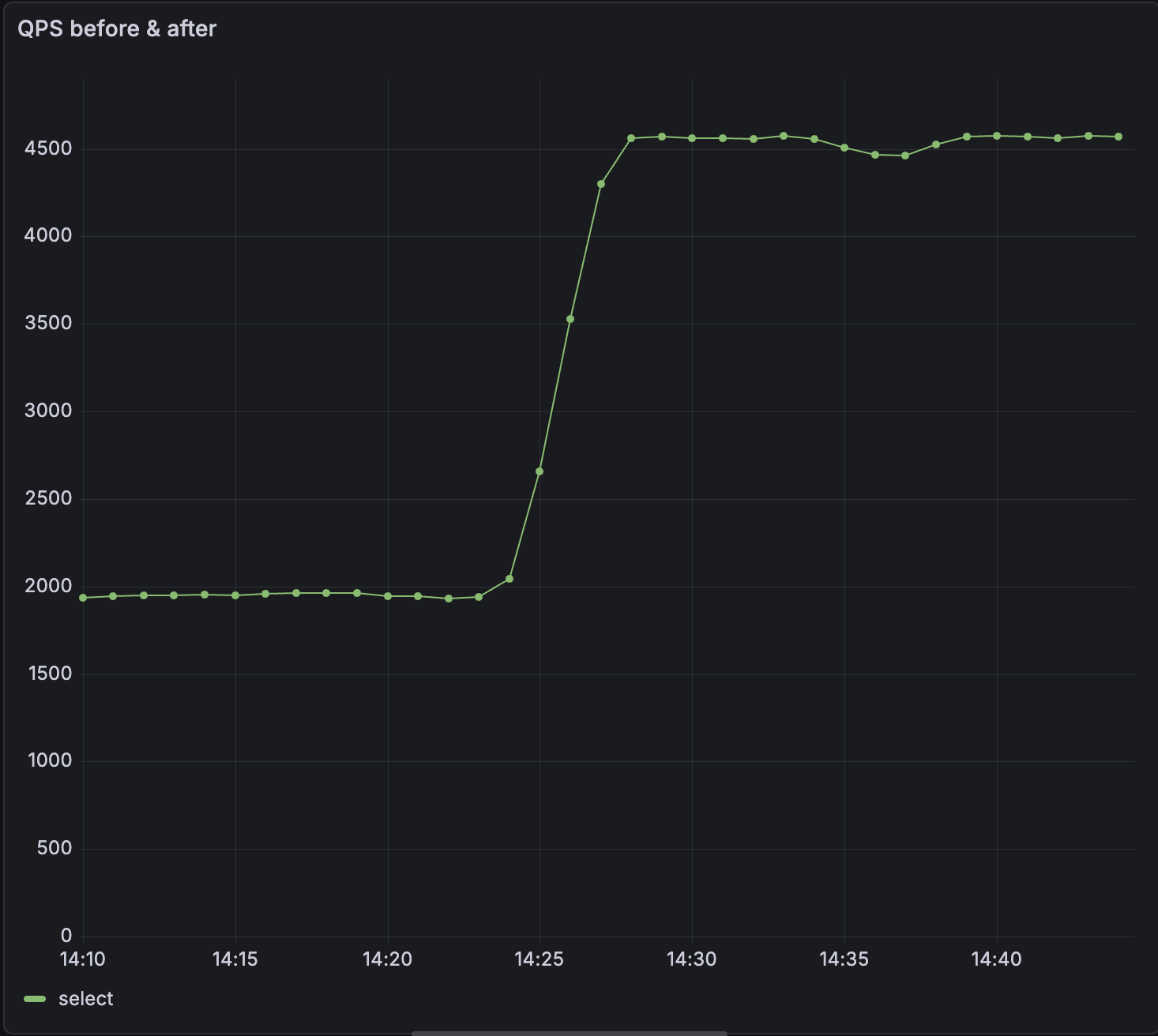
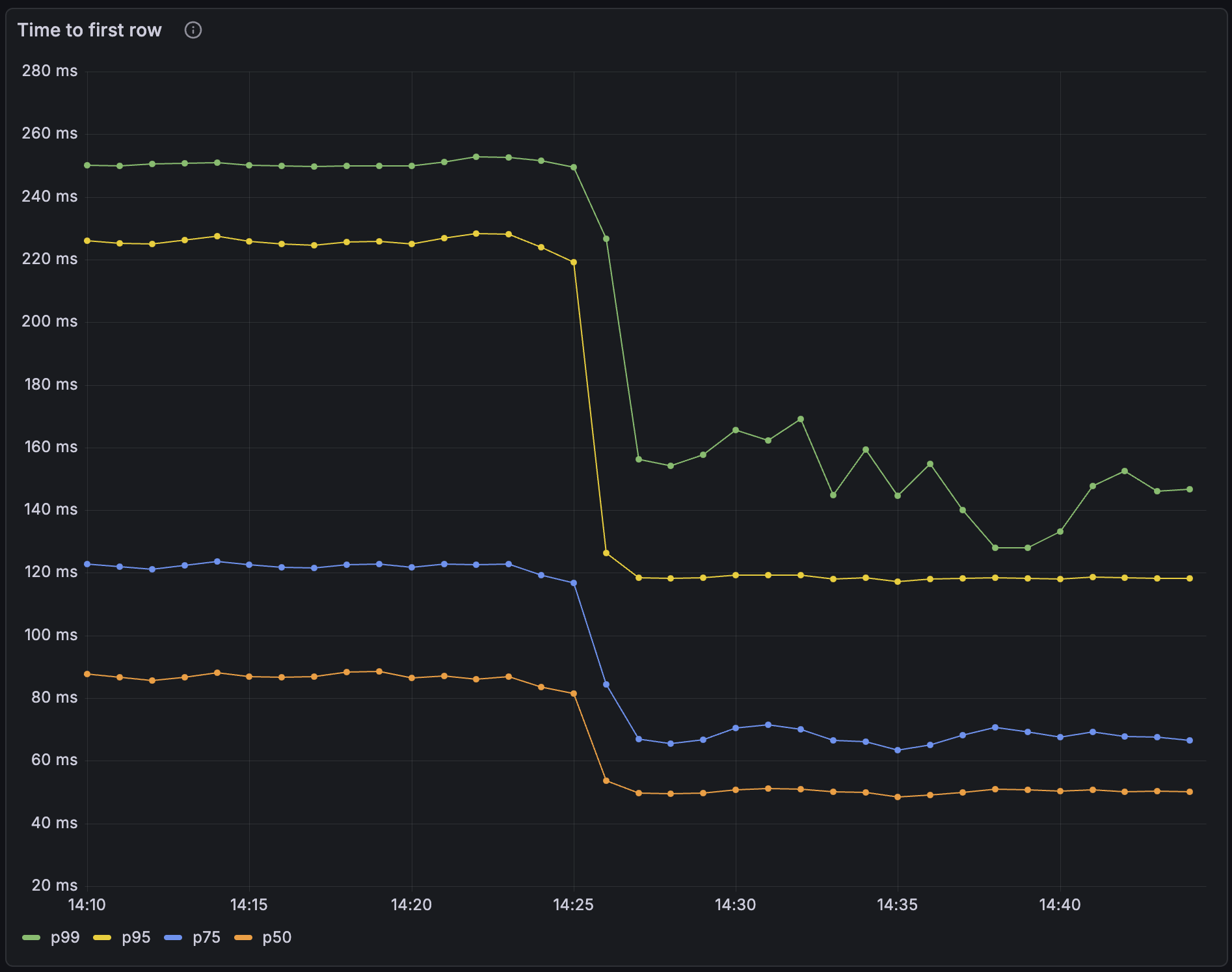
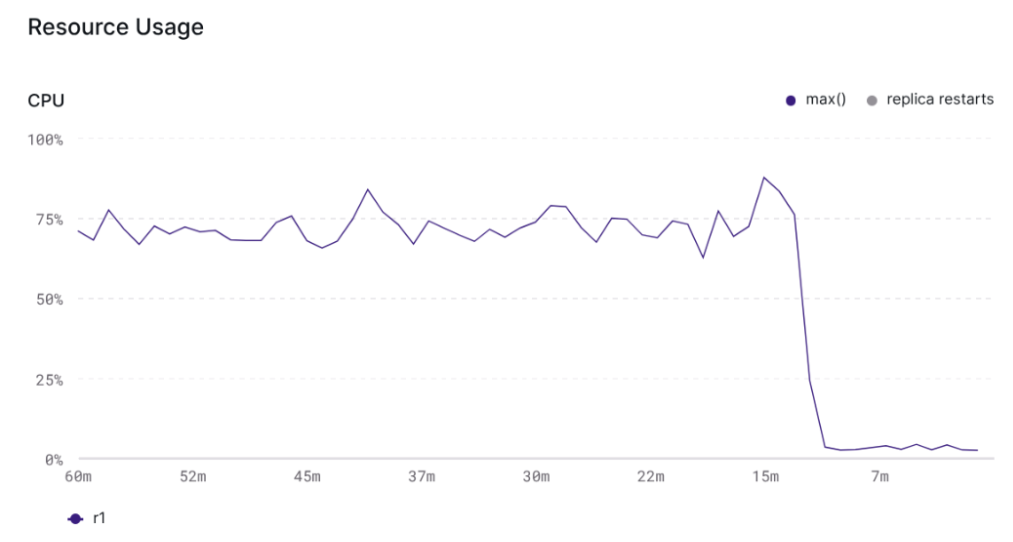
We've also shipped optimizations that substantially reduce CPU usage for views with temporal filters, making these viable for agent scale workloads. While specific results are workload dependent, in our tests, we saw CPU usage drop substantially.
Iterate on the context graph, using replacement materialized views
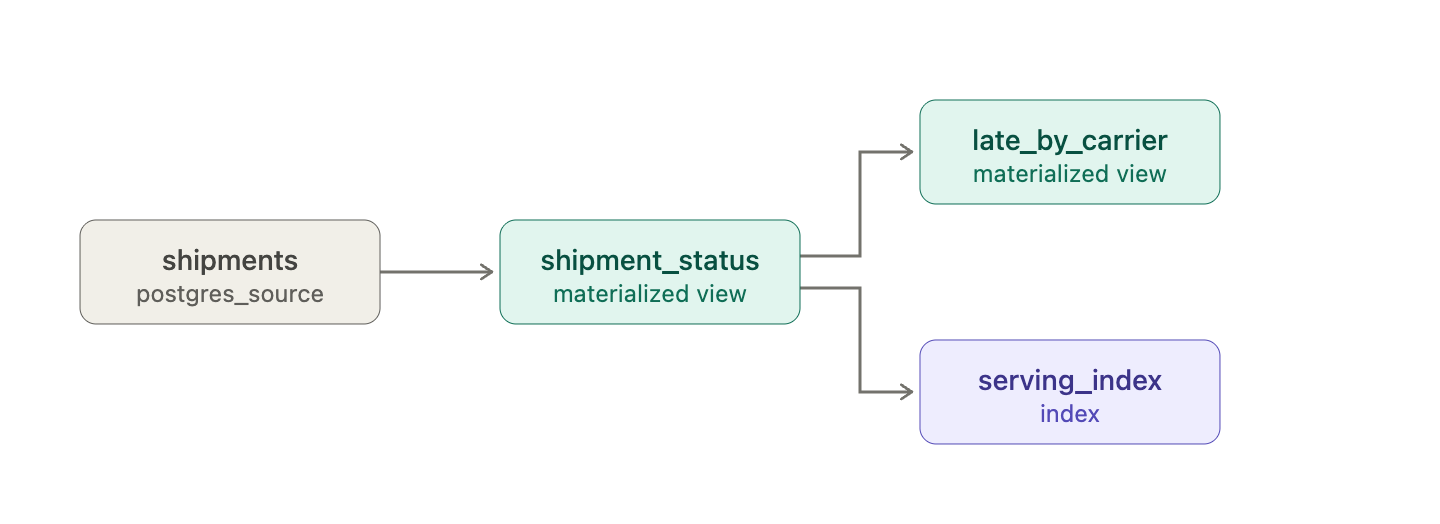
Materialize allows you to build cascading data products, for instance, a materialized view which reads from another materialized view. Since all the materialized views are maintained incrementally, this topology is very cheap to maintain. But as you can imagine, with a cascade of downstream dependencies, iterating on a data product can be hard. With replacement materialized views, we're making it much easier.
Imagine you're a logistics firm, with a data topology like this. And imagine you've accidentally introduced a bug in the shipment_status materialized view:
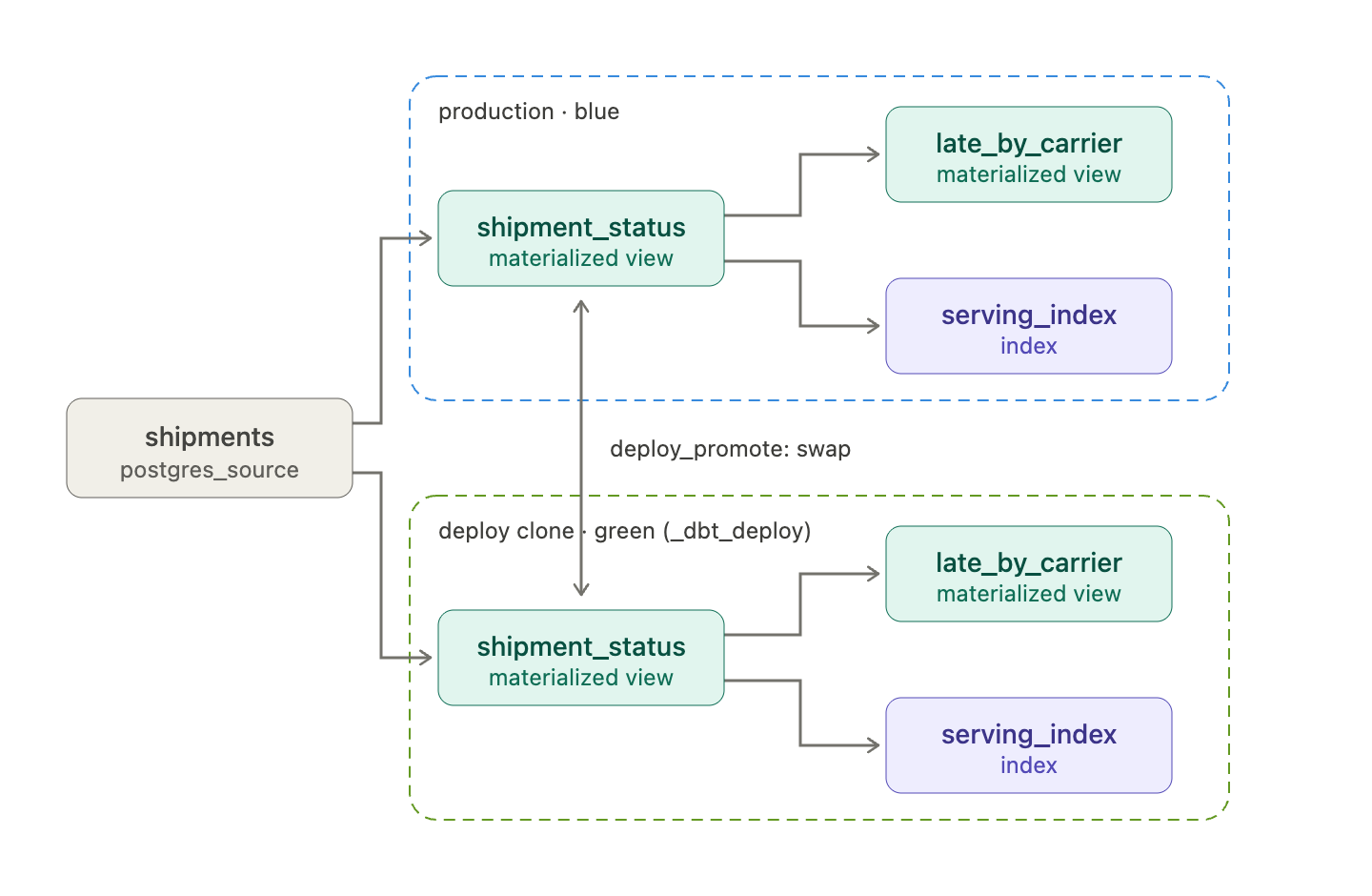
Frequent Materialize users know the drill for deploying changes to their data products: a full blue/green deployment. This works well, but it temporarily doubles resource costs, and requires tight coordination between teams.
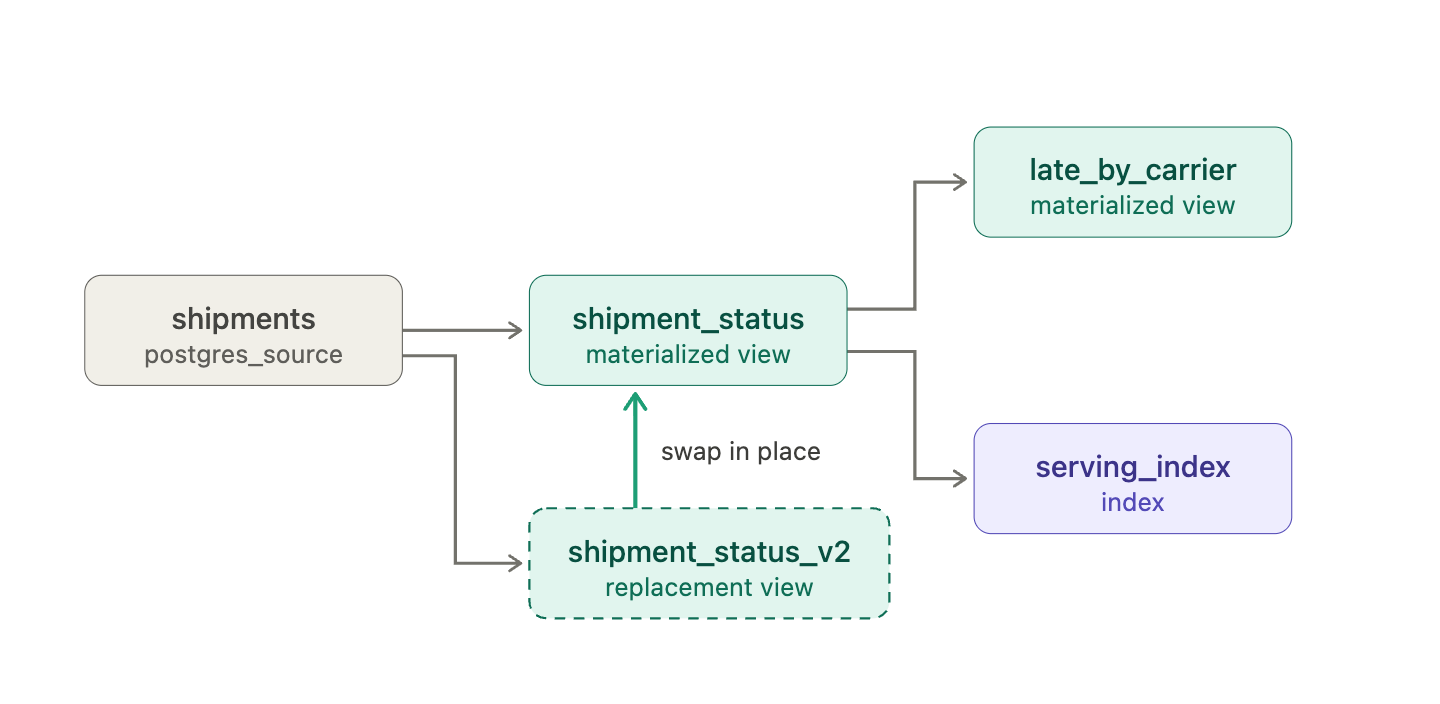
Replacement materialized views are more surgical. You can make an in-place change to a single materialized view and have the change flow downstream, without recreating dependent objects and without downtime.
1 | |
2 | |
3 | |
4 | |
5 | |
6 | |
7 | |
8 | |
9 | |
10 | |
11 | |
12 | |
13 | |
14 | |
15 | |
16 | |
The replacement materialized view will hydrate. Once the replacement is ready, you can apply the change. Materialize will calculate a diff between the original and the replacement, and all the changes flow downstream seamlessly.
1 | |
2 | |
3 | |
4 | |
5 | |
This sounds conceptually simple, but there's a lot of complexity under the hood. Materialize operates on live streams of changing data, and ensuring the replacement emits a correct diff to downstream consumers is not trivial. If you want to learn how we built it, read our deep dive on self-correcting materialized views.
Moving towards a headless developer experience
If agents are going to consume your data, they should help you operate it too. We're building Materialize to be operable end to end without needing a human in the loop, in what we think of as a headless developer experience.
Make coding agents productive with our developer MCP server and agent skills
Materialize environments now include a built-in Developer MCP endpoint. Point your coding agent like Claude Code at the developer MCP server and ask questions like "why isn't this view fresh?". Your coding agents will be able to receive telemetry from Materialize to diagnose the problem.
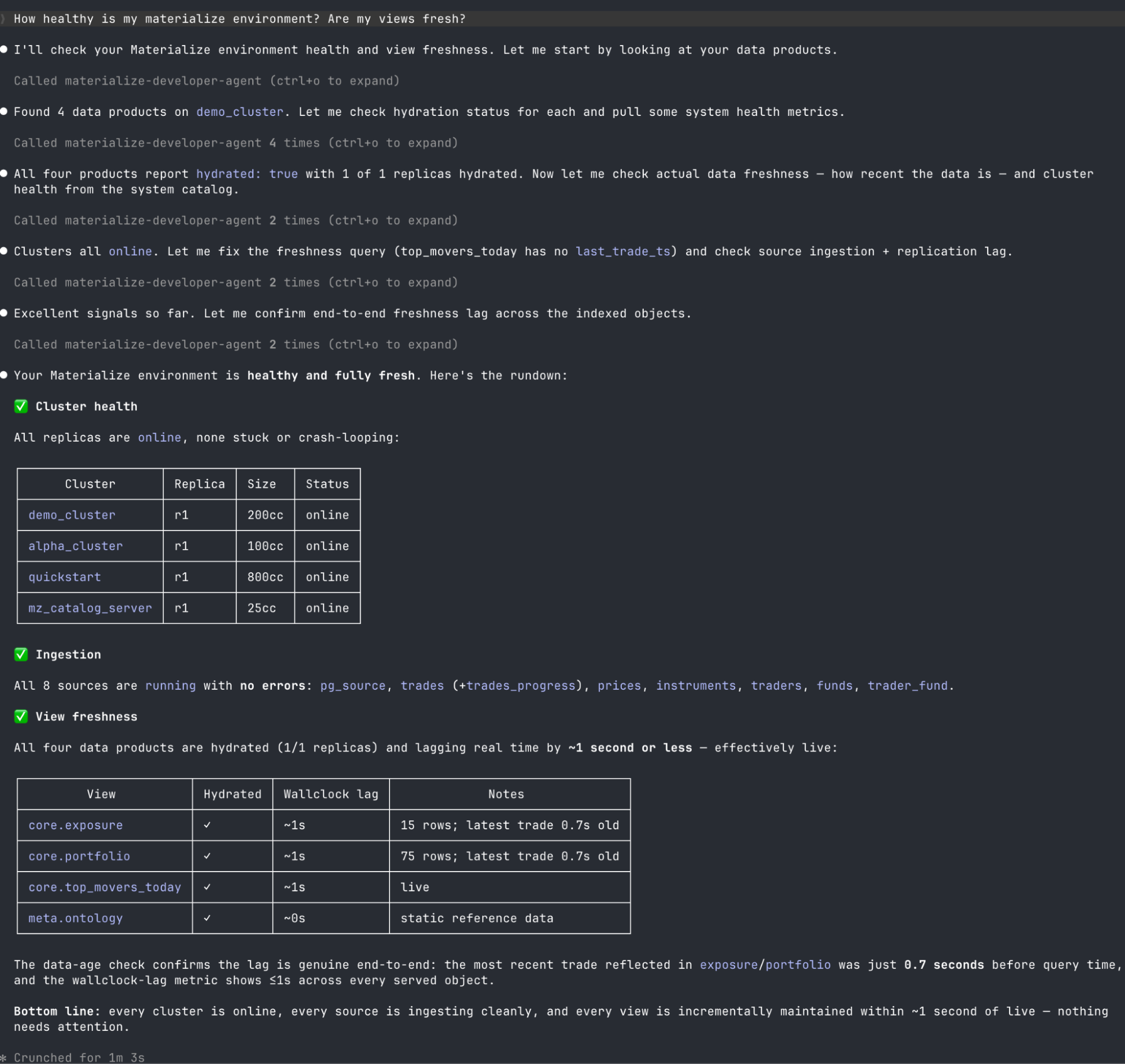
The developer MCP server pairs perfectly with our coding agent skills. These skills give Claude Code and other agents working knowledge of Materialize: idiomatic SQL, indexing strategy, and troubleshooting playbooks. To use our skills, make sure you have Node.js (v16 or later) installed, and then run npx skills add MaterializeInc/agent-skills.
Faster development for software engineers and coding agents with mz-deploy
We're excited to introduce v0.1 of mz-deploy, a new CLI for declarative Materialize deployments. You (and your coding agents) can use mz-deploy to define sources, views, indexes, clusters, and other Materialize objects as code.
But mz-deploy is more than a deployment tool. It brings a software engineering workflow to Materialize. Projects compile locally with no running Materialize instance required. You can run unit tests, inspect query plans, and validate changes entirely inside a sandbox. That means developers, and coding agents like Claude Code, Cursor, and Codex, can safely author and validate changes before ever touching a shared environment.
It's fast, too. Built in Rust, mz-deploy can cold compile a project with more than 40,000 models in under 500ms, with most incremental changes compiling in under 10ms.
Deployments are faster as well. mz-deploy only redeploys objects that have changed, supports blue-green deployments, and allows multiple deployments to proceed concurrently. If overlapping changes occur, conflict detection at promote time keeps things safe.
mz-deploy is an alternative to using dbt. Our dbt adapter is still supported; we're still making improvements to it, and it's still a great way to manage Materialize. But if you're interested in the future of the Materialize developer experience, we'd love for you to give mz-deploy a try, using our instructions here.
Don't ignore the humans: new UIs in the console
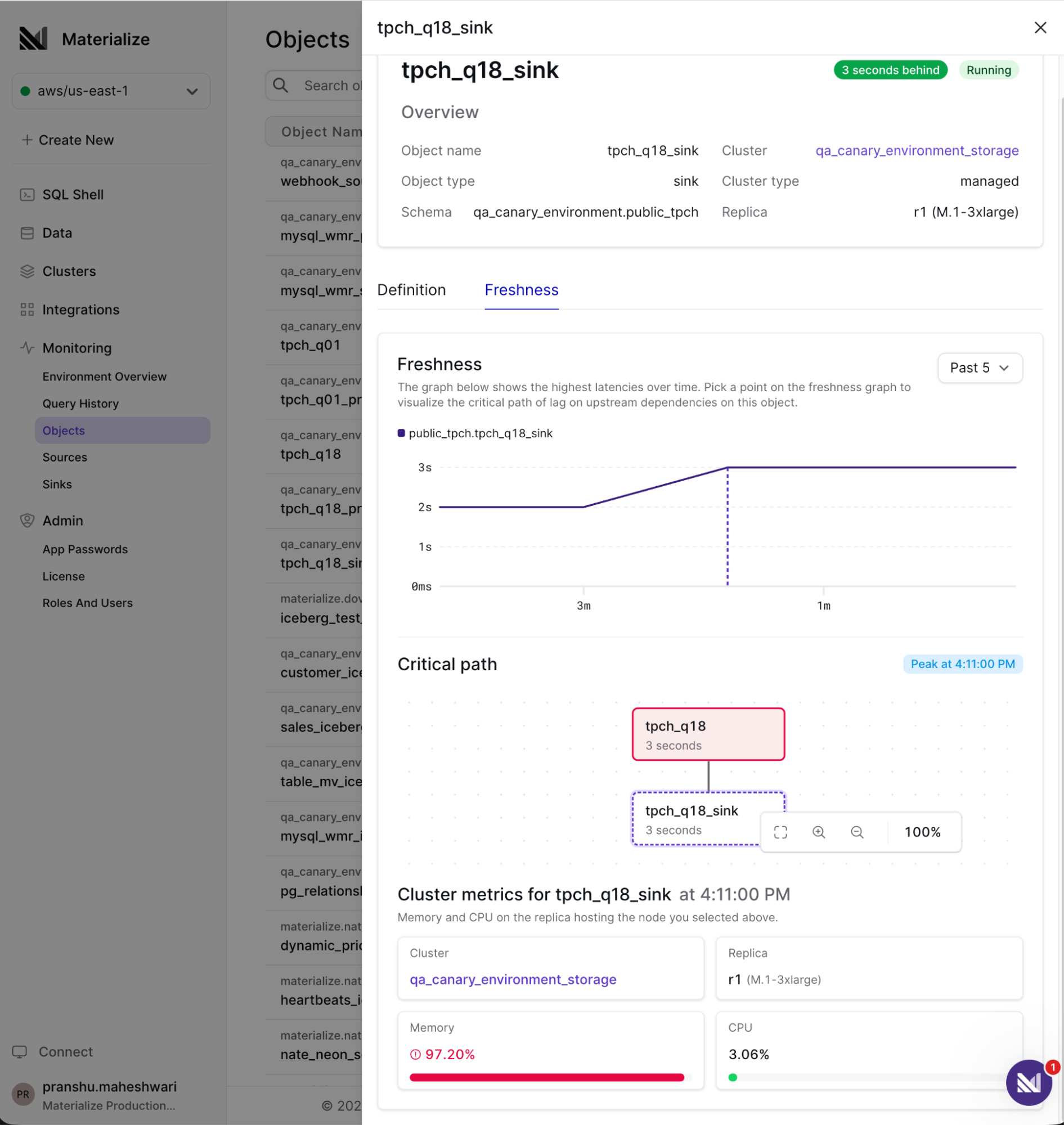
While we're building towards a headless future, we're not ignoring human-readable observability. The new Objects UI in the Console lets you diagnose object freshness directly. If lag is inherited from upstream, you can visualize the critical path to find where it originates. If the object itself is the cause, you can drill into the root cause.
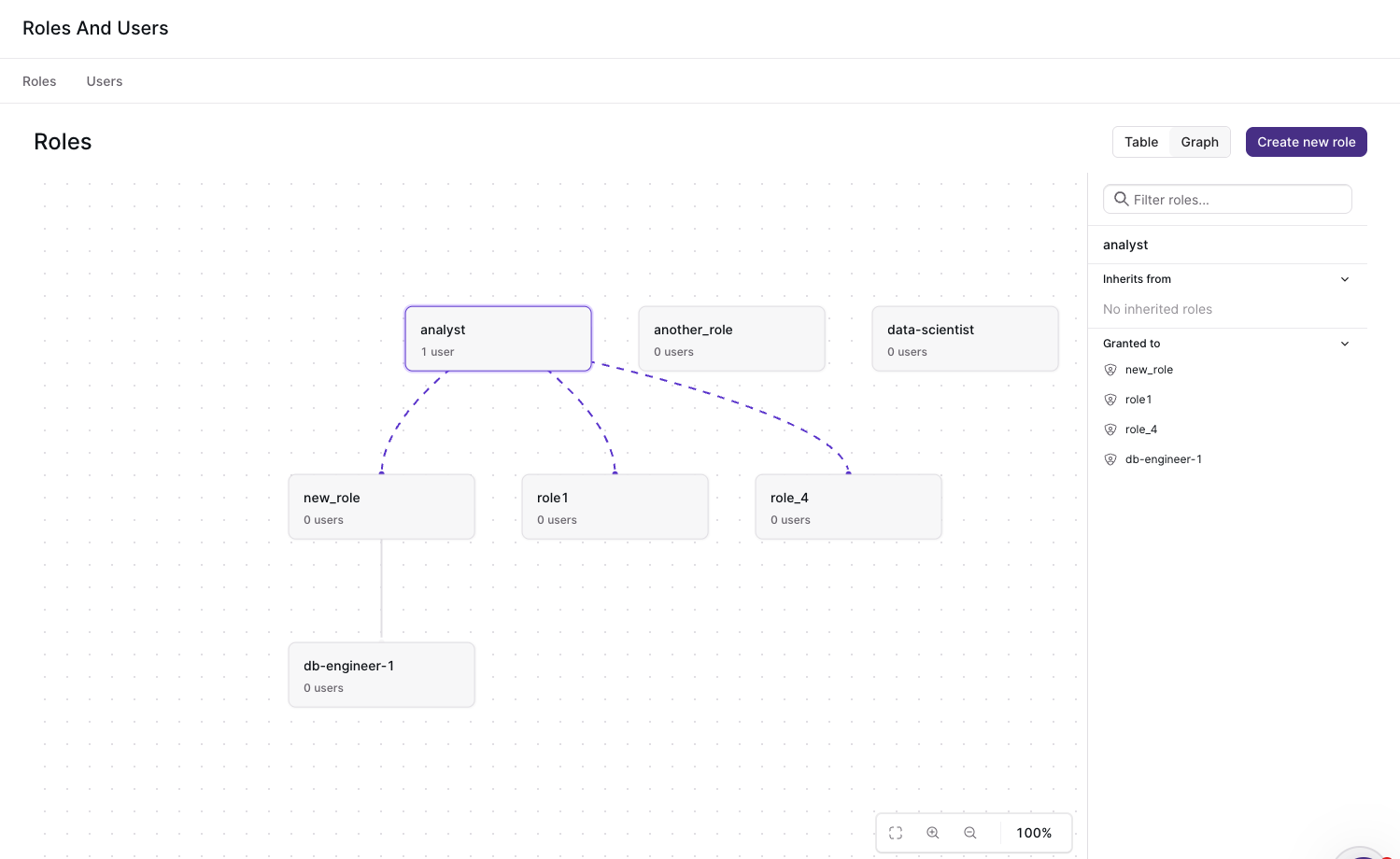
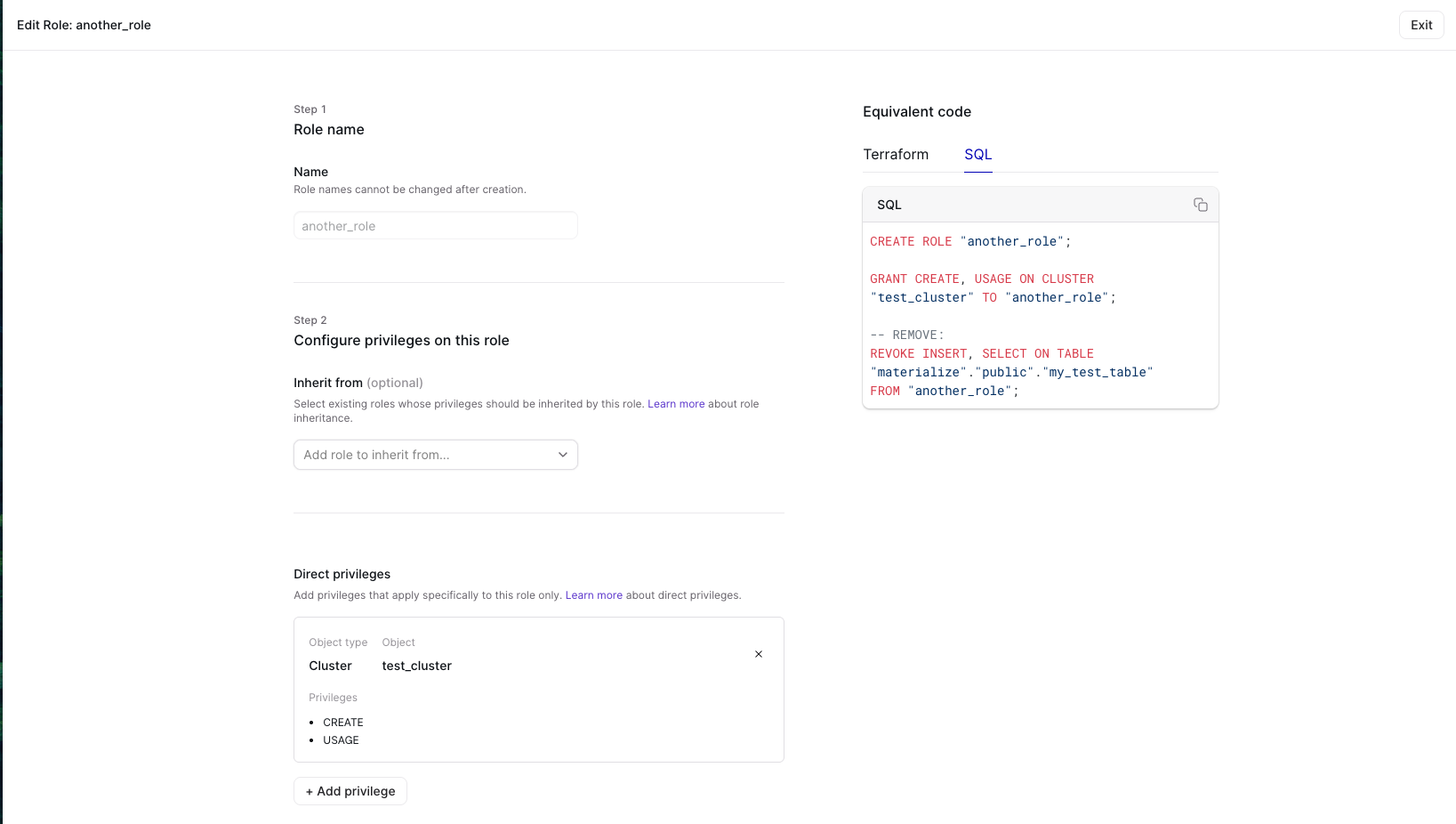
We've also added a new Roles and Users page to help you track the hierarchy of roles, and manage permissions. We all know that changing permissions via clickops isn't durable; so the new UI exposes equivalent terraform and SQL commands so you can make it durable.
Up to 75% faster DDL
Finally, for large-scale environments, we've sped up DDL by as much as 75%, making large deployments and schema migrations faster.
Connect to all your sources and sinks
A context graph is only as good as its edges. This wave of releases expands both what Materialize can ingest and where it can deliver results.
Deliver to your warehouse with the Iceberg sink
Materialize keeps the operational, fresh view of your data; your lakehouse is the right place for history. The new Iceberg sink, in public preview, delivers exactly-once updates to Apache Iceberg tables on AWS S3 Tables, with GCP support coming very soon:
1 | |
2 | |
3 | |
4 | |
5 | |
6 | |
7 | |
8 | |
9 | |
10 | |
11 | |
12 | |
13 | |
14 | |
15 | |
16 | |
17 | |
18 | |
19 | |
20 | |
21 | |
22 | |
Append-only mode is particularly useful with temporal filters; as rows age out of your real-time view in Materialize, the full record is preserved in Iceberg for historical analysis.
The Iceberg sink can simplify your data stack greatly. If you're replicating data into Materialize for operational work already, use the Iceberg sink to replace batch pipelines from your OLTP databases to your OLAP warehouses.
Copy static data from object storage
Not everything is a stream. COPY FROM now supports bulk loading CSV and Parquet files from S3 and S3-compatible object storage, including multi-file loads. It's useful if you have to load features from a machine learning run or load historic data that will no longer change.
1 | |
2 | |
Handle upstream schema changes with source versioning
Source versioning is now in public preview, and available across all our OLTP sources (PostgreSQL, MySQL, and SQL Server). It lets you handle upstream schema changes such as added or dropped columns with zero downtime, by creating a new version of a source table.
Say a shipments table in your upstream Postgres gets a new carrier column. Your existing table keeps ingesting the old schema with no interruption. To pick up the new column, recreate the table from the same source in a new schema:
1 | |
2 | |
3 | |
4 | |
5 | |
6 | |
7 | |
8 | |
9 | |
10 | |
11 | |
12 | |
13 | |
Dropping a column works the same way: recreate the table in a new schema, excluding the column before you drop it upstream.
1 | |
2 | |
3 | |
4 | |
Performance improvements
We've improved memory usage on sinks, by as much as 50%. We've also sped up snapshot times on PostgreSQL sources; some customers saw initial snapshot times improve by as much as 8x.
Enterprise readiness
SSO and OIDC support on Self-Managed
Self-Managed Materialize now supports Single Sign-On (SSO), via OpenID Connect (OIDC). This means you can manage and provision users through your identity provider. It's backwards compatible; username and password authentication continues to work, which matters for tools like Looker that can't complete an OIDC flow.
We're investing heavily in our enterprise authentication offerings, and plan to launch support for SCIM and role-mapping in the near future. Follow our guide to get started with SSO on Self-Managed.
HA database support on Self-Managed
If your upstream runs on an HA configuration like GCP Cloud SQL HA or SQL Server Always On, Materialize now continues ingesting through a failover.
One weekly release at a time
We ship weekly version updates at Materialize. While we've always done this on our managed cloud product, six months ago we began doing the same for our Self-Managed product as well. As soon as we did, something unusual happened: our Self-Managed customers actually upgraded.
While most self-managed infrastructure products measure new version adoption in quarters, many of our customers upgrade within days. They upgrade frequently because each upgrade is stable, and adds functionality they need to power their agents.
As I mentioned in the introduction, we're built around novel primitives, including incremental view maintenance. Incremental view maintenance is the right primitive for the agent era because the volume of reads & writes is exploding. If you want agents to act on fresh context, you can't recompute the world on every query; it's much better to keep views up to date incrementally and serve them in milliseconds.
We're still shipping weekly. If you're already running Materialize, upgrading is the easiest it's ever been; follow our upgrade guide. If you're new, choose the deployment model that works for you, and get started today.