Clusters
View as MarkdownOverview
Clusters are pools of compute resources (CPU, memory, and scratch disk space) for running your workloads.
Resource isolation
Clusters provide resource isolation. Each cluster provisions dedicated compute resources and can fail independently from other clusters. All workloads on a given cluster compete for access to that cluster’s compute resources.
Workloads on different clusters are strictly isolated from one another. That is, a given workload has access only to the CPU, memory, and scratch disk of the cluster it runs on.
Resource isolation lets you place workloads on separate clusters to prevent them from competing for compute resources.
See also three-tier architecture.
Clusters and workloads
The following operations require a cluster in Materialize:
- Maintaining sources, tables (or subsources) created from a source, and sinks.
- Maintaining indexes and materialized views.
- Executing
SELECTandSUBSCRIBEstatements.
Each session has an active cluster, which you can change with SET CLUSTER.
SET CLUSTER = 'my_transform_cluster';
SELECT and SUBSCRIBE statements run in the session’s active cluster.
Objects that require compute (e.g., indexes, materialized views, sources) are associated with a cluster when they are created. The associated cluster is either:
-
the session’s active cluster by default, or
-
the cluster specified by the
IN CLUSTER <cluster>clause in theCREATEstatement.
Cross-cluster objects
Tables, views, and materialized views are accessible across clusters. That is, you can query or reference them from any cluster.
Cluster-local objects
Indexes are accessible only from their own cluster. Indexed results reside in the memory of the cluster where the index is created, and a cluster’s memory cannot be accessed from another cluster.
For more on indexes and clusters, see Indexes.
Cluster replicas
The replication factor of a cluster determines the number of replicas provisioned for the cluster.
Each replica of a cluster provisions a new pool of compute resources to perform exactly the same work on exactly the same data. That is, replicas are redundant copies of the cluster’s workload, not shards: each replica processes the full workload.
Materialize automatically assigns names to replicas (e.g., r1, r2). You can
view information about individual replicas in the Materialize console and the
system catalog.
Fault tolerance
Provisioning more than one replica for a cluster improves fault tolerance. Clusters with multiple replicas can tolerate failures of the underlying hardware that cause a replica to become unreachable. As long as one replica of the cluster remains available, the cluster can continue to maintain dataflows and serve queries.
-
For Cloud, each replica incurs cost, calculated as
cluster size * replication factorper second. See Usage & billing (Cloud) for more details. -
Increasing the replication factor does not increase the cluster’s work capacity. Replicas are exact copies of one another: each replica must do exactly the same work as all the other replicas of the cluster (i.e., maintain the same dataflows and process the same queries). To increase the capacity of a cluster, you must increase its size.
Availability guarantees
When provisioning replicas,
-
For clusters sized up to and including
3200cc, Materialize guarantees that all provisioned replicas in a cluster are distributed across the underlying cloud provider’s availability zones. -
For clusters sized above
3200cc, even distribution of replicas across availability zones cannot be guaranteed.
See also Hydration considerations.
Lifecycle of a cluster
Whenever a cluster starts running a workload (after you create it, resize it, or one of its replicas restarts), its replicas move through a sequence of states before results are fully up to date. Knowing which state a cluster is in tells you whether it is making progress or is stuck.
The queries below monitor a cluster named lifecycle_demo that hosts the
materialized view bids_by_auction and its index bids_by_auction_idx, both
built on a continuously-updating AUCTION load-generator source. Substitute
your own cluster and object names.
Provisioning
Replicas are scheduled and brought online. A cluster with a replication
factor of 0 has no compute and never leaves this state. To
monitor progress, check that replicas report online in
mz_cluster_replica_statuses,
and confirm the cluster has replicas via
mz_clusters.
SELECT c.name AS cluster, r.name AS replica, r.size, st.status, st.reason
FROM mz_internal.mz_cluster_replica_statuses st
JOIN mz_catalog.mz_cluster_replicas r ON r.id = st.replica_id
JOIN mz_catalog.mz_clusters c ON c.id = r.cluster_id
WHERE c.name = 'lifecycle_demo'
ORDER BY r.name;
    cluster     | replica | size | status | reason
----------------+---------+------+--------+--------
 lifecycle_demo | r1      | 25cc | online |
(1 row)
The reason column is empty while the replica is online, and reports why a
replica is unavailable otherwise.
Hydrating
Each replica reconstructs its in-memory state by reading from Materialize’s
storage layer (see hydration). While an object is
hydrating, its hydrated flag reads f and its lag is reported as NULL. To
monitor progress, check the hydrated flag per object in
mz_hydration_statuses,
where the replica_id stays blank until the object attaches to a replica. For
indexes and materialized views,
mz_compute_hydration_statuses
also reports how long hydration took.
SELECT o.name AS object, o.type, r.name AS replica, ch.hydrated, ch.hydration_time
FROM mz_internal.mz_compute_hydration_statuses ch
JOIN mz_objects o ON o.id = ch.object_id
JOIN mz_catalog.mz_cluster_replicas r ON r.id = ch.replica_id
WHERE o.name IN ('bids_by_auction', 'bids_by_auction_idx', 'bids_load')
ORDER BY o.name;
       object        |       type        | replica | hydrated | hydration_time
---------------------+-------------------+---------+----------+-----------------
 bids_by_auction     | materialized-view | r1      | t        | 00:00:00.000074
 bids_by_auction_idx | index             | r1      | t        | 00:00:00.000019
 bids_load           | materialized-view | r1      | t        | 00:00:05.6032
(3 rows)
The light view and index hydrate in microseconds, while the larger bids_load
view takes about 5.6 seconds. A larger object with more state to reconstruct
shows a longer, more visible hydration window.
Both relations report only the current state, so they are wiped when a replica or Materialize restarts. To compare this hydration against earlier ones, and to see the memory and disk it needed, read the durable hydration history described in Optimize cluster size.
Catching up
Once hydrated, the cluster processes the backlog of input updates that
accumulated while it was unavailable, so its total lag starts high and comes
down. To monitor progress, watch lag decrease in
mz_wallclock_global_lag_recent_history,
or break the lag down by input with
mz_materialization_lag.
SELECT o.name AS object, l.local_lag, l.global_lag,
       si.name AS slowest_local_input, sg.name AS slowest_global_input
FROM mz_internal.mz_materialization_lag l
JOIN mz_objects o ON o.id = l.object_id
LEFT JOIN mz_objects si ON si.id = l.slowest_local_input_id
LEFT JOIN mz_objects sg ON sg.id = l.slowest_global_input_id
WHERE o.name IN ('bids_by_auction', 'bids_load')
ORDER BY o.name;
     object      |    local_lag     |    global_lag    | slowest_local_input | slowest_global_input
-----------------+------------------+------------------+---------------------+----------------------
 bids_by_auction | 00:00:34.001     | 00:00:34.001     | bids                | bids
 bids_load        | 00:00:41.001     | 00:00:41.001     | bids                | bids
Both objects trail their slowest input, the bids source, by tens of seconds.
As the cluster works through the backlog, these lags fall.
Steady state
The cluster has caught up and its lag holds low and roughly constant, typically a few seconds. Re-running the lag query confirms the objects have caught up to their input.
SELECT o.name AS object, l.local_lag, l.global_lag,
       si.name AS slowest_local_input, sg.name AS slowest_global_input
FROM mz_internal.mz_materialization_lag l
JOIN mz_objects o ON o.id = l.object_id
LEFT JOIN mz_objects si ON si.id = l.slowest_local_input_id
LEFT JOIN mz_objects sg ON sg.id = l.slowest_global_input_id
WHERE o.name = 'bids_by_auction';
     object      | local_lag | global_lag | slowest_local_input | slowest_global_input
-----------------+-----------+------------+---------------------+----------------------
 bids_by_auction | 00:00:00  | 00:00:00   | bids                | bids
(1 row)
Wallclock lag in
mz_wallclock_global_lag_recent_history
holds near-constant at a few seconds. A lag that instead climbs steadily, at
about one minute per minute, means the cluster has stopped making progress.
Cluster sizing
When creating a cluster, you must choose its
size (e.g., 25cc, 50cc, 100cc),
which determines its resource allocation (CPU, memory, and scratch disk space)
and cost (for Cloud). The appropriate size
for a cluster depends on the resource requirements of your workload. Larger
clusters have more compute resources available and can therefore process data
faster and handle larger data volumes.
To gauge the performance and utilization of your clusters, use the Environment Overview page in the Materialize Console.
As your workload changes, you can resize a cluster. A resize triggers hydration. During hydration, the cluster keeps serving since Materialize provisions new replicas at the target size and hydrates them before retiring the old ones.
Because peak resource usage normally happens during hydration, size a cluster for the resources hydration needs. For how to measure those, see Optimize cluster size.
Hydration considerations
Hydration is the reconstruction of an object’s in-memory state by reading from Materialize’s storage layer and existing indexes; hydration does not read from the upstream system.
Depending on the object, hydration (or rehydration) occurs after:
- An object is created, triggering its hydration.
- This includes dropping and recreating objects to force re-planning. For example, after dropping an index, you can drop and recreate its dependent objects to force them to re-plan. The recreated objects then hydrate like any newly created object.
- A cluster replica restarts, such as during Materialize Cloud’s routine maintenance or after an out-of-memory event. Hydration can be memory-intensive and can itself trigger the out-of-memory event. The replica then restarts and rehydrates again, potentially creating a restart-and-rehydrate loop if the replica is undersized.
- A cluster resize. A cluster resize provisions new replicas at the target size and hydrates them before retiring the old ones. The cluster keeps serving throughout.
- Adding a replica to a cluster, which hydrates the new replica only. Existing replicas are unaffected and keep serving.
Hydration is per cluster replica: when a hydration trigger occurs, the objects on the affected replicas hydrate. When a replica restarts, every object on it re-hydrates. A resize or an added replica hydrates only the new replicas.
For more information, including the memory usage of hydrating objects, see Hydration. For strategies to reduce hydration memory, see Optimize hydration requirements.
Best practices
The following provides some general guidelines for clusters. See also Operational guidelines.
Three-tier architecture in production
In production, use a three-tier architecture, if feasible.
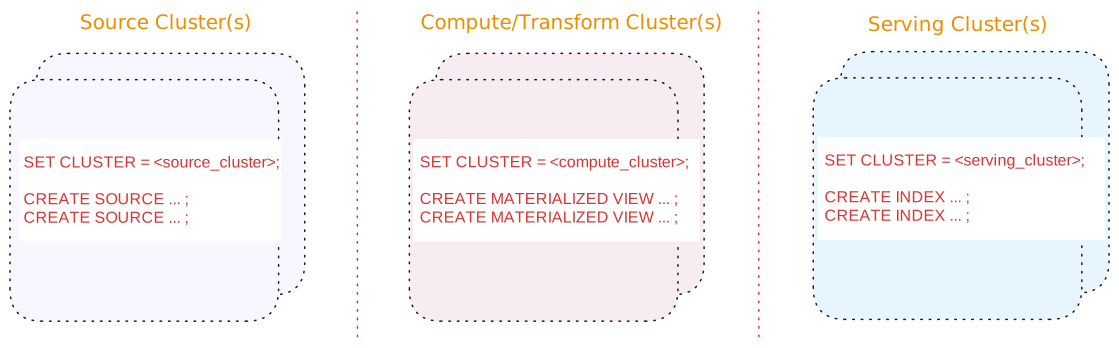
A three-tier architecture consists of:
| Tier | Description |
|---|---|
| Source cluster(s) |
A dedicated cluster(s) for sources. In addition, for upsert sources:
|
| Compute/Transform cluster(s) |
A dedicated cluster(s) for compute/transformation:
|
| Serving cluster(s) | A dedicated cluster(s) for serving queries, including indexes on the materialized views. Indexes are local to the cluster in which they are created. |
Benefits of a three-tier architecture include:
-
Support for blue/green deployments
-
Independent scaling of each tier.
See also Operational guidelines.
Alternatives
Alternatively, if a three-tier architecture is not feasible or unnecessary due to low volume or a non-production setup, a two cluster or a single cluster architecture may suffice.
See Appendix: Alternative cluster architectures for details.
Use production clusters for production workloads only
Use production cluster(s) for production workloads only. That is, avoid using production cluster(s) to run development workloads or non-production tasks.