Operational guidelines
View as MarkdownThe following provides some general guidelines for production.
Clusters
Production clusters for production workloads only
Use production cluster(s) for production workloads only. That is, avoid using production cluster(s) to run development workloads or non-production tasks.
Three-tier architecture
In production, use a three-tier architecture, if feasible.
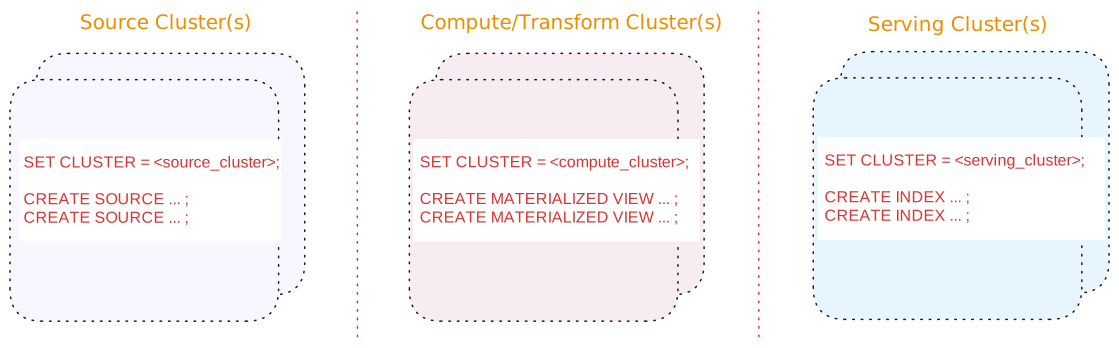
A three-tier architecture consists of:
| Tier | Description |
|---|---|
| Source cluster(s) |
A dedicated cluster(s) for sources. In addition, for upsert sources:
|
| Compute/Transform cluster(s) |
A dedicated cluster(s) for compute/transformation:
|
| Serving cluster(s) | A dedicated cluster(s) for serving queries, including indexes on the materialized views. Indexes are local to the cluster in which they are created. |
Benefits of a three-tier architecture include:
-
Support for blue/green deployments
-
Independent scaling of each tier.
Alternatives
If a three-tier architecture is infeasible or unnecessary due to low volume or a non-production setup, a two cluster or a single cluster architecture may suffice.
See Appendix: Alternative cluster architectures for details.
Sources
Scheduling
If possible, schedule creating new sources during off-peak hours to mitigate the impact of snapshotting on both the upstream system and the Materialize cluster.
Separate cluster(s) for sources
In production, if possible, use a dedicated cluster for sources; i.e., avoid putting sources on the same cluster that hosts compute objects, sinks, and/or serves queries.
In addition, for upsert sources:
-
Consider separating upsert sources from your other sources. Upsert sources have higher resource requirements (since, for upsert sources, Materialize maintains each key and associated last value for the key as well as to perform deduplication). As such, if possible, use a separate source cluster for upsert sources.
-
Consider using a larger cluster size during snapshotting for upsert sources. Once the snapshotting operation is complete, you can downsize the cluster to align with the steady-state ingestion.
See also Production cluster architecture.
Sinks
Separate sinks from sources
To allow for blue/green deployment, avoid putting sinks on the same cluster that hosts sources .
See also Cluster architecture.
Snapshotting considerations
For upsert sources, snapshotting is a resource-intensive operation that can require a significant amount of CPU and memory.
Hydration considerations
When sizing a cluster, budget for hydration memory on top of the steady-state cost. Rather than estimating that budget, start at a size that hydrates comfortably and size down once you have measured what hydration needed: see Optimize cluster size. For strategies to reduce hydration memory, see Optimize hydration requirements.
The table below summarizes, per object type, when each object hydrates and the memory it uses. For more on hydration, see Hydration.
| Object | Hydration behavior |
|---|---|
| Materialized views |
|
| Indexes |
|
| Kafka upsert sources and associated read-only tables/subsources |
|
| Append-only Kafka sources and CDC database sources (PostgreSQL, MySQL, SQL Server), and their read-only tables/subsources |
|
| Webhook sources |
Not applicable. A webhook source is not maintained by a dataflow. It receives data pushed over HTTP and writes the data directly to storage, so it does not hydrate. |
| Sinks |
|
| Subscriptions |
|
Role-based access control (RBAC)
Cloud
Follow the principle of least privilege
Role-based access control in Materialize should follow the principle of least privilege. Grant only the minimum access necessary for users and service accounts to perform their duties.
Restrict the assignment of Organization Admin role
An Organization
Admin has
Restrict the granting of CREATEROLE privilege
Roles with the CREATEROLE privilege can obtain the privileges of any other
role in the system by granting themselves that role. Avoid granting
CREATEROLE unnecessarily.
Use Reusable Roles for Privilege Assignment
When possible, avoid granting privileges directly to individual user or service
account roles (which are named after email addresses or service account user).
Instead, create reusable, functional roles (e.g., data_reader, view_manager)
with well-defined privileges, and grant these roles to the individual user or
service account roles. You can also grant functional roles to other functional
roles to compose more complex functional roles.
See also Manage database roles.
Audit for unused roles and privileges.
Audit and remove unused roles periodically.
See also Show roles in system and Drop a role for more information.
Self-Managed
Follow the principle of least privilege
Role-based access control in Materialize should follow the principle of least privilege. Grant only the minimum access necessary for users and service accounts to perform their duties.
Restrict the granting of CREATEROLE privilege
Roles with the CREATEROLE privilege can obtain the privileges of any other
role in the system by granting themselves that role. Avoid granting
CREATEROLE unnecessarily.
Use Reusable Roles for Privilege Assignment
When possible, avoid granting privileges directly to individual user or service
account roles. Instead, create reusable, functional roles (e.g., data_reader,
view_manager) with well-defined privileges, and grant these roles to the
individual user or service account roles. You can also grant functional roles to
other functional roles to compose more complex functional roles.
See also Manage database roles.
Audit for unused roles and privileges.
Audit and remove unused roles periodically.
See also Show roles in system and Drop a role for more information.