Indexes
View as MarkdownOverview
Materialize indexes maintain the full result set of the indexed object in the memory of the cluster where the index is created. The cluster’s workers keep the indexed results up-to-date as new data arrives. Like clustered1 hash indexes, Materialize indexes store the indexed results themselves and are efficient for equality lookups on the full index key. Materialize indexes are not themselves hash indexes; hashing is used only to distribute the index across the cluster’s workers.
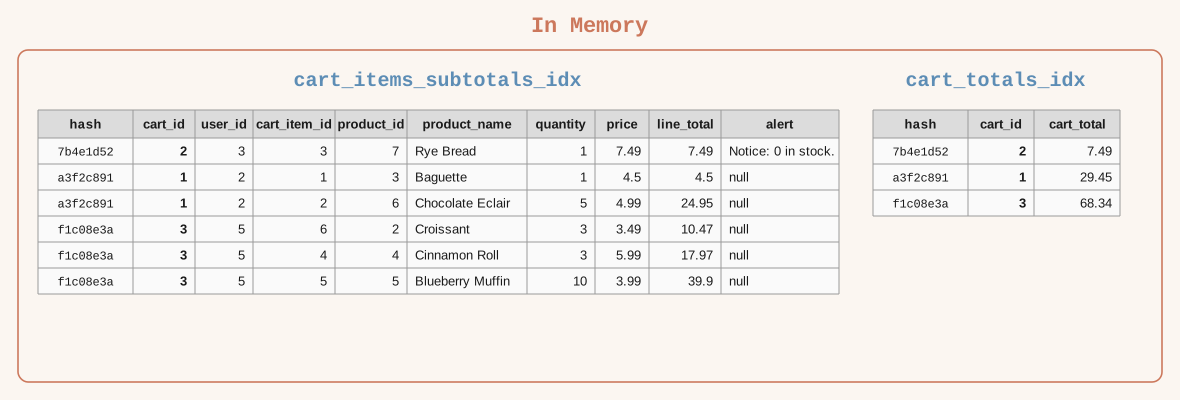
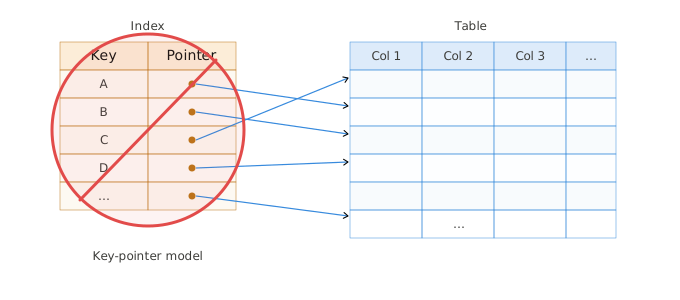
Materialize indexes are not secondary indexes that store the index keys and pointers to data rows.
-
The term clustered index is a database term unrelated to Materialize clusters, which are compute resources. ↩︎
Creating indexes on objects
In Materialize, you can create indexes on views and materialized views as well as on sources, tables, and subsources.
To create indexes on an object, use the CREATE INDEX
command. To create the index in a cluster other than the active cluster, include
the IN CLUSTER clause in the CREATE INDEX statement.
CREATE INDEX [<index_name>]
[IN CLUSTER <cluster_name>]
ON <obj_name> [USING <method>] (<col_expr>, ...)
[WITH (<with_options>)];
See CREATE INDEX for the syntax details.
Indexes on sources, tables, and subsources
In Materialize, you can create indexes on sources, tables, or subsources to maintain up-to-date data in the memory of the cluster where you create the index. This can help improve query performance, for example when using joins in your transformation. However, in practice, you may find that you rarely need to index these objects directly.
CREATE INDEX idx_on_my_source_table ON my_source_table(...);
Indexes on views
In Materialize, you can create indexes on a view to maintain up-to-date view results in memory within the cluster where you create the index.
-
To create the index in the current active cluster (you can use the
SET CLUSTERcommand to change the active cluster):CREATE INDEX idx_on_my_view ON my_view_name(...); -
To create the index in a specified cluster:
CREATE INDEX idx_on_my_view IN CLUSTER serving_cluster ON my_view_name(...);
During the index creation, the view is executed and the view results are stored in memory within the cluster. As new data arrives, the index incrementally updates the view results in memory.
Querying a view from a cluster where the view is indexed is fast because the results are already computed and are served from memory. Querying a view from a cluster where the view isn’t indexed requires executing the view each time you query it.
Indexes on materialized views
In Materialize, materialized view results are stored in durable storage and incrementally updated as new data arrives. Indexing a materialized view makes the already up-to-date view results available in memory within the cluster where you create the index. That is, indexes on materialized views require no additional computation to keep results up-to-date.
-
To create the index in the current active cluster (you can use the
SET CLUSTERcommand to change the active cluster):CREATE INDEX idx_on_my_mat_view ON my_mat_view_name(...); -
To create the index in a specified cluster:
CREATE INDEX idx_on_my_mat_view IN CLUSTER serving_cluster ON my_mat_view_name(...);
Properties
Cluster-local
Indexes are accessible only from their own cluster. Indexed results reside in the memory of the cluster where the index is created, and a cluster’s memory cannot be accessed from another cluster. As such, references to the indexed object from a different cluster cannot use the index.
Data distribution and ordering
The index data is distributed across the cluster’s workers by a hash of the key, which spreads the maintenance and lookup work across the cluster.
Within each worker, index keys are ordered by their internal representation (the encoded key’s length, then its bytes), not by the data types’ natural ordering.
Serving ad-hoc queries
Within a cluster, all ad-hoc queries that reference an indexed object read from
the index, regardless of whether the index is optimized for the query. This
includes queries that do not specify a WHERE condition on the index key.
Because the indexed results are already up-to-date and in memory, reading from
an index avoids recomputing the results.
-
Point lookups: For queries that specify an equality condition on the full index key, Materialize can perform a point lookup, reading only the matching records from the index. Point lookups are the most efficient use of an index. See Point lookups for the exact requirements.
-
Index scans: Otherwise, Materialize scans the index. Although the indexed results are already up-to-date and in memory, a full index scan must examine the indexed results and is less efficient than a point lookup. The performance of full index scans degrades with data volume.
Index use by objects
Within a cluster, an index can be used not only by ad-hoc queries but also by other indexes and materialized views. For an index or materialized view to use another index, however, that index must exist when the dependent object is created. That is:
-
When you create an index or a materialized view, Materialize plans how to compute its results at creation time. As part of planning, Materialize checks whether it can reuse an existing index in the same cluster.
-
Because the plan is bound at creation time, creation order matters. An index or materialized view that is already running will not adopt an index created afterward. To have an existing index or materialized view use a newer index, drop and recreate the existing object. However, recreating an index or a materialized view triggers hydration.
Ad-hoc queries, by contrast, are planned at query time. They can use any index that exists in the cluster when the query runs.
To inspect index reuse and dependencies:
-
To check whether a new index would reuse an existing index before creating it, use
EXPLAIN CREATE INDEX. -
To find which indexes and materialized views use an index, query
mz_internal.mz_materialization_dependencies.
Limitations
Materialize indexes are not optimized for:
-
Ordered access, including:
-
Range queries, that is, queries using
>,>=,<,<=, orBETWEEN(e.g.,WHERE quantity > 10,WHERE price >= 10 AND price <= 50, andWHERE quantity BETWEEN 10 AND 20). -
Queries that use
ORDER BYon the index key.
-
-
Lookups on a prefix of a multi-column index key. For example, an index with the key
(a, b)is not optimized for a query that specifies an equality condition onabut not onb. -
Lookups that do not match the exact index key expression. For example, for an index with the key
lower(a), an equality condition onadoes not match the index key; the query must specify an equality condition onlower(a)for a point lookup. -
GROUP BYaggregations.An index on the grouping key does not reduce the work of computing the aggregation: Materialize reads the full index and maintains the aggregation separately.
Point lookups vs index scans
Point lookups
Point lookups read just the matching records from the index and are the most
efficient use of an index. Materialize performs a point lookup if the query’s
WHERE clause:
-
Specifies equality (
=orIN) condition and only equality conditions on all the indexed fields. The equality conditions must specify the exact index key expression (including type) for point lookups. For example:-
If the index is on
round(quantity), the query must specify equality condition onround(quantity)(and not justquantity) for Materialize to perform a point lookup. -
If the index is on
quantity * price, the query must specify equality condition onquantity * price(and notprice * quantity) for Materialize to perform a point lookup. -
If the index is on the
quantityfield which is an integer, the query must specify an equality condition onquantitywith a value that is an integer.
-
-
Only uses
AND(conjunction) to combine conditions for different fields.
For queries whose WHERE clause meets the point lookup criteria and includes
conditions on additional fields (also using AND conjunction), Materialize
performs a point lookup on the index keys and then filters the results using the
additional conditions on the non-indexed fields.
Index scans
For queries that do not meet the point lookup criteria,
Materialize performs a full index scan (including for range queries). That is,
Materialize performs a full index scan if the WHERE clause:
- Does not specify all the indexed fields.
- Does not specify only equality conditions on the index fields or specifies an equality condition that specifies a different value type than the index key type.
- Uses
OR(disjunction) to combine conditions for different fields. - Specifies a long
INlist. See LongINlists.
Full index scans are less efficient than point lookups. The performance of full index scans will degrade with data volume; i.e., as you get more data, full scans will get slower.
Examples
Within a cluster, indexes can serve queries that reference an indexed object, regardless of whether the index is optimized for the query.
Consider the following index on the orders_view:
CREATE INDEX idx_orders_view_qty ON orders_view (quantity);
Materialize can use the index to serve various queries on the orders_view
(and not just queries that specify conditions on orders_view.quantity). For
example:
SELECT * FROM orders_view;  -- scans the index
SELECT * FROM orders_view WHERE status = 'shipped';  -- scans the index
SELECT * FROM orders_view WHERE quantity = 10;  -- point lookup on the index
For the queries that do not satisfy the point-lookup conditions, Materialize scans the index.
The following table shows various queries and whether Materialize performs a point lookup or an index scan.
| Query | Index Usage |
|---|---|
|
Index scan. |
|
Point lookup. |
|
Point lookup. |
|
Point lookup. Query uses OR to combine conditions on the same field.
|
|
Point lookup on quantity, then filter on price.
|
|
Point lookup on quantity, then filter on price.
|
|
Index scan. Query uses OR to combine conditions on different fields.
|
|
Index scan. |
|
Index scan. |
|
Index scan, assuming quantity field in orders_view is an integer.
In the first query, the quantity is implicitly cast to text.
In the second query, the quantity is explicitly cast to text.
|
Consider that the view has an index on the quantity and price fields
instead of an index on the quantity field:
DROP INDEX idx_orders_view_qty;
CREATE INDEX idx_orders_view_qty_price on orders_view (quantity, price);
| Query | Index Usage |
|---|---|
|
Index scan. |
|
Index scan. Query does not include equality conditions on all indexed fields. |
|
Point lookup. |
|
Index scan. Query uses OR to combine conditions on different fields.
|
|
Point lookup. Query uses OR to combine conditions on same field and AND to combine conditions on different fields.
|
|
Point lookup on the index keys quantity and price, then filter on
item.
|
|
Index scan. Query uses OR to combine conditions on different fields.
|
Usage
Indexes on views vs. materialized views
In Materialize, both indexes on views and materialized views incrementally update the view results when Materialize ingests new data. Whereas materialized views persist the view results in durable storage and can be accessed across clusters, indexes on views compute and store view results in memory within a single cluster.
Some general guidelines for usage patterns include:
| Usage Pattern | General Guideline |
|---|---|
| View results are accessed from a single cluster only; such as in a 1-cluster or a 2-cluster architecture. |
View with an index |
| View used as a building block for stacked views; i.e., views not used to serve results. | View |
| View results are accessed across clusters; such as in a 3-cluster architecture. |
Materialized view (in the transform cluster) Index on the materialized view (in the serving cluster) |
Use with a sink or a SUBSCRIBE operation |
Materialized view |
| Use with temporal filters | Materialized view |
For example:
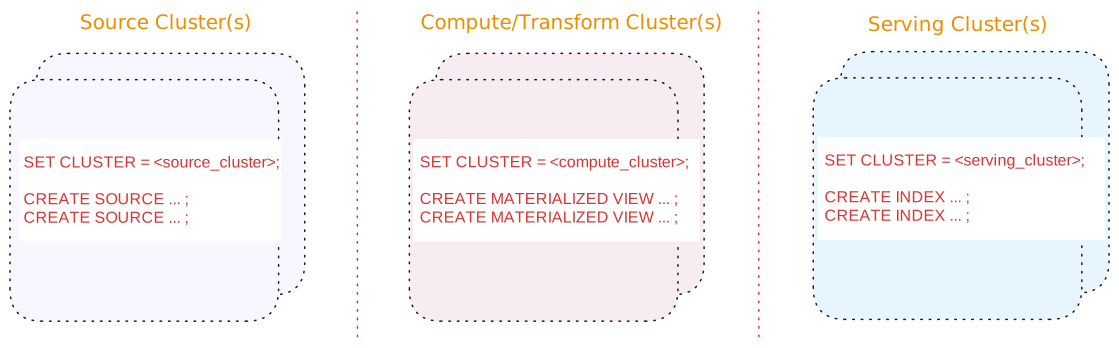
In a 3-tier architecture where queries are served from a cluster different from the compute/transform cluster that maintains the view results:
-
Use materialized view(s) in the compute/transform cluster for the query results that will be served.
If you are using stacked views (i.e., views whose definition depends on other views) to reduce SQL complexity, generally, only the topmost view (i.e., the view whose results will be served) should be a materialized view. The underlying views that do not serve results do not need to be materialized.
-
Index the materialized view in the serving cluster(s) to serve the results from memory.
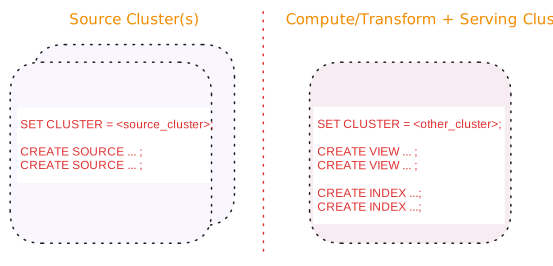
In a 2-tier architecture where queries are served from the same cluster that performs the compute/transform operations:
-
Use view(s) in the shared cluster.
-
Index the view(s) to incrementally update the view results and serve the results from memory.
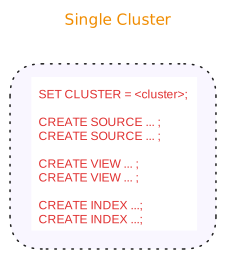
In a 1-tier architecture where queries are served from the same cluster that performs the compute/transform operations:
-
Use view(s) in the shared cluster.
-
Index the view(s) to incrementally update the view results and serve the results from memory.
Indexes and query optimizations
By making up-to-date results available in memory, indexes can help optimize query performance, such as:
-
Provide faster sequential access than unindexed data.
-
Provide fast random access for lookup queries (i.e., selecting individual keys).
Specific instances where indexes can be useful to improve performance include:
-
When used in ad-hoc queries.
-
When used by multiple queries within the same cluster.
-
When used to enable delta joins.
For more information, see Optimization.
Best practices
Before creating an index, consider the following:
-
If you create stacked views (i.e., views that depend on other views) to reduce SQL complexity, we recommend that you create an index only on the view that will serve results, taking into account the expected data access patterns.
-
Materialize can reuse indexes across queries that concurrently access the same data in memory, which reduces redundancy and resource utilization per query. In particular, this means that joins do not need to store data in memory multiple times.
-
For queries that have no supporting indexes, Materialize uses the same mechanics used by indexes to optimize computations. However, since this underlying work is discarded after each query run, take into account the expected data access patterns to determine if you need to index or not.