Serve results during source stalls
View as MarkdownWhen an upstream system becomes unavailable, for example a Kafka broker outage, a database restart, or an ingestion cluster with no replicas, the affected source stops ingesting. Your application does not have to stop reading. In many cases, Materialize keeps serving results from the last data it ingested.
Whether a query keeps serving depends on the session’s isolation level and on which inputs the query reads. This guide covers how to design your queries so that they keep serving through an upstream outage, and how to fail fast when they can’t.
Understand stalls and errors
Stalls and errors
A source that stops ingesting is in one of two situations. Use
mz_source_statuses to
check its status, and see Understand the lifecycle of a
source for what each status means.
| Situation | Status | Examples | Recovery |
|---|---|---|---|
| Stall | paused, or stalled with a retryable error |
Upstream unreachable, no replica running the source | Resumes on its own once the cause clears |
| Definite error | stalled, with an error that says the source or table must be dropped and recreated |
Dropped publication, incompatible upstream schema change | Recreate the affected objects |
A source can also stop ingesting without changing its status, for example when
the upstream connection hangs. Check whether its write frontier still advances
in mz_frontiers.
What happens to timestamps
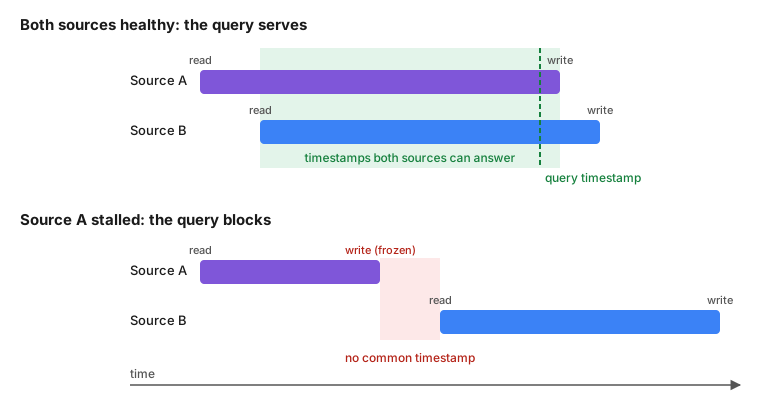
Materialize serves every query at a single timestamp. Each collection, whether a source table, index, or materialized view, tracks two frontiers:
- The write frontier is how far the collection’s data is complete. All changes before it are known, and new data arrives at or after it.
- The read frontier is the earliest timestamp the collection can still answer. Materialize compacts older history, so it moves forward over time.
A collection can answer queries at timestamps between its read frontier and its write frontier. While a source ingests, both frontiers keep advancing.
- During a stall, the write frontier freezes at the last timestamp the source ingested. The data up to that timestamp stays intact and readable.
- After a definite error, the error is written into the collection, and the collection closes. Every read of it at or after the error’s timestamp returns the error, at every isolation level. None of the patterns in this guide apply. Recreate the affected objects instead.
The rest of this guide is about stalls.
How a stall affects queries
A query can only be served at a timestamp that every one of its inputs can answer. When source A stalls, its write frontier freezes, while the read frontier of a healthy source B keeps advancing. Once B’s read frontier moves past A’s frozen write frontier, no timestamp works for both, and a query that reads A and B together blocks until A resumes.
For example, a query that joins source A and source B must find a timestamp that both sources can answer:
The isolation level adds its own constraint. Under strict serializable (the default), a query must read at a timestamp at least as late as any result Materialize has already served. That timestamp keeps advancing during a stall, so any query that reads stalled data blocks. For a guarantee that a query sees everything available upstream, see real-time recency. Under serializable, a query can read at an earlier timestamp, so a query whose inputs all stalled together serves results as of the stall.
Blocked queries wait. They do not error, and they complete once the source resumes.
Behavior by query shape and isolation level
| Query shape | Serializable | Strict serializable | Bounded staleness |
|---|---|---|---|
| Reads only healthy inputs | Serves | Serves | Serves |
| Reads only the stalled source’s tables, or indexes and views over them | Serves stale | Blocks | Serves stale, then errors once the stall exceeds the bound |
| Reads an indexed view or materialized view which joins the stalled and healthy sources | Serves stale | Blocks | Serves stale, then errors once the stall exceeds the bound |
| Ad hoc query that joins a stalled input with a healthy one, including user-writable tables | Blocks | Blocks | Errors |
SUBSCRIBE to the stalled source’s tables |
Emits the snapshot as of the stall, then waits | Blocks before the snapshot | Errors once the stall exceeds the bound |
| Explicit transaction that reads stalled data | Blocks | Blocks | Errors |
How to join across sources and serve stale
To keep serving a query that combines several sources, maintain it as an indexed view or a materialized view, and query that object under the serializable isolation level:
CREATE VIEW order_details AS
  SELECT o.id, o.total, c.name, c.region
  FROM orders o
  JOIN customers c ON o.customer_id = c.id;

CREATE INDEX order_details_idx ON order_details (id);
SET TRANSACTION_ISOLATION TO 'serializable';

SELECT * FROM order_details WHERE id = 42;
The view’s write frontier follows its slowest input. When one source stalls, the whole view freezes at a consistent point, and reading it is a query against a single collection. It keeps serving results as of the stall for as long as the stall lasts.
Create the view before the outage. A view that joins a stalled and a healthy source and is created during the stall blocks, like the equivalent ad hoc query.
Fail fast instead of blocking
If your application would rather get an error than wait, or than serve results beyond a staleness threshold, use the bounded staleness isolation level:
SET TRANSACTION_ISOLATION TO 'bounded staleness 1m';
Bounded staleness never blocks. Queries that serve stale under serializable
keep serving until the stall is older than the bound. After that, they fail
with a retryable serialization failure (SQLSTATE 40001):
ERROR:  cannot serve query under bounded staleness 1m
DETAIL:  Freshest available timestamp is 104029ms older than the bound.
Queries whose inputs no longer share a valid timestamp, such as an ad hoc join
of a stalled and a healthy input, fail with a different error (SQLSTATE 22000). Retrying doesn’t help until the source resumes:
ERROR: could not find a valid timestamp for the query
Handle both errors in your application, for example by showing a “data unavailable” state.
Best practices
Avoid explicit transactions
Inside an explicit transaction (BEGIN ... COMMIT), Materialize picks one
timestamp that is valid for every object in the schemas the first statement
references, plus the system catalog. During a stall, a transaction that reads
stalled data blocks even under serializable, because the other objects in its
time domain keep advancing.
Issue single-statement queries instead. Some SQL clients and BI tools open transactions implicitly, so check your client’s autocommit setting.