Live Context Graph
View as MarkdownWhat is a live context graph?
A context graph is the live, queryable model of your business: a set of data products (customers, orders, stores, couriers) defined in SQL, kept current within about a second, and composed into a single coherent ontology that you can expose to your agents.
Each data product is a real noun in your business. Define it once in SQL; Materialize maintains it as the underlying systems change. Your applications, services, ML features, dashboards, and AI agents all read from the same live result. The relationships between products form the graph structure: a customer has orders, an order belongs to a store, a store has couriers.
Materialize’s context graph is always live and always correct. Changes propagate through every dependent product incrementally, without batch windows, without staleness, and with strict serializability.
In this architecture pattern, we’ll walk you through how to setup a context graph for your agents
Architecture
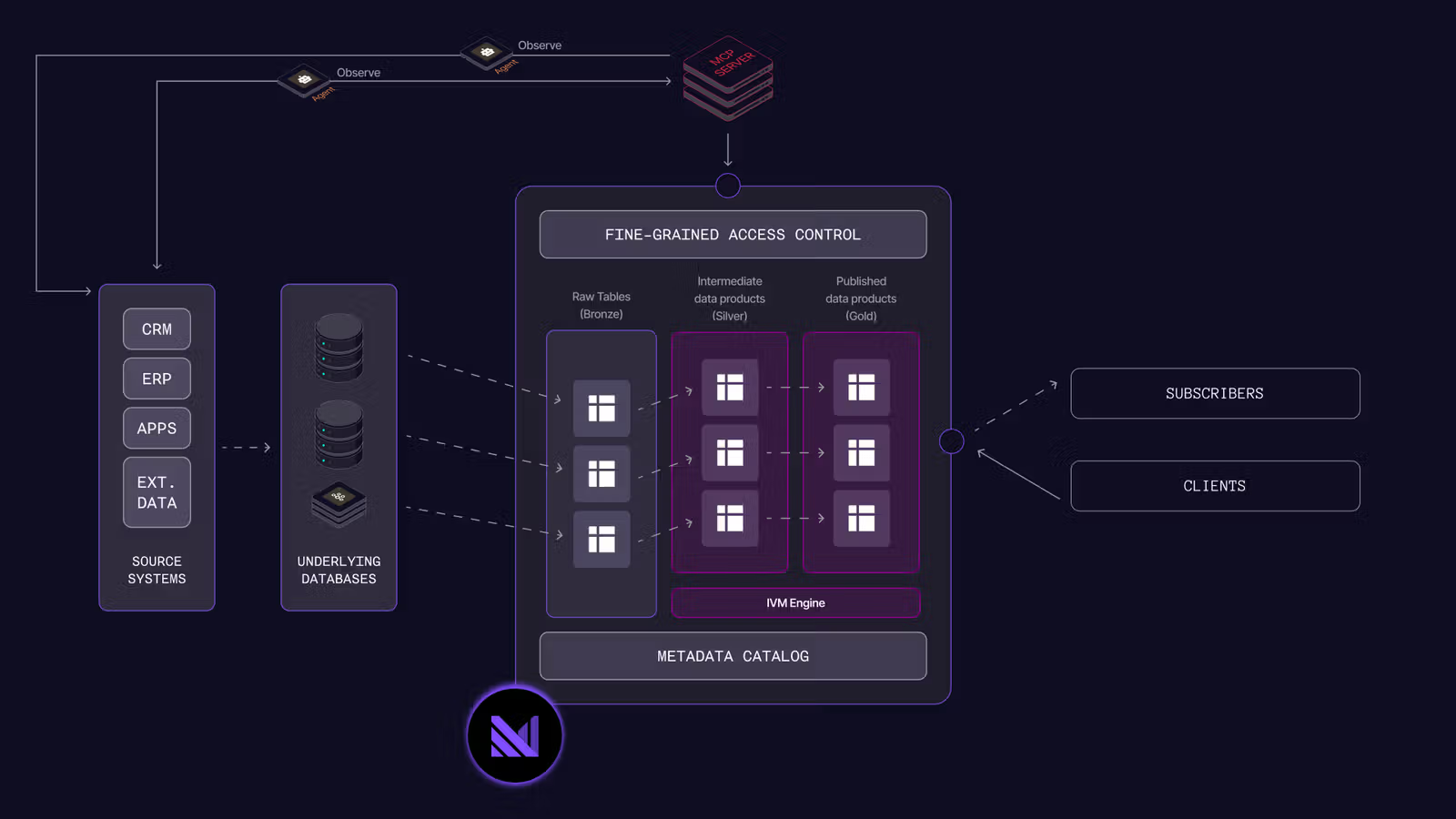
Materialize ingests changes from sources, such as Postgres databases and Kafka. Data products can be created via SQL, and are maintained incrementally to ensure they are kept fresh. Finally applications and dashboards read via SQL over the PostgreSQL wire protocol. AI agents can connect via the Materialize MCP server.
Ingest data from operational sources
Before you can define live data products, you connect Materialize to your operational systems to fetch raw operational data. Materialize ingests changes continuously using Change Data Capture (CDC), so your downstream views are always fresh.
PostgreSQL source (CRM database)
Connect Materialize to a PostgreSQL database and subscribe to a publication that includes the tables you care about:
CREATE SECRET crm_password AS '<your-password>';

CREATE CONNECTION crm_conn TO POSTGRES (
    HOST 'crm.internal',
    PORT 5432,
    USER 'materialize',
    PASSWORD SECRET crm_password,
    DATABASE 'crm'
);

CREATE SOURCE crm_source
    FROM POSTGRES CONNECTION crm_conn (PUBLICATION 'mz_source')
    FOR TABLES (
        accounts AS crm.accounts,
        tickets  AS crm.tickets
    );
Materialize now tracks every insert, update, and delete in crm.accounts and crm.tickets and makes them available as live tables.
Kafka source (ERP order events)
Connect Materialize to a Kafka topic carrying order events in Avro format:
CREATE CONNECTION kafka_conn TO KAFKA (
    BROKER 'kafka.internal:9092'
);

CREATE CONNECTION csr_conn TO CONFLUENT SCHEMA REGISTRY (
    URL 'https://schema-registry.internal'
);

CREATE SCHEMA erp;

CREATE SOURCE erp.orders
    FROM KAFKA CONNECTION kafka_conn (TOPIC 'erp.orders')
    FORMAT AVRO USING CONFLUENT SCHEMA REGISTRY CONNECTION csr_conn
    ENVELOPE DEBEZIUM;
Additional sources (WMS inventory, store locations, workforce shifts) follow the same pattern: a CREATE CONNECTION for the system, and a CREATE SOURCE for the tables or topics.
Represent the nouns of your business as live data products
The objects you reason about (Customer, Order, Subscription, Store, Courier) are the nouns of your business. Each has a meaning, fields, identity, and relationships to other nouns. Almost none of them live in a single system.
The Customer noun isn’t in one place. Identity lives in the CRM, orders arrive as a Kafka stream, and support tickets are tracked in the same CRM database. A consumer that wants the full Customer has to stitch those systems together itself, on every read.
In Materialize, you can create live data products by defining Materialized Views in SQL. These live data products are kept fresh, even as the underlying data changes:
CREATE MATERIALIZED VIEW customers AS
  WITH order_summary AS (
    SELECT account_id, count(*) AS lifetime_orders
    FROM   erp.orders
    GROUP BY account_id
  ),
  ticket_summary AS (
    SELECT account_id, max(opened_at) AS last_ticket_at
    FROM   crm.tickets
    GROUP BY account_id
  )
  SELECT a.account_id,
         a.name,
         a.plan_tier,
         coalesce(o.lifetime_orders, 0) AS lifetime_orders,
         t.last_ticket_at
  FROM        crm.accounts   a
  LEFT JOIN   order_summary  o USING (account_id)
  LEFT JOIN   ticket_summary t USING (account_id);
The materialized view is your business’s authoritative statement of what a customer is. Each row is the live representation of one customer, joined across the sources you ingested. Open a ticket, place an order, change a plan, and the row reflects it within about a second. Materialize doesn’t add a batch window on top of your source systems; whatever those systems publish, the row reflects within an incremental maintenance step. You don’t write incremental update logic, schedule batch refreshes, or reconcile staleness windows.
Create a compounding ontology of data products
Each live data product you define joins a few sources and yields one noun. As the ontology grows, you don’t just gain a noun; you gain every combination of that noun with the ones already there. With ten source-spanning nouns, you can express hundreds of derived views in plain SQL.
Define Stores by joining the locations registry with inventory and active shifts:
CREATE MATERIALIZED VIEW stores AS
  WITH inventory_summary AS (
    SELECT store_id, sum(on_hand) AS units_on_hand
    FROM   wms.inventory
    GROUP BY store_id
  ),
  staffing_summary AS (
    SELECT store_id, count(*) AS staff_on_shift
    FROM   workforce.active_shifts
    WHERE  shift_end > now()
    GROUP BY store_id
  )
  SELECT s.store_id,
         s.name,
         s.geo,
         coalesce(i.units_on_hand, 0)   AS units_on_hand,
         coalesce(st.staff_on_shift, 0) AS staff_on_shift
  FROM        locations.stores  s
  LEFT JOIN   inventory_summary i  USING (store_id)
  LEFT JOIN   staffing_summary  st USING (store_id);
Now the operational question, which orders need intervention right now, is one materialized view over two existing nouns:
CREATE MATERIALIZED VIEW at_risk_orders AS
  SELECT o.order_id,
         o.account_id,
         o.placed_at,
         o.current_status,
         s.store_id,
         s.name               AS store_name,
         s.units_on_hand      AS store_units_on_hand,
         s.staff_on_shift     AS store_staff_on_shift
  FROM   orders o
  JOIN   stores s ON s.store_id = o.fulfillment_store_id
  WHERE  o.current_status NOT IN ('delivered', 'cancelled')
    AND  (mz_now() - o.placed_at > interval '30 minutes'
          OR s.units_on_hand  = 0
          OR s.staff_on_shift = 0);
at_risk_orders doesn’t exist in any operational system. It’s a new noun defined over two existing nouns, built with no new source integration: pure SQL over what’s already in the context graph. An agent asking “what should I escalate right now?” reads this view directly. The same applies to any combination: Customer x Order x Store, Store x Courier x Inventory, Courier x Order x Customer.
The context graph models the nouns. The verbs (actions that change state) happen in your systems of action: order placement, account updates, ticket resolution. You take action in those systems; you observe the effects through the live context graph.
Ensure a tight feedback loop with agents
Agents need to observe, act, and then observe the consequences.
Because the context graph updates live, any consumer can take an action in its own system and watch the effect propagate through dependent nouns:
operational silos                          live data products              consumer

  erp.orders       ──┐
  billing.payments ──┤  CDC  ──►  orders  ──┐
  wms.fulfillment  ──┘                      │
                                            ├──►  at_risk_orders  ──► reads now
  locations.stores ──┐                      │
  wms.inventory    ──┤  CDC  ──►  stores  ──┘
  workforce.shifts ──┘
An AI agent calls a tool and verifies the change reached the customer record; a service makes a transactional decision and reads the downstream signal on the next request; a UI reacts to a user action without polling; a pipeline alerts the moment a condition flips. All close the loop against the same context graph.
The interval between a real-world event and the moment it becomes trusted context is time to trusted action. When it drops to seconds, the experiences you can build change fundamentally.
Agents need to observe the consequences of their actions. That’s what unlocks the agentic feedback loop: an agent observes the state of the world through the context graph, thinks using a large language model, acts, and then takes a follow-on action based on the consequences. Without observing the consequence, there is no next step. A warehouse hours behind cannot close that loop; a live context graph can.
For agent builders, Materialize provides two primitives:
- Read: typed queries over live rows in the context graph.
- Compose: SQL functions and views that shape rows for an agent’s task.
The Materialize MCP server exposes both primitives to agents as tool definitions over the SQL surface. An agent connects to the MCP server, discovers the available data products as tools, and queries them directly:
agent  ──► MCP server  ──► Materialize  ──► customers / at_risk_orders / stores
              (tool definitions over SQL)        (always fresh, strictly serializable)
To expose the context graph to an agent, point your MCP client at the Materialize MCP server endpoint. The server introspects the schema and generates one tool per view, with typed input and output schemas derived from the SQL definition.
Write-back happens through your existing systems. Materialize observes the changes from those systems and updates the context graph within about a second. The closed loop is only as fast as the source systems publish changes.
Once you’ve modeled your business as a context graph, the same graph serves every application, service, dashboard, ML feature, alert, and agent you build on top of it. You stop building bespoke pipelines per consumer; you build the graph once, and every downstream system reads the same truth.
Learn more
- Quickstart: build your first live data product.
- Reaction time, freshness, and query latency: the freshness contract.
- Serve results: read the context graph from your applications and services.
- MCP integration: expose the context graph to AI agents.